
Audience
Developers interested in a Git client for Mac or Windows
About GitHub Desktop
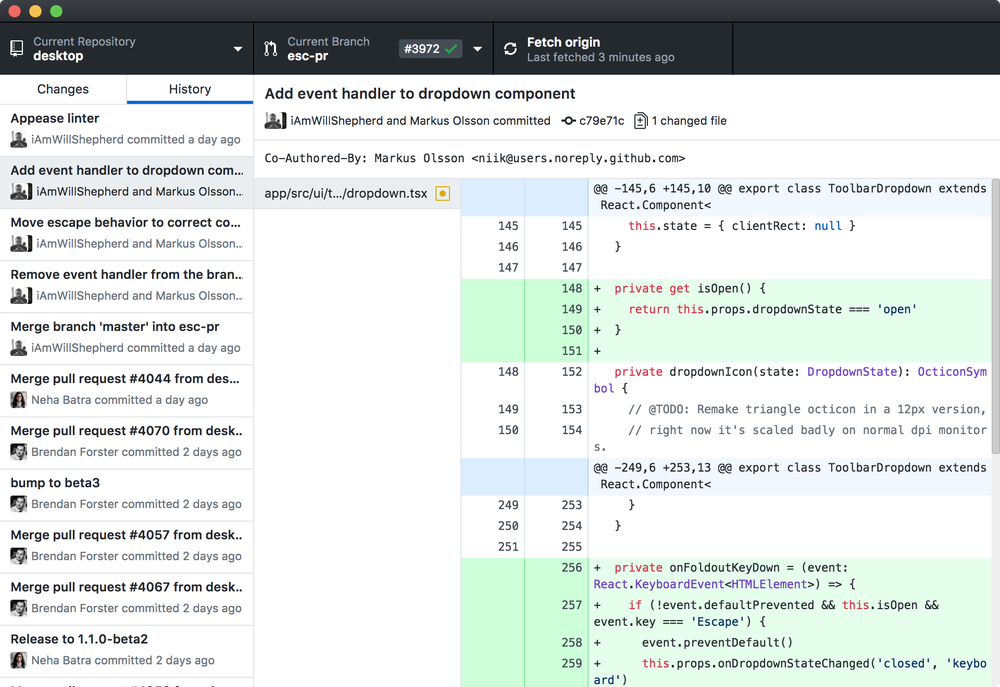
Focus on what matters instead of fighting with Git. Whether you're new to Git or a seasoned user, GitHub Desktop simplifies your development workflow. Quickly add co-authors to your commit. Great for pairing and excellent for sending a little love/credit to that special someone who helped fix that gnarly bug of yours. See the attribution on the history page, undo an accidental attribution, and see the co-authors on GitHub. See all open pull requests for your repositories and check them out as if they were a local branch, even if they're from upstream branches or forks. See which pull requests pass commit status checks, too! The new GitHub Desktop supports syntax highlighting when viewing diffs for a variety of different languages. Easily compare changed images. See the before and after, swipe or fade between the two, or look at just the changed parts. Open your favorite editor or shell from the app, or jump back to GitHub Desktop from your shell.
Pricing
Integrations
Company Information
Videos and Screen Captures

Product Details
GitHub Desktop Frequently Asked Questions
GitHub Desktop Product Features
GitHub Desktop Verified User Reviews
Write a Review-
Probability You Would Recommend?1 2 3 4 5 6 7 8 9 10
"It makes performing git operations easy." Posted 2022-08-21
Pros: 1. It provides an easy to understand graphical user interface for all the GitHub operations.
2. The application is smooth and has fast responsive speed.
3. It allows performing tasks like committing code, creating branches or cloning a repository in just few clicks.
4. It keeps the user data saved in the local disk, so the user does not have to input credentials every time.Cons: 1. It does not support integration with other than few applications.
2. Other than providing a graphical user interface for all the command line codes, it does not serve any other purpose or offers additional features.Overall: Overall, GitHub Desktop is an easy-to-use application which allows doing all the GitHub operation without having to type code in the command line interface. It has a smooth and intuitive user interface which is easy to understand even for beginners.
Read More... -
Probability You Would Recommend?1 2 3 4 5 6 7 8 9 10
"GitHub: An Excellent Collaborative Tool" Posted 2022-07-11
Pros: Nearly everything, the branch management is excellent to start with. It is very easy for new users on a team to be able to setup their own branch and easily maintain it by pulling from the designated master branch which helps immensely in version control. The ease of use of this tool for what it does is spectacular and beats all of its competition in my opinion for collaborative tools in a similar space.
I have used this tool nearly daily for several years, I would not change it for any others that I have tried over that same time period.Cons: The user interface can be a tad obtuse at times and has some minor performance issues. This said, it is a relatively minor issue and as long as the computer has decent resources it is not much of an issue.
Overall: GitHub is an amazing program and easily my favorite collaborative too. The version control management of the features enables users to mitigate catastrophic events and enables users to properly coordinate changes to projects and aids in documentation of the project. This program has saved my projects from disasters repeatedly over the years and I strongly recommend giving it a try.
Read More... -
Probability You Would Recommend?1 2 3 4 5 6 7 8 9 10
"Great application to get started with the GitHub." Posted 2022-06-25
Pros: - It provides an intuitive and easy to interface to perform all the git functions instead using codes on the command line.
- It records and saves all the changes locally.
- The user interface of the application is quite user-friendly and great for beginners starting with git.
- It also lets the user make changes in the GitHub profile directly from the application.Cons: - I did not find any cons in the application. It is easy to use, user-friendly and does what it claims.
Overall: Overall, GitHub Desktop is a great application for beginners and an intuitive alternative for the command line interface for the git. It is easy to use and simple and does not take much effort to learn the application.
Read More... -
Probability You Would Recommend?1 2 3 4 5 6 7 8 9 10
" A productive application to have." Posted 2022-02-19
Pros: 1. GitHub Desktop provides a graphical user interface for all the git operations.
2. It stores all the changes in the repositories locally and pushes it to the master branch on demand.
3. The application user interface is rich, and it feels robust to use.
4. It makes doing all the git operation easy for the beginners and removes the hassle of typing commands.Cons: 1. There is nothing that I dislike about the application, it is just flawless.
Overall: Overall, GitHub Desktop is a great application, especially for beginners because it provides a graphical user interface for all the git operations rather than typing the commands.
Read More... -
Probability You Would Recommend?1 2 3 4 5 6 7 8 9 10
"Makes handling repos easier." Posted 2021-12-26
Pros: 1. GitHub Desktop provides a graphical user interface for pulling, pushing and committing repositories.
2. It works as an alternative for command line so that the users does not have to type type commands to do git operations.
3. The user interface of the application is simple and makes the user's interaction with their repositories on GitHub a seamless and easy task.Cons: 1. It is a simple application made for a certain work to do, and it does those things pretty well. No cons whatsoever.
Overall: Overall, GitHub Desktop is a graphical user interface and a command line alternative for doing all the operations on GitHub.
Read More...
- Previous
- You're on page 1
- Next

