Second BrowserYoeyo
|
||||||
About
Sometimes when you’re using Safari, you need to view another webpage at the same time. You can use the new iPad multitasking features Split View and Slide Over to do just that with Second Browser. It’s perfect for making the most of an iPad Pro. Once you open Second Browser, just type in or paste in the URL you’d like to visit and tap “Let’s Go”. Because Second Browser is based on Apple’s Safari technology, if you use a Content Blocker in Safari, Second Browser will too. Using the Second Browser Action Extension in Safari, you can send your current open Safari page to Second Browser. Second Browser will also remember the last URL you visited, so there is no losing your place if you close Second Browser.
|
About
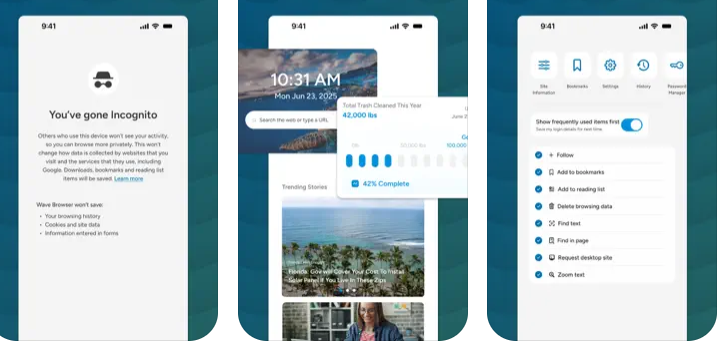
Wave Browser is an efficient, eco-conscious browser that creates a cleaner, more organized, and more meaningful online experience while helping remove ocean plastic through its partnership with 4ocean.
Built on the trusted Chromium foundation, Wave Browser brings essential tools directly into the browser so you can work, study, and explore without extra extensions or switching apps. The sidebar keeps your favorite tools within reach, and split view lets you work across two pages at once for effortless research and multitasking.
Wave Browser brings together helpful built-in tools that make everyday browsing simpler, keeping you organized, speeding up tasks, and supporting your workflow with features like reading tools, trackers, quick-access messaging, and an AI assistant. If you want efficient built-in tools and a simple way to make a positive impact, Wave Browser aligns with your values.
Surf the web. Save the ocean. Make every tab count.
|
|||||
Platforms Supported
Windows
Not Supported
Mac
Not Supported
Linux
Not Supported
Cloud
Not Supported
On-Premises
Not Supported
iPhone
Not Supported
iPad
Supported
Android
Not Supported
Chromebook
Not Supported
|
Platforms Supported
Windows
Supported
Mac
Supported
Linux
Not Supported
Cloud
Not Supported
On-Premises
Not Supported
iPhone
Supported
iPad
Supported
Android
Supported
Chromebook
Not Supported
|
|||||
Audience
iPad users that want a web browser that allows for a second-tiled browser view
|
Audience
Individuals interested in a web browser optimized for speed, productivity and environmental impact
|
|||||
Support
Phone Support
Not Supported
24/7 Live Support
Not Supported
Online
Not Supported
|
Support
Phone Support
Supported
24/7 Live Support
Not Supported
Online
Supported
|
|||||
API
Offers API
Not Supported
|
API
Offers API
Not Supported
|
|||||
Screenshots and Videos |
Screenshots and Videos |
|||||
Pricing
Free
Free Version
Supported
Free Trial
Not Supported
|
Pricing
Free
Wave Browser is completely free to use.
Free Version
Supported
Free Trial
Supported
|
|||||
Reviews/
|
Reviews/
|
|||||
Pros from Real UsersPros
|
||||||
Training
Documentation
Not Supported
Webinars
Not Supported
Live Online
Not Supported
In Person
Not Supported
|
Training
Documentation
Supported
Webinars
Not Supported
Live Online
Not Supported
In Person
Supported
|
|||||
Company InformationYoeyo
United States
www.secondbrowser.com
|
Company InformationWave Browser
Cayman Islands
wavebrowser.co
|
|||||
Alternatives |
Alternatives |
|||||
|
|
|
|||||
|
|
|
|||||
|
|
||||||
|
|
||||||
Categories |
CategoriesWave Browser includes a powerful, free built-in ad blocker that removes intrusive ads, pop-ups, and hidden trackers to create a faster, cleaner, and safer browsing experience. By stopping most unwanted scripts before they load, Wave Browser improves page speed and reduces the risk of malicious activity. Its thoughtful design and smooth interface make browsing feel effortless, while privacy features and security protections help keep your browsing safe. Wave Browser is built to help you move confidently across the web with less noise and greater control. Wave Browser is built for productivity, combining essential tools with a clean, uncluttered design that helps you stay focused throughout your day. With features like a reading list, bookmarks, price tracking, package tracking, and a versatile converter tool, Wave Browser keeps everything organized without the need for extra apps. The convenient sidebar gives you quick access to tools and apps, while split view lets you work across two pages at once, perfect for studying, researching, comparing, or multitasking efficiently. Wave’s smooth interface creates a workspace that feels natural and streamlined, making it easier to move between tasks. And because each user contributes to verified ocean cleanup, your productivity has purpose, turning everyday browsing into real-world impact. Wave Browser is an efficient, modern web browser built on Chromium and designed for clarity, safety, and productivity. Its built-in tools and extensions help you work, study, and game with ease, while privacy features and strong security protections keep your browsing safe. Wave’s clean, ocean-inspired interface feels intuitive and comfortable for everyday use. Whether you're researching, creating, or exploring the web, Wave Browser delivers fast, reliable performance in a streamlined experience that stays out of your way. And because every user supports verified ocean cleanup, Wave becomes more than just a browser, it turns each session into a meaningful contribution toward a cleaner planet. |
|||||
Integrations
Amazon
Not Supported
Chromium
Not Supported
Facebook Messenger
Not Supported
Instagram
Not Supported
JavaScript
Not Supported
WhatsApp
Not Supported
|
Integrations
Amazon
Supported
Chromium
Supported
Facebook Messenger
Supported
Instagram
Supported
JavaScript
Supported
WhatsApp
Supported
|
|||||
|
|