| PyAutoGUI | Python RPA | statsmodels | ||||
|---|---|---|---|---|---|---|
Related Products
|
||||||
PyAutoGUI:
About
PyAutoGUI lets your Python scripts control the mouse and keyboard to automate interactions with other applications. The API is designed to be simple. PyAutoGUI works on Windows, macOS, and Linux, and runs on Python 2 and 3. Moving the mouse and clicking in the windows of other applications. Sending keystrokes to applications (for example, to fill out forms). Take screenshots, and give an image (for example, of a button or checkbox), and find it on the screen. Locate an application’s window, and move, resize, maximize, minimize, or close it (Windows-only, currently). Display alert and message boxes. The bot watches the game’s application window and searches for images of sushi orders. When it finds one, it clicks the ingredient buttons to make the sushi. It also clicks the phone in the game to order more ingredients as needed. The bot is completely autonomous and can finish all seven days of the game. This is the kind of automation that PyAutoGUI is capable of.
|
Python RPA:
About
Powerful and affordable RPA platform. Use the flexibility of Python, the convenience of low code, and the potential of AI for intelligent automation. Python RPA is an easy-to-use platform for developing and managing bots in Python. The capabilities of Python make the platform an effective and powerful tool for automating business processes. Enterprise-grade orchestrator for managing Python scripts and low-code projects. Basic Python knowledge is enough to start your automation journey. Stay ahead with instant notifications and a status management board. Uninterrupted flow of process execution, keeping things running smoothly. Ensure secured and managed user access. Keep your credentials secured and ensure activities are being logged. Use any library or framework for creating your project. Develop your Python automation in any open-source Python development environment.
|
statsmodels:
About
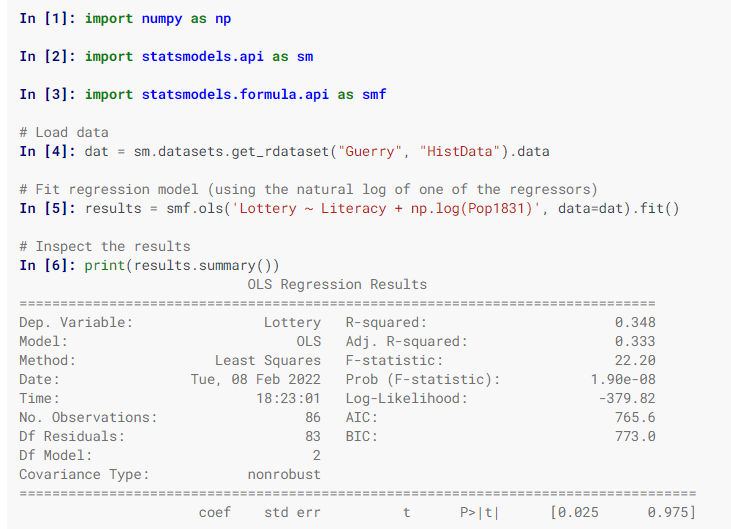
statsmodels is a Python module that provides classes and functions for the estimation of many different statistical models, as well as for conducting statistical tests and statistical data exploration. An extensive list of result statistics is available for each estimator. The results are tested against existing statistical packages to ensure that they are correct. The package is released under the open-source Modified BSD (3-clause) license. statsmodels supports specifying models using R-style formulas and pandas DataFrames. Have a look at dir(results) to see available results. Attributes are described in results.__doc__ and results methods have their own docstrings. You can also use numpy arrays instead of formulas. The easiest way to install statsmodels is to install it as part of the Anaconda distribution, a cross-platform distribution for data analysis and scientific computing. This is the recommended installation method for most users.
|
||||
PyAutoGUI:
Platforms Supported
Windows
Supported
Mac
Supported
Linux
Supported
Cloud
Not Supported
On-Premises
Not Supported
iPhone
Not Supported
iPad
Not Supported
Android
Not Supported
Chromebook
Not Supported
|
Python RPA:
Platforms Supported
Windows
Not Supported
Mac
Not Supported
Linux
Not Supported
Cloud
Supported
On-Premises
Not Supported
iPhone
Not Supported
iPad
Not Supported
Android
Not Supported
Chromebook
Not Supported
|
statsmodels:
Platforms Supported
Windows
Supported
Mac
Supported
Linux
Supported
Cloud
Not Supported
On-Premises
Not Supported
iPhone
Not Supported
iPad
Not Supported
Android
Not Supported
Chromebook
Not Supported
|
||||
PyAutoGUI:
Audience
Anyone seeking a tool to control the mouse and keyboard through scripts to automate interactions
|
Python RPA:
Audience
Enterprises interested in a tool to manage their business processes and automate routine tasks
|
statsmodels:
Audience
Users and anyone in search of a solution to calculate the estimation of many different statistical models
|
||||
PyAutoGUI:
Support
Phone Support
Not Supported
24/7 Live Support
Not Supported
Online
Supported
|
Python RPA:
Support
Phone Support
Supported
24/7 Live Support
Supported
Online
Supported
|
statsmodels:
Support
Phone Support
Not Supported
24/7 Live Support
Not Supported
Online
Supported
|
||||
PyAutoGUI:
API
Offers API
Not Supported
|
Python RPA:
API
Offers API
Not Supported
|
statsmodels:
API
Offers API
Supported
|
||||
PyAutoGUI:
Screenshots and Videos |
Python RPA:
Screenshots and Videos |
statsmodels:
Screenshots and Videos |
||||
PyAutoGUI:
Pricing
Free
Free Version
Supported
Free Trial
Not Supported
|
Python RPA:
Pricing
$275 per month
Free Version
Not Supported
Free Trial
Supported
|
statsmodels:
Pricing
Free
Free Version
Supported
Free Trial
Not Supported
|
||||
PyAutoGUI:
Reviews/
|
Python RPA:
Reviews/
|
statsmodels:
Reviews/
|
||||
PyAutoGUI:
Training
Documentation
Supported
Webinars
Not Supported
Live Online
Not Supported
In Person
Not Supported
|
Python RPA:
Training
Documentation
Supported
Webinars
Not Supported
Live Online
Supported
In Person
Supported
|
statsmodels:
Training
Documentation
Supported
Webinars
Not Supported
Live Online
Not Supported
In Person
Not Supported
|
||||
PyAutoGUI:
Company InformationPyAutoGUI
United States
pyautogui.readthedocs.io/en/latest/
|
Python RPA:
Company InformationPython RPA
Founded: 2019
Kazakhstan
pythonrpa.org
|
statsmodels:
Company Informationstatsmodels
www.statsmodels.org/stable/index.html
|
||||
PyAutoGUI:
Alternatives |
Python RPA:
Alternatives |
statsmodels:
Alternatives |
||||
|
PyAutoGUI:
|
Python RPA: | statsmodels: | ||||
|
PyAutoGUI:
|
Python RPA: | statsmodels: | ||||
|
PyAutoGUI:
|
Python RPA:
|
statsmodels: | ||||
|
PyAutoGUI:
|
Python RPA:
|
statsmodels: | ||||
PyAutoGUI:
Categories |
Python RPA:
Categories |
statsmodels:
Categories |
||||
PyAutoGUI:
Integrations
Python
Supported
Anaconda
Not Supported
Docker
Not Supported
GPT-4
Not Supported
Java
Not Supported
Microsoft Azure
Not Supported
OpenAI
Not Supported
PyCharm
Not Supported
SAP Cloud Platform
Not Supported
Visual Studio
Not Supported
|
Python RPA:
Integrations
Python
Supported
Anaconda
Not Supported
Docker
Supported
GPT-4
Supported
Java
Supported
Microsoft Azure
Supported
OpenAI
Supported
PyCharm
Supported
SAP Cloud Platform
Supported
Visual Studio
Supported
|
statsmodels:
Integrations
Python
Supported
Anaconda
Supported
Docker
Not Supported
GPT-4
Not Supported
Java
Not Supported
Microsoft Azure
Not Supported
OpenAI
Not Supported
PyCharm
Not Supported
SAP Cloud Platform
Not Supported
Visual Studio
Not Supported
|
||||
|
PyAutoGUI:
|
Python RPA:
|
statsmodels:
|