Microsoft Lens

Microsoft Lens

Microsoft
Notezilla

Notezilla

Conceptworld Corporation
+
+

Related Products

  • PackageX OCR Scanning
    48 Ratings
    Visit Website
  • Xero
    5,909 Ratings
    Visit Website
  • FreshBooks
    5,506 Ratings
    Visit Website
  • Apryse PDF SDK
    157 Ratings
    Visit Website
  • Expedience Software
    34 Ratings
    Visit Website
  • Interfacing Integrated Management System (IMS)
    66 Ratings
    Visit Website
  • Fathom
    7,732 Ratings
    Visit Website
  • SmartDraw
    559 Ratings
    Visit Website
  • Nutrient SDK
    111 Ratings
    Visit Website
  • LinkSquares
    724 Ratings
    Visit Website

About

Microsoft Lens (formerly Microsoft Office Lens) trims, enhances, and makes pictures of whiteboards and docs readable. You can use Microsoft Lens to convert images to PDF, Word and PowerPoint files, and you can even save images to OneNote or OneDrive. Microsoft Lens is like having a scanner in your pocket. Like magic, it will digitize notes from whiteboards or blackboards. Always find important documents or business cards. Sketch your ideas and snap a picture for later. Don't lose receipts or stray sticky notes again!

About

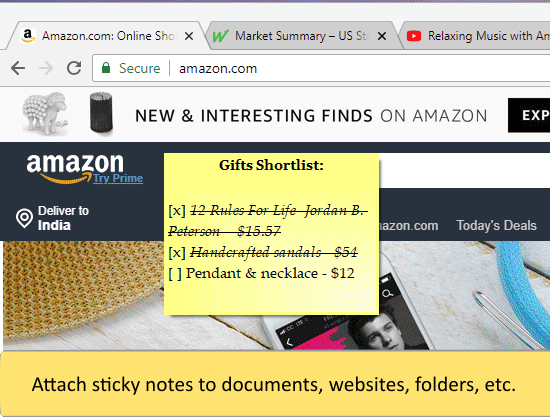
Notezilla is a sticky notes app for Windows & Phones designed to keep you well-equipped & well-organized. It lets you take quick notes on sticky notes (that look like 3M Post-It® Notes), right on your Windows desktop & gives you the best sticky notes experience. With the optional cloud synchronization feature, you can sync sticky notes between computers, access them from any smartphone using our free apps for iPhone/iPad, Android, etc or send sticky notes to any contact across the globe. Notezilla is a professionally designed, simple & elegant sticky notes software. Over the last 15 years, it has gained an excellent reputation (read customer reviews) from all over the world.

Platforms Supported

Windows
Mac
Linux
Cloud
On-Premises
iPhone
iPad
Android
Chromebook

Platforms Supported

Windows
Mac
Linux
Cloud
On-Premises
iPhone
iPad
Android
Chromebook

Audience

Any company that needs a scanning and optical character recognition tool

Audience

Anyone who wants to use sticky notes

Support

Phone Support
24/7 Live Support
Online

Support

Phone Support
24/7 Live Support
Online

API

Offers API

API

Offers API

Screenshots and Videos

Screenshots and Videos

Pricing

No information available.
Free Version
Free Trial

Pricing

$29.95/year/user
Free Version
Free Trial

Reviews/Ratings

Overall 4.8 / 5
ease 4.8 / 5
features 5.0 / 5
design 4.8 / 5
support 4.8 / 5

Reviews/Ratings

Overall 4.6 / 5
ease 4.6 / 5
features 4.6 / 5
design 4.4 / 5
support 4.6 / 5

Pros & Cons from Real Users

Pros

  • Automatically recognizes borders and is super fast in scanning documents. Frequent updates help keep it ahead of the curve.
  • Microsoft Office Lens is a pretty decent scanning utility which is available for free and provides a range of features which can be seen in many paid apps. it offer document scan of multiple types as well as provides basic editing tools to give a touch up to scanned images.
  • Lots of features like Scanning, Photo Editing, OCR capture Integrates with other Office 365 apps like OneNote. Great mobile app. Available for free.
  • Free to use Integrates with OneNote, OneDrive and other services to store images OCR functionality to recognize words in images Basic Photo editing features Save captured images as pdf , word or ppt files Available on smartphones as well
  • Great tools for taking photos and utilizing the content from the pictures. Neat tool for snapping a picture of a business card and sending the applicable information automatically to a list of contacts.

Cons

  • Certain functions like adding pages are not very intuitive.
  • No cons, great to see such a nice utility available for free.
  • For a free software it is really good and holds up pretty well against premium scanning apps.
  • It is a it slower than other scanning apps. Editing options are very limited.
  • Could only integrate with Microsoft Notes for sending business card data.

Pros & Cons from Real Users

Pros

  • Easy to use - intuitive. Highly Customizable and Lightweight. Sync between devices. Available across platforms and online as well. Frequent updates. Good support.
  • You can use it as notes or convert a series of items into a checklist to use for task management. Each sticky note can be assigned to a specific folder and have tags added. It feels very similar to Evernote in some regards, albeit significantly trimmed down in functionality. Notes can be starred for later and you can assign due dates with reminders to each note.
  • Create multiple notes Add reminders to notes Formatting options Sync across devices Also Available on mobile devices
  • #1- It's also available on mobile platforms. #1- Very convenient to add notes, the sticky notes are very attractive and catch your attention every time you open desktop. #3- Note reminder option is there, in case you missed it.
  • Notezilla is a very intuitive sticky notes app. It gives me each on-time reminder alarm. You can sync your notes between any devices. Notezilla app is available on cross platforms. Backup notes is also available.

Cons

  • No free personal version (only 30 day trial) - although there is a lifetime validity license at decent price.
  • The app looks unfinished. I know it's supposed to look like Post-it sticky notes, but that's no reason for there to be so much padding missing. If you use the checklist feature, there's practically no padding whatsoever between the checkbox and the edge of the sticky note. For notes that are checklists, the titles have a [x] in them to distinguish them from the others, but this looks awful and is pointless since every note shows a preview of the first line and you will see a [] in the first line of any note that has a checklist anyway. That itself also looks bad. Why not use a symbol like a checkmark or something? Titles have nearly no padding from the top of the notes either. While it's meant to look like a Post-it note, the illusion is entirely lost with the checklists and their highlighted boxes and the symbol on the other side of each line to let you know you can move the list items up and down. I'm really confused as to what they were going for, which makes it look even more like the app is unpolished and unfinished.
  • Expensive - the pricing is too high for such a basic utility
  • #1- We had a very positive overall experience with it.
  • Notezilla is a very intuitive app, I never had any bad experience.

Training

Documentation
Webinars
Live Online
In Person

Training

Documentation
Webinars
Live Online
In Person

Company Information

Microsoft
Founded: 1975
United States
www.microsoft.com

Company Information

Conceptworld Corporation
Founded: 2000
India
www.conceptworld.com

Alternatives

Alternatives

ShixxNOTE

ShixxNOTE

Mavel
Google Lens

Google Lens

Google
Pocket Scanner

Pocket Scanner

Kdan Mobile

Categories

Categories

OCR Features

Batch Processing
Convert to PDF
ID Scanning
Image Pre-processing
Indexing
Metadata Extraction
Multi-Language
Multiple Output Formats
Text Editor
Zone Selection Tool

Integrations

3CX
Click2Mail
Crow Canyon Contract Management
Microsoft OneDrive
Microsoft OneNote
Microsoft PowerPoint
Microsoft Word

Integrations

3CX
Click2Mail
Crow Canyon Contract Management
Microsoft OneDrive
Microsoft OneNote
Microsoft PowerPoint
Microsoft Word
Claim Microsoft Lens and update features and information
Claim Notezilla and update features and information