Meliora TestlabMeliora
|
||||||
Related Products
|
||||||
About
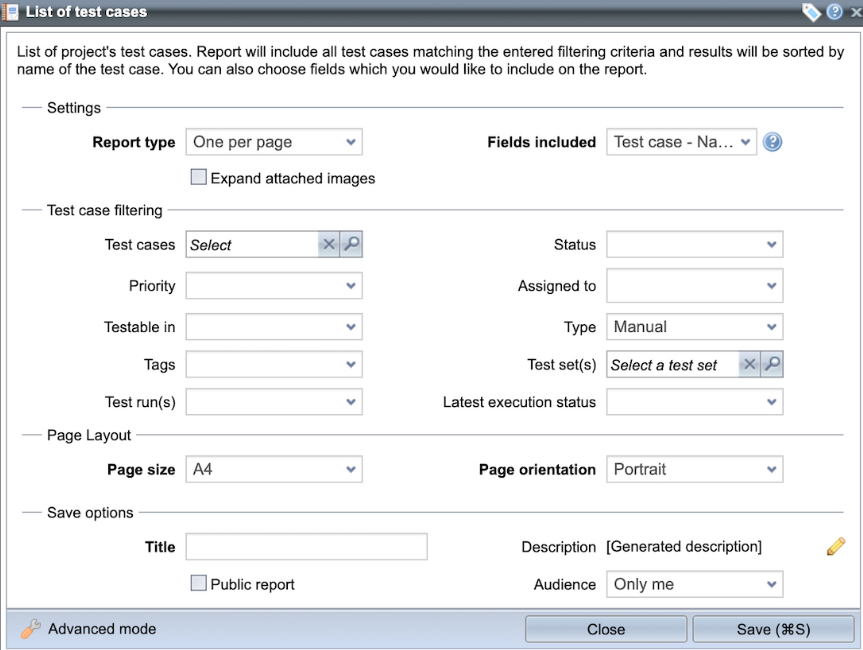
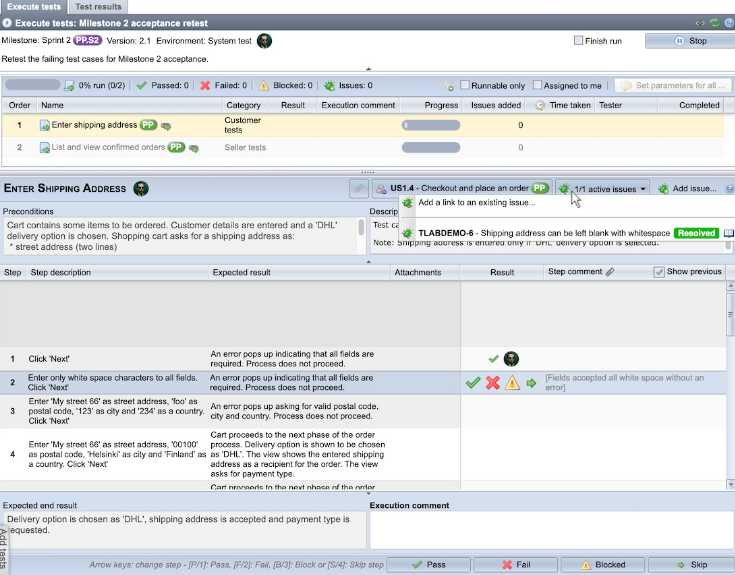
Meliora Testlab is a test management/application lifecycle management tool with unique features to support manual and automated testing. The tool is easy to use, but has powerful features that really help it's users see what should be done next to improve quality. Test management tool that makes your life easier. No more surprises or needless searching. Comprehensive realtime situational view. Get clear picture instantly. Right data is always at hand in right places. Test right things easier and faster. With fewer mistakes, with less costs. We help the way you want to be helped. Go solo or get help and consultation from our experts. Flexible and effective. Hassle-free one-stop service. Agilely developing what you and the world needs. Our solution grows with you. No matter what size you are. No matter how big you grow.
|
About
Designed to streamline your QA process. Manage test cases, boost team collaboration, and track every step of your testing journey.
🌟 Key Features:
✓ Unlimited Users
✓ Unlimited Projects
✓ Trusted by 300+ Software Development Companies
✓ GDPR Compliance
✓ 24/7 Accessibility
✓ Live Chat Support
About Us
Born from the needs of QA engineers at Gera-IT, our Ukrainian SaaS cloud solution was created in 2016 to solve the very challenges we faced on our projects.
Why Choose TestCaseLab:
✅ Simplify Your Workflow and say goodbye to spreadsheets.
✅ Budget-Friendly. Pay only for the test cases you need.
✅ Speed up your QA process with intuitive features.
✅ No more needless clicks or confusing navigation with a user-friendly interface.
✅ Modify test cases on the fly during testing.
✅ Connect with your favorite tools (Redmine, Jira, Pivotal, YouTrack, Asana, Trello, Mantis, GitHub).
Ready to take your QA testing to the next level? Visit our website to learn
|
|||||
Platforms Supported
Windows
Not Supported
Mac
Not Supported
Linux
Not Supported
Cloud
Supported
On-Premises
Not Supported
iPhone
Not Supported
iPad
Not Supported
Android
Not Supported
Chromebook
Not Supported
|
Platforms Supported
Windows
Not Supported
Mac
Not Supported
Linux
Not Supported
Cloud
Supported
On-Premises
Not Supported
iPhone
Not Supported
iPad
Not Supported
Android
Not Supported
Chromebook
Not Supported
|
|||||
Audience
Software teams and organizations seeking a tool to ensure quality assurance
|
Audience
Small and mid-sized companies who would like to organise their testing process and get rid of Excel sheets.
|
|||||
Support
Phone Support
Supported
24/7 Live Support
Supported
Online
Supported
|
Support
Phone Support
Supported
24/7 Live Support
Not Supported
Online
Supported
|
|||||
API
Offers API
Not Supported
|
API
Offers API
Supported
|
|||||
Screenshots and Videos |
Screenshots and Videos |
|||||
Pricing
$50.00/month
Free Version
Not Supported
Free Trial
Supported
|
Pricing
$40.00/month
💰Pricing plans:
Basic $40/$48 per month (yearly/monthly) - 500 test cases / unlimited users Essential $83/$99 per month (yearly/monthly) - 1000 test cases / unlimited users Advanced $124/$149 per month (yearly/monthly) - 3000 test cases / unlimited users Ultimate $199/$169 per month (yearly/monthly) - 9 000 test cases / unlimited users. Enterprise $399/$332 per month (yearly/monthly) - 50 000 test cases / unlimited users. *Annual subscription: -15% off monthly price.
Free Version
Not Supported
Free Trial
Supported
|
|||||
Reviews/
|
Reviews/
|
|||||
Pros & Cons from Real UsersPros
Cons
|
Pros & Cons from Real UsersPros
Cons
|
|||||
Training
Documentation
Supported
Webinars
Supported
Live Online
Supported
In Person
Supported
|
Training
Documentation
Supported
Webinars
Not Supported
Live Online
Supported
In Person
Supported
|
|||||
Company InformationMeliora
Founded: 2012
Finland
www.melioratestlab.com
|
Company InformationTestCaseLab
Founded: 2016
Ukraine
www.testcaselab.com
|
|||||
Alternatives |
Alternatives |
|||||
|
|
|
|||||
|
|
|
|||||
|
|
||||||
|
|
||||||
Categories |
Categories |
|||||
Software Testing Features
Automated Testing
Not Supported
Black-Box Testing
Supported
Dynamic Testing
Not Supported
Issue Tracking
Supported
Manual Testing
Supported
Quality Assurance Planning
Supported
Reporting / Analytics
Supported
Static Testing
Supported
Test Case Management
Supported
Variable Testing Methods
Not Supported
White-Box Testing
Supported
Test Management Features
Automation Integration
Supported
Collaboration Tools
Supported
Pass/Fail Results Tabulation
Not Supported
Reporting / Analytics
Supported
Requirements Management
Supported
Test Scheduling
Supported
Test Tracking
Not Supported
Time/Budget Tracking
Not Supported
Application Performance Monitoring (APM) Features
Baseline Manager
Not Supported
Diagnostic Tools
Supported
Full Transaction Diagnostics
Supported
Performance Control
Supported
Resource Management
Supported
Root-Cause Diagnosis
Not Supported
Server Performance
Not Supported
Trace Individual Transactions
Not Supported
Automated Testing Features
Hierarchical View
Supported
Move & Copy
Supported
Parameterized Testing
Supported
Requirements-Based Testing
Supported
Security Testing
Not Supported
Supports Parallel Execution
Supported
Test Script Reviews
Not Supported
Unicode Compliance
Not Supported
Bug Tracking Features
Backlog Management
Not Supported
Filtering
Supported
Issue Tracking
Supported
Release Management
Not Supported
Task Management
Supported
Ticket Management
Supported
Workflow Management
Not Supported
Issue Tracking Features
Assignment Management
Supported
Dashboard
Supported
Escalation Management
Supported
Issue Auditing
Supported
Issue Scheduling
Not Supported
Knowledge Base
Not Supported
Project Management
Supported
Recurring Issues
Not Supported
Scheduling
Not Supported
Task Management
Supported
Performance Testing Features
API Testing
Supported
Benchmarking
Not Supported
Cross Browser Testing
Supported
Debugging
Not Supported
Historical Reporting
Not Supported
Load Testing
Supported
Mobile Testing
Not Supported
Parallel Testing
Not Supported
Regression Testing
Supported
UI Testing
Supported
Web Testing
Supported
|
||||||
Integrations
Jira
Supported
YouTrack
Supported
Asana
Not Supported
Confluence
Supported
Git
Supported
GitHub
Not Supported
Jenkins
Supported
Mantis
Not Supported
MantisBT
Supported
Mercurial
Supported
|
Integrations
Jira
Supported
YouTrack
Supported
Asana
Supported
Confluence
Not Supported
Git
Not Supported
GitHub
Supported
Jenkins
Not Supported
Mantis
Supported
MantisBT
Not Supported
Mercurial
Not Supported
|
|||||
|
|
|