Maple CalculatorMapleSoft
|
MyScript CalculatorMyScript
|
|||||
Related Products
|
||||||
About
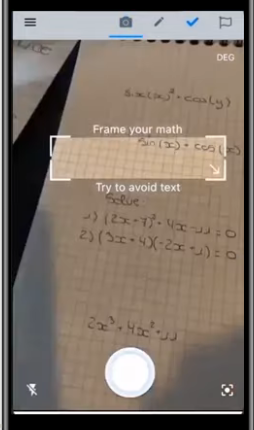
Maple Calculator is a free powerful math solver and versatile math learning tool that gives you answers, 2D and 3D graphs, and even step-by-step solutions! Whether you are doing simple calculations or working on university-level math problems, Maple Calculator can do it all. Enter handwritten and typeset math problems at the click of your camera using powerful AI technology. Or, enter your expression into the calculator using the same mathematical notation your teacher uses, your problem is easy to enter because it looks right. No matter how you enter your problem, you can find integrals, factor polynomials, invert matrices, solve systems of equations, solve ODEs, and much more. The app has the power of the world-leading Maple math engine behind it, so it can do a lot of math! In addition to the answer, you get fully worked, step-by-step solutions to a wide variety of math problems, including solving systems of equations; finding limits, derivatives, and, integrals.
|
About
Scratch out and rewrite as much as needed. The easiest way to calculate. Simply write any calculation as you would on paper. The result is automatically calculated. Interact live with your calculation. Add new elements or erase naturally with a scratch gesture. Get automatic conversion and calculation or take the time you need by using calculation on demand. Display the result in decimal, fraction, or mixed numbers. Use radian or degree for trigonometry. Whenever you lack space when entering a long calculation, just continue on the next line. Write several calculations on different lines. Use drag and drop to easily create multi-step calculations. Drag and drop numbers from and to the canvas, the memory bar, or to an external app. Drag and drop numbers on the toolbar to store them. Reuse them by dragging them back onto the canvas. All your previous calculations are automatically saved. Pick one from the history to use it again.
|
|||||
Platforms Supported
Windows
Not Supported
Mac
Not Supported
Linux
Not Supported
Cloud
Supported
On-Premises
Not Supported
iPhone
Supported
iPad
Supported
Android
Supported
Chromebook
Not Supported
|
Platforms Supported
Windows
Not Supported
Mac
Supported
Linux
Not Supported
Cloud
Supported
On-Premises
Not Supported
iPhone
Supported
iPad
Supported
Android
Supported
Chromebook
Not Supported
|
|||||
Audience
Users that are searching for a solution to learn and get answers to mathematical problems
|
Audience
Anyone wanting an application to draw, write and make math calculations to get automatic results
|
|||||
Support
Phone Support
Supported
24/7 Live Support
Not Supported
Online
Supported
|
Support
Phone Support
Not Supported
24/7 Live Support
Not Supported
Online
Supported
|
|||||
API
Offers API
Not Supported
|
API
Offers API
Supported
|
|||||
Screenshots and Videos |
Screenshots and Videos |
|||||
Pricing
Free
Free Version
Supported
Free Trial
Not Supported
|
Pricing
$2.99 per month
Free Version
Supported
Free Trial
Not Supported
|
|||||
Reviews/
|
Reviews/
|
|||||
Training
Documentation
Supported
Webinars
Not Supported
Live Online
Not Supported
In Person
Supported
|
Training
Documentation
Supported
Webinars
Not Supported
Live Online
Supported
In Person
Supported
|
|||||
Company InformationMapleSoft
Canada
www.maplesoft.com/products/MapleCalculator/
|
Company InformationMyScript
France
www.myscript.com/calculator/
|
|||||
Alternatives |
Alternatives |
|||||
|
|
||||||
|
|
|
|||||
Categories |
Categories |
|||||
Integrations
No info available.
|
Integrations
No info available.
|
|||||
|
|
|