JDiskReportJGoodies
|
||||||
| JDiskReport | PixelDisk | |||||
|---|---|---|---|---|---|---|
Related Products
|
||||||
JDiskReport:
About
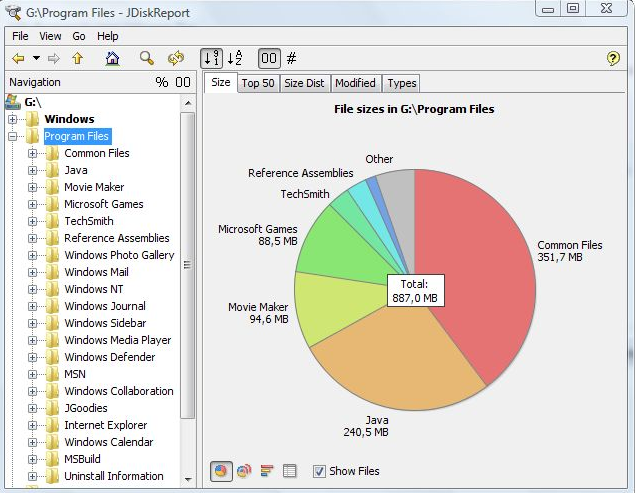
JDiskReport enables you to understand how much space the files and directories consume on your disk drives, and it helps you find obsolete files and folders. The tool analyses your disk drives and collects several statistics which you can view as overview charts and details tables. This is ad-free uncrippled no-charge software that never expires. JDiskReport runs on Windows, Mac, Linux, and other platforms. It requires Java. JDiskReport requires Java. Make sure Java is installed before you install JDiskReport. The tool has been tested on Windows, Mac, and Linux; it runs also on Solaris and other Java-enabled operating systems. A stable preview of JDiskReport 2 is available. This version is rawer than other releases that you have downloaded from JGoodies in the past. It lacks some features (you cannot click in the size pie), but can be run as a cron job (executed in the background), provides more information, and has seen a visual cleanup.
|
PixelDisk:
About
PixelDisk is a native macOS disk space analyzer and cleaner for Mac users, including developers with large build caches and local development files. It visualizes a disk in nine categories and helps users review caches, old installers, and developer data for cleanup. In Safe mode, personal files go to the Trash; caches, logs, and rebuildable build files are deleted. Each item explains the cleanup impact. Developer cleanup covers Xcode data, simulator files, node_modules, Docker and OrbStack images, and Ollama and LM Studio models. The app also detects duplicate files, removes apps and leftovers, lists large files unopened for a year, shows free space in the menu bar, and automatically clears unused caches, logs, and build files when storage is low. Scanning is free; a $19 one-time purchase unlocks cleaning and future updates. It runs locally on macOS 14 or later on Apple silicon and Intel Macs, without an account, and supports 11 languages.
|
|||||
JDiskReport:
Platforms Supported
Windows
Supported
Mac
Supported
Linux
Supported
Cloud
Not Supported
On-Premises
Not Supported
iPhone
Not Supported
iPad
Not Supported
Android
Not Supported
Chromebook
Not Supported
|
PixelDisk:
Platforms Supported
Windows
Not Supported
Mac
Supported
Linux
Not Supported
Cloud
Not Supported
On-Premises
Not Supported
iPhone
Not Supported
iPad
Not Supported
Android
Not Supported
Chromebook
Not Supported
|
|||||
JDiskReport:
Audience
Users looking for a solution to see and manage the space that files and directories consume on disk drives
|
PixelDisk:
Audience
Mac users who run low on disk space, including developers with Xcode, Docker and node_modules leftovers, who want a safe one-time-purchase cleaner instead of a subscription.
|
|||||
JDiskReport:
Support
Phone Support
Supported
24/7 Live Support
Not Supported
Online
Supported
|
PixelDisk:
Support
Phone Support
Not Supported
24/7 Live Support
Not Supported
Online
Supported
|
|||||
JDiskReport:
API
Offers API
Not Supported
|
PixelDisk:
API
Offers API
Not Supported
|
|||||
JDiskReport:
Screenshots and Videos |
PixelDisk:
Screenshots and VideosNo images available
|
|||||
JDiskReport:
Pricing
Free
Free Version
Supported
Free Trial
Not Supported
|
PixelDisk:
Pricing
$19 one-time
Scanning and disk analysis are free. Cleaning costs $19 one time, and future updates are included.
Free Version
Supported
Free Trial
Not Supported
|
|||||
JDiskReport:
Reviews/
|
PixelDisk:
Reviews/
|
|||||
JDiskReport:
Training
Documentation
Supported
Webinars
Not Supported
Live Online
Not Supported
In Person
Supported
|
PixelDisk:
Training
Documentation
Supported
Webinars
Not Supported
Live Online
Not Supported
In Person
Not Supported
|
|||||
JDiskReport:
Company InformationJGoodies
Germany
www.jgoodies.com/freeware/jdiskreport/
|
PixelDisk:
Company InformationPixelDisk
Poland
pixeldisk.app
|
|||||
JDiskReport:
Alternatives |
PixelDisk:
Alternatives |
|||||
|
JDiskReport:
|
PixelDisk:
|
|||||
|
JDiskReport:
|
PixelDisk:
|
|||||
| JDiskReport: |
PixelDisk:
|
|||||
| JDiskReport: | PixelDisk: | |||||
JDiskReport:
Categories |
PixelDisk:
Categories |
|||||
| JDiskReport: |
PixelDisk:
Integrations
Java
Not Supported
|
|||||
|
JDiskReport:
|
PixelDisk:
|