JDiskReport

JDiskReport

JGoodies
MiniTool Partition Wizard

MiniTool Partition Wizard

MiniTool Software
+
+

Related Products

  • Secure Eraser
    15 Ratings
    Visit Website
  • Filerev
    3 Ratings
    Visit Website
  • Windocks
    7 Ratings
    Visit Website
  • Nutrient SDK
    111 Ratings
    Visit Website
  • Thinfinity Workspace
    14 Ratings
    Visit Website
  • JSCAPE MFT Server
    188 Ratings
    Visit Website
  • JS7 JobScheduler
    1 Rating
    Visit Website
  • Apify
    1,441 Ratings
    Visit Website
  • Source Defense
    7 Ratings
    Visit Website
  • pCloud Business
    189 Ratings
    Visit Website

About

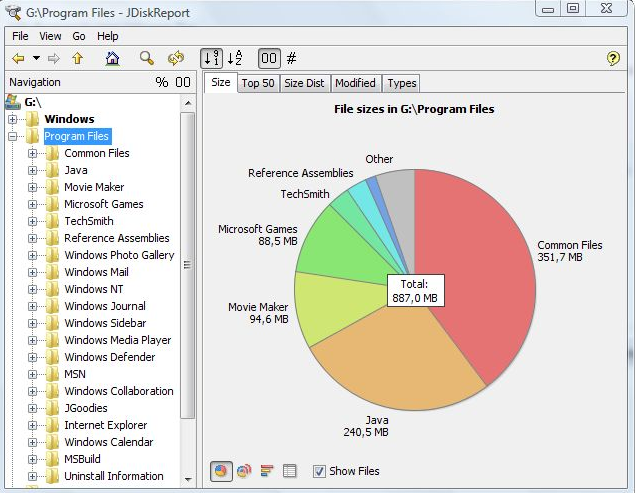
JDiskReport enables you to understand how much space the files and directories consume on your disk drives, and it helps you find obsolete files and folders. The tool analyses your disk drives and collects several statistics which you can view as overview charts and details tables. This is ad-free uncrippled no-charge software that never expires. JDiskReport runs on Windows, Mac, Linux, and other platforms. It requires Java. JDiskReport requires Java. Make sure Java is installed before you install JDiskReport. The tool has been tested on Windows, Mac, and Linux; it runs also on Solaris and other Java-enabled operating systems. A stable preview of JDiskReport 2 is available. This version is rawer than other releases that you have downloaded from JGoodies in the past. It lacks some features (you cannot click in the size pie), but can be run as a cron job (executed in the background), provides more information, and has seen a visual cleanup.

About

MiniTool Partition Wizard is a piece of partition manager targeting home and home office users. It owns comprehensive disk partition management functions for flexible partitioning, optimization and managing your computer. This high-performance tool helps make the optimal disk space distribution and ensure an ideal hard disk structure.

Platforms Supported

Windows
Mac
Linux
Cloud
On-Premises
iPhone
iPad
Android
Chromebook

Platforms Supported

Windows
Mac
Linux
Cloud
On-Premises
iPhone
iPad
Android
Chromebook

Audience

Users looking for a solution to see and manage the space that files and directories consume on disk drives

Audience

Users that need a disk partition manager

Support

Phone Support
24/7 Live Support
Online

Support

Phone Support
24/7 Live Support
Online

API

Offers API

API

Offers API

Screenshots and Videos

Screenshots and Videos

Pricing

Free
Free Version
Free Trial

Pricing

$39/Year/PC
1 Year Free Upgrade
Single License for 1 PC
Not Support Data Recovery
Snap-in WinPE Bootable Builder
For Windows 10/8.1/8/7
Free Version
Free Trial

Reviews/Ratings

Overall 0.0 / 5
ease 0.0 / 5
features 0.0 / 5
design 0.0 / 5
support 0.0 / 5

This software hasn't been reviewed yet. Be the first to provide a review:

Review this Software

Reviews/Ratings

Overall 5.0 / 5
ease 4.8 / 5
features 5.0 / 5
design 4.8 / 5
support 4.8 / 5

Pros & Cons from Real Users

Pros

  • Its support perfectly Windows operating system but don't know about Mac. Interface is arranged in proper manner so it's easy to understand. You can perform disk wipe, disk partition, change labels, split or merge partition and many others features. MiniTool Partition also help you move you os from HHD to SSD without losing any data Which is best thing.
  • Great interface with frequent updates Format or re-partition hard disk drives Convert between disk filesystems SSD performance analytics and tools Disk Benchmark feature Free version
  • Even the free version gets a lot of work done for the average user. You can extend, shrink, merge, create and remove partitions easily. It also has options to work with a variety of filesystem formats. Very stable Doesn't have intrusive or annoying ads. Partition and Data Recovery works to a great extent.
  • I've used Minitool Partition Wizard on everything from large NAS hard discs to 8gb micro usb cards. The system is pretty straight forward and you are asked to confirm and apply your changes before it actually happens to avoid overwriting drives/data.

Cons

  • There are no cons that I've observed in MiniTool but just want to inform, you need to purchase MiniTool Partition because there are lot of features which are locked in the free version.
  • It takes a little bit of learning for beginners so they can maybe include a lite version just for basic tasks as any beginner can by mistake erase their drive with this. Apart from that it just works great.
  • Data recovery is not included in the Pro version. No file viewer for other filesystems such as hfs+ or APFS.
  • With all the warnings, there is a potential for you to damage the hard drive your operating system is running if you are not following directions or are unsure drive you are actually making a change to.

Training

Documentation
Webinars
Live Online
In Person

Training

Documentation
Webinars
Live Online
In Person

Company Information

JGoodies
Germany
www.jgoodies.com/freeware/jdiskreport/

Company Information

MiniTool Software
Founded: 2009
Canada
www.minitool.com/partition-manager/

Alternatives

SpaceObServer

SpaceObServer

JAM Software

Alternatives

Robot Space

Robot Space

Fortra
Wise Disk Cleaner

Wise Disk Cleaner

WiseCleaner
4n6 Disk Spy

4n6 Disk Spy

4n6Soft
Paragon Hard Disk Manager

Paragon Hard Disk Manager

Paragon Software Group

Categories

Categories

Integrations

Java

Integrations

Java
Claim JDiskReport and update features and information
Claim MiniTool Partition Wizard and update features and information