Related Products
|
||||||
About
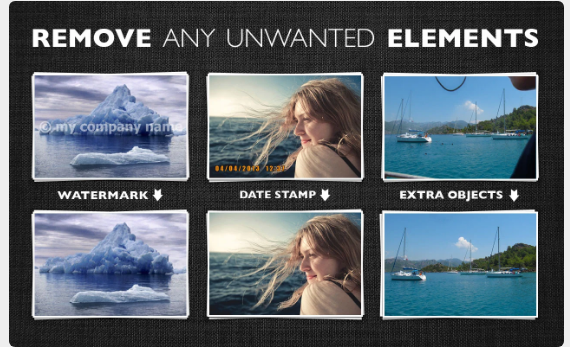
Inpaint will magically fill the selected area with intelligently-generated textures pulled from the surrounding image data. Go to our Tutorials page and see for yourself how easy it is for anyone to do with just a few simple steps. Drop a file here or click to upload an image. The format should be JPG, PNG or WebP. The maximum image size is 10Mb. The maximum image resolution is 4.2 megapixels. Frustrated by nasty tourists stalking back and forth and spoiling the best shots? Take them away from your photos with Inpaint! With a few simple gestures, you will get clear, spectacular pictures, just like you intended them to be. Inpaint allows you to select unnecessary objects or persons on a photo in literally seconds, so all you have to do then is to let Inpaint do the rest. Aside from the information we truly want to see in our photographs, there are also many not so crucial for composition if not worse. So remove it with Inpaint!
|
About
Cull 1000 photos in 60 seconds. Select your best shots in seconds with Optyx AI. Find the best shots of your most important subjects in a snap. Intelligent computer vision recognizes similar faces and evaluates each one for expression, blinks, and focus. Shave hours off your culling. Powerful AI automatically groups similar images and selects the best of every unique shot, so you don't have to. Navigate between photo previews in a snap. Whether you let the AI cull or love kickin' it manually, you'll love lightning-fast previews, even on those massive RAW files. Optyx analyzes your photos with an arsenal of AI models to group similar images and rate them according to facial expression, sharpness, composition, exposure, and more! Don't ever stress again about selecting the perfect shot. Let AI filter your bursts, so you can get back to what you love. Whether editing your selects to match your artistic vision or getting back out into the field for another day of shooting.
|
|||||
Platforms Supported
Windows
Mac
Linux
Cloud
On-Premises
iPhone
iPad
Android
Chromebook
|
Platforms Supported
Windows
Mac
Linux
Cloud
On-Premises
iPhone
iPad
Android
Chromebook
|
|||||
Audience
Photographers and anyone seeking a solution to remove objects from their photos online
|
Audience
Photographers and any user requiring a solution to analyze their photos with AI models to group similar images
|
|||||
Support
Phone Support
24/7 Live Support
Online
|
Support
Phone Support
24/7 Live Support
Online
|
|||||
API
Offers API
|
API
Offers API
|
|||||
Screenshots and Videos |
Screenshots and Videos |
|||||
Pricing
$19.99 one-time payment
Free Version
Free Trial
|
Pricing
$6.99 per month
Free Version
Free Trial
|
|||||
Reviews/
|
Reviews/
|
|||||
Training
Documentation
Webinars
Live Online
In Person
|
Training
Documentation
Webinars
Live Online
In Person
|
|||||
Company InformationInpaint
United States
theinpaint.com
|
Company InformationOptyx
United States
www.optyx.app/
|
|||||
Alternatives |
Alternatives |
|||||
|
|
|
|||||
|
|
|
|||||
|
|
||||||
Categories |
Categories |
|||||
Integrations
Adobe Lightroom
|
||||||
|
|
|