HideNStick NotesCode A Program Studio
|
|
|||||
| HideNStick Notes | Notezilla | |||||
|---|---|---|---|---|---|---|
Related Products
|
||||||
HideNStick Notes:
About
HideNStick Notes is a Windows sticky-notes application that keeps notes in a slim rail along the edge of the screen and opens it with a double edge gesture or keyboard shortcut. Users can create up to six notes with unlimited tabs, type into notes that tuck away when dismissed, and pin notes above other apps, resize them or show them full-screen. The app supports rich-text formatting, checklists, code blocks, colors, pasted images, and search across notes and tabs. A quick-capture shortcut can save selected text from other applications. Notes are stored locally on the PC, with automatic backup and restore, and the app works offline without an account. HideNStick Notes is designed for Windows 10 version 1809 or later and Windows 11, for people who want quick reminders, reference material, and lightweight task notes without leaving separate note windows on the desktop.
|
Notezilla:
About
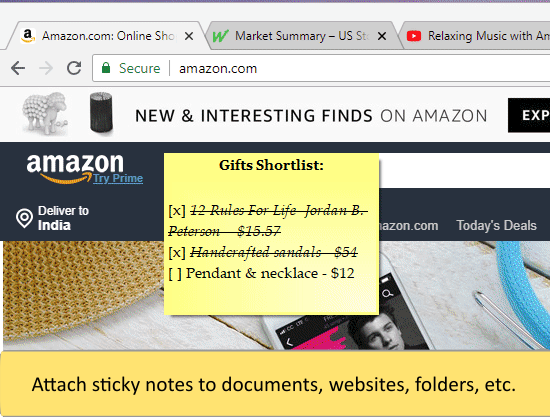
Notezilla is a sticky notes app for Windows & Phones designed to keep you well-equipped & well-organized. It lets you take quick notes on sticky notes (that look like 3M Post-It® Notes), right on your Windows desktop & gives you the best sticky notes experience.
With the optional cloud synchronization feature, you can sync sticky notes between computers, access them from any smartphone using our free apps for iPhone/iPad, Android, etc or send sticky notes to any contact across the globe.
Notezilla is a professionally designed, simple & elegant sticky notes software. Over the last 15 years, it has gained an excellent reputation (read customer reviews) from all over the world.
|
|||||
HideNStick Notes:
Platforms Supported
Windows
Supported
Mac
Not Supported
Linux
Not Supported
Cloud
Not Supported
On-Premises
Not Supported
iPhone
Not Supported
iPad
Not Supported
Android
Not Supported
Chromebook
Not Supported
|
Notezilla:
Platforms Supported
Windows
Supported
Mac
Not Supported
Linux
Not Supported
Cloud
Supported
On-Premises
Not Supported
iPhone
Supported
iPad
Supported
Android
Supported
Chromebook
Not Supported
|
|||||
HideNStick Notes:
Audience
Windows users who want a cleaner, more organized desktop. Ideal for professionals, students, developers, and anyone who uses sticky notes for reminders or quick notes but wants to keep their workspace clutter-free.
|
Notezilla:
Audience
Anyone who wants to use sticky notes
|
|||||
HideNStick Notes:
Support
Phone Support
Not Supported
24/7 Live Support
Not Supported
Online
Supported
|
Notezilla:
Support
Phone Support
Not Supported
24/7 Live Support
Not Supported
Online
Supported
|
|||||
HideNStick Notes:
API
Offers API
Not Supported
|
Notezilla:
API
Offers API
Not Supported
|
|||||
HideNStick Notes:
Screenshots and Videos |
Notezilla:
Screenshots and Videos |
|||||
HideNStick Notes:
Pricing
$3.99 one-time
A 15-day full-feature trial is free. The promotional price is $3.99 one-time through December 5, 2026; the regular price is $4.99 one-time. No subscription is required.
Free Version
Not Supported
Free Trial
Supported
|
Notezilla:
Pricing
$29.95/year/user
Free Version
Not Supported
Free Trial
Supported
|
|||||
HideNStick Notes:
Reviews/
|
Notezilla:
Reviews/
|
|||||
Notezilla:
Pros & Cons from Real UsersPros
Cons
|
||||||
HideNStick Notes:
Training
Documentation
Not Supported
Webinars
Not Supported
Live Online
Not Supported
In Person
Not Supported
|
Notezilla:
Training
Documentation
Supported
Webinars
Not Supported
Live Online
Not Supported
In Person
Not Supported
|
|||||
HideNStick Notes:
Company InformationCode A Program Studio
India
hidenstick.codeaprogram.dev
|
Notezilla:
Company InformationConceptworld Corporation
Founded: 2000
India
www.conceptworld.com
|
|||||
HideNStick Notes:
AlternativesNo Alternatives
|
Notezilla:
Alternatives |
|||||
|
Notezilla:
|
||||||
|
Notezilla:
|
||||||
|
Notezilla:
|
||||||
| HideNStick Notes: | Notezilla: | |||||
HideNStick Notes:
Categories |
Notezilla:
Categories |
|||||
HideNStick Notes:
Integrations
No info available.
|
Notezilla:
Integrations
No info available.
|
|||||
|
HideNStick Notes:
|
Notezilla:
|