File Manager Prob-eng
|
YXFileousaa
|
|||||
Related Products
|
||||||
About
File Manager Pro comes with a classic double window view for easy file handling and includes many extras like preview, compare, sync, compress, and various editors. File Manager Pro allows you to manipulate folder content as well as single files in various ways. No matter if you want to compare the content of a whole drive or just a folder, the File manager can do it. And when needed you can sync single folders or complete drives. For better comfort is a preview for all kinds of file types available, be it MS Office, Libre Office, txt, or movies, File Manager Pro provides you with an overview. And if you have tons of movies on your drive or NAS, don't worry, File Manager gets rid of the black preview icon you are used to seeing for movies, it shows the correct icon and description for the movie! Of course, a professional file manager can't go without a disk overview in a clickable graphic display to zoom into the content of the drive.
|
About
Your computer desktop is cluttered and confused, and the files or applications you want to find are always out of reach?
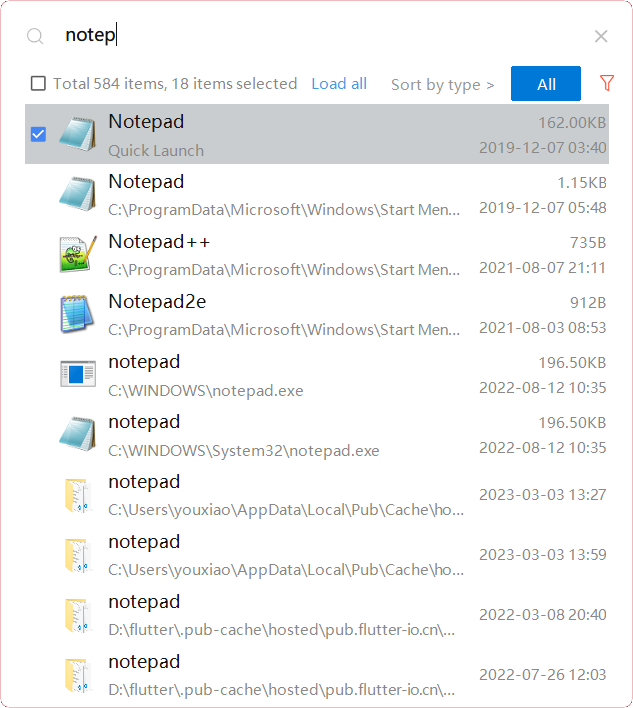
With YXFile you can tagging file, search file, launch apps.
Tag Any File:
YXFile can tag any file type on any file system: the tagging is stored in a database. YXFile won't mess up with your file names or leave hidden files on your disk. Move or rename a file under the same disk partition, its tags will not be lost
Search everything:
Search files and folders by name. as well as file tags and launch items.
Launch Apps:
One of the most powerful and favorite benefits of YXFile users is the Launch App feature. You can type the name of the program or application you want to open, or use a shortcode, click return, and YXFile opens the program.
|
|||||
Platforms Supported
Windows
Not Supported
Mac
Supported
Linux
Not Supported
Cloud
Not Supported
On-Premises
Not Supported
iPhone
Not Supported
iPad
Not Supported
Android
Not Supported
Chromebook
Not Supported
|
Platforms Supported
Windows
Supported
Mac
Not Supported
Linux
Not Supported
Cloud
Not Supported
On-Premises
Not Supported
iPhone
Not Supported
iPad
Not Supported
Android
Not Supported
Chromebook
Not Supported
|
|||||
Audience
Individuals seeking a tool to preview, compare, sync, compress, manage and handle files
|
Audience
Individual users who want to improve the efficiency of their computer use
|
|||||
Support
Phone Support
Not Supported
24/7 Live Support
Not Supported
Online
Supported
|
Support
Phone Support
Supported
24/7 Live Support
Not Supported
Online
Not Supported
|
|||||
API
Offers API
Not Supported
|
API
Offers API
Not Supported
|
|||||
Screenshots and Videos |
Screenshots and Videos |
|||||
Pricing
$8.99 one-time payment
Free Version
Supported
Free Trial
Not Supported
|
Pricing
$39/user
One-time payment for lifetime access to Yfile
Free Version
Not Supported
Free Trial
Supported
|
|||||
Reviews/
|
Reviews/
|
|||||
Training
Documentation
Supported
Webinars
Not Supported
Live Online
Not Supported
In Person
Not Supported
|
Training
Documentation
Supported
Webinars
Not Supported
Live Online
Not Supported
In Person
Not Supported
|
|||||
Company Informationb-eng
United States
www.b-eng.ch/app/file-manager-pro/
|
Company Informationousaa
Founded: 2016
China
yxfile.cc/
|
|||||
Alternatives |
Alternatives |
|||||
|
|
||||||
|
|
|
|||||
|
|
|
|||||
Categories |
Categories |
|||||
Integrations
7-Zip
Supported
Gzip
Supported
LibreOffice
Supported
Microsoft Office 2021
Supported
WinRAR
Supported
|
Integrations
7-Zip
Not Supported
Gzip
Not Supported
LibreOffice
Not Supported
Microsoft Office 2021
Not Supported
WinRAR
Not Supported
|
|||||
|
|
|