FancyZonesMicrosoft
|
MultiplicityStardock
|
|||||
Related Products
|
||||||
About
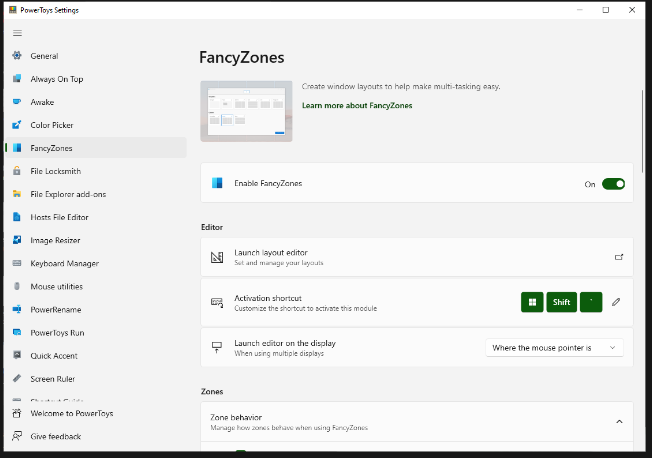
FancyZones is a window manager utility for arranging and snapping windows into efficient layouts to improve the speed of your workflow and restore layouts quickly. FancyZones allows you to define a set of zone locations to be used as targets for Windows on your desktop. When you drag a window into a zone or enter the associated keyboard shortcut, the window is resized and repositioned to fill that zone. You can also trigger zone selection mode by clicking the non-primary mouse button if the "Use non-primary mouse button to toggle zone activation" setting is enabled. If two zones are adjacent, a window can be snapped to the sum of their area (rounded to the minimum rectangle that contains both). When the mouse cursor is near the common edge of two zones, both zones are activated simultaneously, allowing you to drop the window into both zones. You can drag the window until one zone is activated, then press and hold the control key while dragging the window to select multiple zones.
|
About
Our KVM switch virtualization frees up your workspace, removing the cables and extra hardware of a traditional KVM switch. Whether you are a designer, editor, call center agent or road warrior using both a PC and laptop, Multiplicity makes working across multiple computers a breeze. Quickly and securely drag and drop and copy/paste between PCs. Control multiple PCs with one keyboard and mouse. AES 256 encryption of all data sent between PCs. A single keyboard and mouse can control multiple PCs, each with dedicated displays. Smoothly move the cursor across multiple displays connected to multiple computers.
|
|||||
Platforms Supported
Windows
Mac
Linux
Cloud
On-Premises
iPhone
iPad
Android
Chromebook
|
Platforms Supported
Windows
Mac
Linux
Cloud
On-Premises
iPhone
iPad
Android
Chromebook
|
|||||
Audience
Anyone searching for a solution to optimize their workflow by improving control over windows and layouts
|
Audience
IT teams searching for a wireless KVM software solution to control multiple PCs with one keyboard and mouse
|
|||||
Support
Phone Support
24/7 Live Support
Online
|
Support
Phone Support
24/7 Live Support
Online
|
|||||
API
Offers API
|
API
Offers API
|
|||||
Screenshots and Videos |
Screenshots and Videos |
|||||
Pricing
Free
Free Version
Free Trial
|
Pricing
$21.24 one-time payment
Free Version
Free Trial
|
|||||
Reviews/
|
Reviews/
|
|||||
Pros & Cons from Real UsersPros
Cons
|
||||||
Training
Documentation
Webinars
Live Online
In Person
|
Training
Documentation
Webinars
Live Online
In Person
|
|||||
Company InformationMicrosoft
United States
learn.microsoft.com/en-us/windows/powertoys/fancyzones
|
Company InformationStardock
Founded: 1993
United States
www.stardock.com/products/multiplicity/
|
|||||
Alternatives |
Alternatives |
|||||
|
|
|
|||||
|
|
|
|||||
|
|
|
|||||
|
|
||||||
Categories |
Categories |
|||||
Integrations
No info available.
|
Integrations
No info available.
|
|||||
|
|
|