DisplayFusionBinary Fortress Software
|
FancyZonesMicrosoft
|
|||||
Related Products
|
||||||
About
Use DisplayFusion's window management feature to easily move windows between your monitors. Whether you use the simple middle-click move, or the more advanced maximized window dragging, managing your desktop windows has never been so easy. You can even show tooltips when moving or resizing windows to help you position them precisely. Automatically move child dialogs and windows to the same monitor as the parent window. Mouse management options allow you to scroll inactive windows with the mouse wheel, wrap the mouse cursor at screen edges, and prevent the mouse cursor from snagging on unaligned monitor edges. Left-click a maximized window's title bar and drag it to the monitor you would like it to be on. DisplayFusion will show a monitor selector to help you choose the monitor. You'll never need to restore the window, drag it to the monitor and re-maximize it again. Just click, drag and you're done. DisplayFusion will take care of the details for you.
|
About
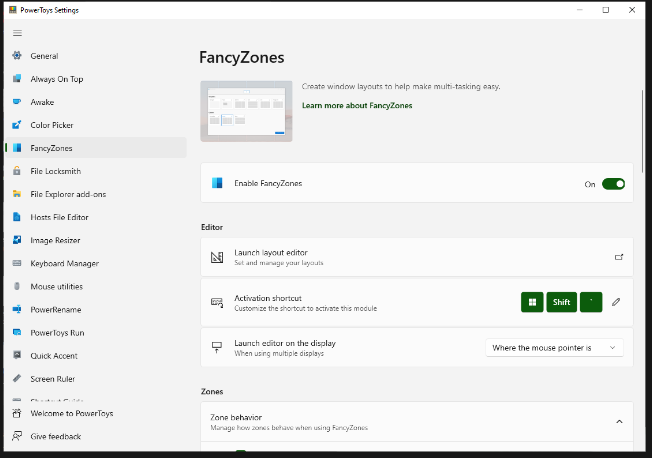
FancyZones is a window manager utility for arranging and snapping windows into efficient layouts to improve the speed of your workflow and restore layouts quickly. FancyZones allows you to define a set of zone locations to be used as targets for Windows on your desktop. When you drag a window into a zone or enter the associated keyboard shortcut, the window is resized and repositioned to fill that zone. You can also trigger zone selection mode by clicking the non-primary mouse button if the "Use non-primary mouse button to toggle zone activation" setting is enabled. If two zones are adjacent, a window can be snapped to the sum of their area (rounded to the minimum rectangle that contains both). When the mouse cursor is near the common edge of two zones, both zones are activated simultaneously, allowing you to drop the window into both zones. You can drag the window until one zone is activated, then press and hold the control key while dragging the window to select multiple zones.
|
|||||
Platforms Supported
Windows
Supported
Mac
Not Supported
Linux
Not Supported
Cloud
Not Supported
On-Premises
Not Supported
iPhone
Not Supported
iPad
Not Supported
Android
Not Supported
Chromebook
Not Supported
|
Platforms Supported
Windows
Supported
Mac
Not Supported
Linux
Not Supported
Cloud
Not Supported
On-Premises
Not Supported
iPhone
Not Supported
iPad
Not Supported
Android
Not Supported
Chromebook
Not Supported
|
|||||
Audience
Windows users seeking a tool to move windows between their monitors
|
Audience
Anyone searching for a solution to optimize their workflow by improving control over windows and layouts
|
|||||
Support
Phone Support
Not Supported
24/7 Live Support
Not Supported
Online
Supported
|
Support
Phone Support
Supported
24/7 Live Support
Not Supported
Online
Supported
|
|||||
API
Offers API
Not Supported
|
API
Offers API
Not Supported
|
|||||
Screenshots and Videos |
Screenshots and Videos |
|||||
Pricing
$34 one-time payment
Free Version
Not Supported
Free Trial
Not Supported
|
Pricing
Free
Free Version
Supported
Free Trial
Not Supported
|
|||||
Reviews/
|
Reviews/
|
|||||
Training
Documentation
Supported
Webinars
Not Supported
Live Online
Not Supported
In Person
Supported
|
Training
Documentation
Supported
Webinars
Supported
Live Online
Not Supported
In Person
Supported
|
|||||
Company InformationBinary Fortress Software
Canada
www.displayfusion.com/Features/WindowManagement/
|
Company InformationMicrosoft
United States
learn.microsoft.com/en-us/windows/powertoys/fancyzones
|
|||||
Alternatives |
Alternatives |
|||||
|
|
|
|||||
|
|
|
|||||
|
|
||||||
|
|
||||||
Categories |
Categories |
|||||
Integrations
No info available.
|
Integrations
No info available.
|
|||||
|
|
|