JDiskReportJGoodies
|
||||||
Related Products
|
||||||
About
Diskfern is a native macOS utility for analyzing storage and reviewing files for cleanup. It scans a Mac’s startup disk, home folder, selected folders, and connected drives, then organizes accessible files in treemap, list, and sunburst views. Users can compare folder sizes, search indexed file names with natural-language queries, apply filters, and use Smart Highlights to locate common storage such as developer caches, logs, downloads, and application data. File inspection provides size, location, permissions, safety labels, and Quick Look previews. Pro and Family add a review-based cleanup Collector, app removal, and one-click staging of selected items before they are moved to Trash. Disk Advisor can explain scan findings using Apple’s on-device language model on supported Macs. Diskfern is designed for Mac users who want to understand local disk usage and decide what to remove; scanning and storage analysis run on the Mac.
|
About
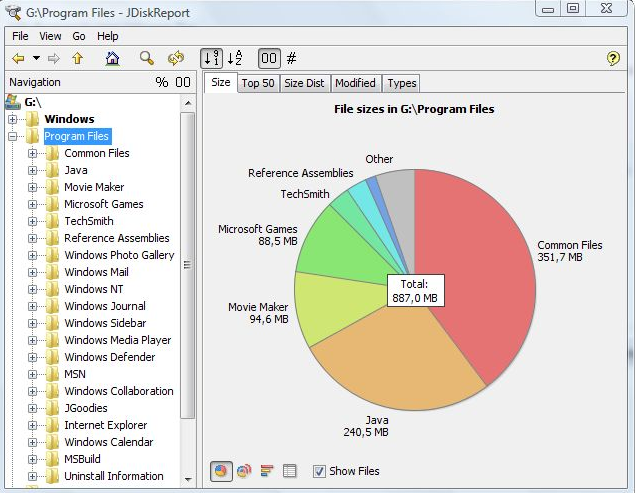
JDiskReport enables you to understand how much space the files and directories consume on your disk drives, and it helps you find obsolete files and folders. The tool analyses your disk drives and collects several statistics which you can view as overview charts and details tables. This is ad-free uncrippled no-charge software that never expires. JDiskReport runs on Windows, Mac, Linux, and other platforms. It requires Java. JDiskReport requires Java. Make sure Java is installed before you install JDiskReport. The tool has been tested on Windows, Mac, and Linux; it runs also on Solaris and other Java-enabled operating systems. A stable preview of JDiskReport 2 is available. This version is rawer than other releases that you have downloaded from JGoodies in the past. It lacks some features (you cannot click in the size pie), but can be run as a cron job (executed in the background), provides more information, and has seen a visual cleanup.
|
|||||
Platforms Supported
Windows
Not Supported
Mac
Supported
Linux
Not Supported
Cloud
Not Supported
On-Premises
Not Supported
iPhone
Not Supported
iPad
Not Supported
Android
Not Supported
Chromebook
Not Supported
|
Platforms Supported
Windows
Supported
Mac
Supported
Linux
Supported
Cloud
Not Supported
On-Premises
Not Supported
iPhone
Not Supported
iPad
Not Supported
Android
Not Supported
Chromebook
Not Supported
|
|||||
Audience
Mac users, software developers, IT professionals, system administrators, and power users who want to understand disk usage, locate large files, investigate application and developer storage, and safely reclaim disk space. Particularly useful for users working with Xcode, Docker, development environments, and local AI models.
|
Audience
Users looking for a solution to see and manage the space that files and directories consume on disk drives
|
|||||
Support
Phone Support
Not Supported
24/7 Live Support
Not Supported
Online
Supported
|
Support
Phone Support
Supported
24/7 Live Support
Not Supported
Online
Supported
|
|||||
API
Offers API
Not Supported
|
API
Offers API
Not Supported
|
|||||
Screenshots and Videos |
Screenshots and Videos |
|||||
Pricing
$0
The free plan is $0 forever. Pro and Family are one-time lifetime purchases; Pro covers one Mac, and Family covers up to five household Macs. Paid plans include a 30-day refund window.
Free Version
Supported
Free Trial
Not Supported
|
Pricing
Free
Free Version
Supported
Free Trial
Not Supported
|
|||||
Reviews/
|
Reviews/
|
|||||
Training
Documentation
Supported
Webinars
Not Supported
Live Online
Supported
In Person
Not Supported
|
Training
Documentation
Supported
Webinars
Not Supported
Live Online
Not Supported
In Person
Supported
|
|||||
Company InformationDiskfern
Founded: 2026
India
diskfern.com
|
Company InformationJGoodies
Germany
www.jgoodies.com/freeware/jdiskreport/
|
|||||
Alternatives |
Alternatives |
|||||
|
|
||||||
|
|
|
|||||
|
|
||||||
|
|
||||||
Categories |
Categories |
|||||
Integrations
Java
Not Supported
|
||||||
|
|
|