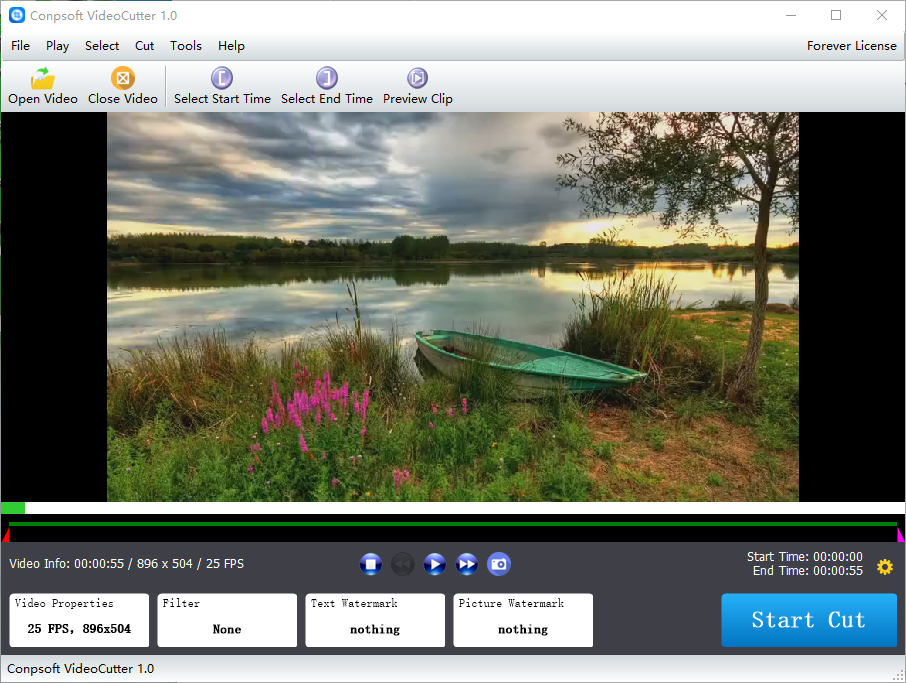
Conpsoft VideoCutter

Conpsoft VideoCutter

Conpsoft Technology
iMovie

iMovie

Apple
+
+

Related Products

  • AI Video Cut
    1 Rating
    Visit Website
  • 3Q
    14 Ratings
    Visit Website
  • LTX
    182 Ratings
    Visit Website
  • Adobe Firefly
    25,029 Ratings
    Visit Website
  • 4K Video Downloader
    12,631 Ratings
    Visit Website
  • Switcher Studio
    21 Ratings
    Visit Website
  • CoachIQ
    41 Ratings
    Visit Website
  • LALAL.AI
    5,230 Ratings
    Visit Website
  • Muzaic
    2 Ratings
    Visit Website
  • 4ALLPORTAL
    78 Ratings
    Visit Website

About

Video cutting software professional video cutting tool, from the original video quickly cut out the video clips you need, original picture quality, fast and convenient.

About

With iMovie for iOS and macOS, you can enjoy your videos like never before. It’s easy to browse your clips and create Hollywood-style trailers and stunning 4K-resolution movies. You can even start editing on iPhone or iPad, then finish on your Mac. Whether you’re using a Mac or an iOS device, it’s never been easier to make it in the movies. Just choose your clips, then add titles, music, and effects. iMovie even supports 4K video for stunning cinema-quality films. And that, ladies and gentlemen, is a wrap. Select from dozens of styles to add beautifully animated titles and credits to your movies. On a Mac, you can easily customize the font, size, formatting, and color of the text. Make action shots more exciting by slowing them down. Let viewers fly through scenes by speeding them up. Or add a broadcast feel to your school report with picture-in-picture and split-screen effects.

Platforms Supported

Windows
Mac
Linux
Cloud
On-Premises
iPhone
iPad
Android
Chromebook

Platforms Supported

Windows
Mac
Linux
Cloud
On-Premises
iPhone
iPad
Android
Chromebook

Audience

Users that need a video cutting tool

Audience

Video editors

Support

Phone Support
24/7 Live Support
Online

Support

Phone Support
24/7 Live Support
Online

API

Offers API

API

Offers API

Screenshots and Videos

Screenshots and Videos

Pricing

$18
Free Version
Free Trial

Pricing

No information available.
Free Version
Free Trial

Reviews/Ratings

Overall 0.0 / 5
ease 0.0 / 5
features 0.0 / 5
design 0.0 / 5
support 0.0 / 5

This software hasn't been reviewed yet. Be the first to provide a review:

Review this Software

Reviews/Ratings

Overall 4.3 / 5
ease 4.6 / 5
features 4.0 / 5
design 4.4 / 5
support 4.3 / 5

Pros & Cons from Real Users

Pros

  • One of the easiest movie editing tools. It is a great stepping stone into more complex softwares. I also love how you can edit movies either on your computer or on the iMovie app.
  • - iMovie is the best application to quickly edit raw videos with basic transitions and cuts. - It is a lightweight software available on both Mac and iPhone. - It has all the necessary features for basic editing. - the rendering time is quite low, and the overall UI feels a lot smoother.
  • - It is the best application for simple and quick video editing. - It has all the basic features like trimming, captions, effects and transitions. - It comes free with Apple devices. - The rendering time of the software is lightening.
  • It's hard to beat a program that's FREE! Not only that, but it has enough functionality to meet most any need for a beginner to medium level movie maker.
  • Comes preinstalled on Mac OS. Easy to use for beginners. Best for editing small videos or just edit a small project that does not have much effects.

Cons

  • There is definitely a learning curve when it comes to knowing how to use the software. But, once you get it down it is quite user friendly.
  • - It did not have any con, but some templates or pre-made presets would be a great add to this software.
  • - iMovie can be used to edit simple video quickly, but it is not suitable for heavy or professional editing.
  • The only con would be that it has to be run on a Mac. But, if you buy a Mac, it's already included :-)
  • I have found no cons in using this and works pretty well for me.

Training

Documentation
Webinars
Live Online
In Person

Training

Documentation
Webinars
Live Online
In Person

Company Information

Conpsoft Technology
Founded: 2019
conpsoft.com

Company Information

Apple
Founded: 1976
United States
www.apple.com/imovie/

Alternatives

Alternatives

MiniTool MovieMaker

MiniTool MovieMaker

MiniTool Software Ltd.
Joyoshare VidiKit

Joyoshare VidiKit

Joyoshare Studio

Categories

Categories

Integrations

Aimersot Video Converter
Emulsio 4
Smartrazor

Integrations

Aimersot Video Converter
Emulsio 4
Smartrazor
Claim Conpsoft VideoCutter and update features and information
Claim iMovie and update features and information