Canvas EnvisionCanvas GFX
|
HyCanvasHyScaler
|
|||||
Related Products
|
||||||
About
From a powerful creator app to hosted solutions and deep integrations with manufacturing tech stacks, Canvas Envision delivers interactive instructional experiences that minimize errors and delays.
The Envision platform is an End-to-end solution for creating, managing, and consuming interactive digital work instructions. Cloud collaboration and document viewing. Available hosted or in your private cloud.
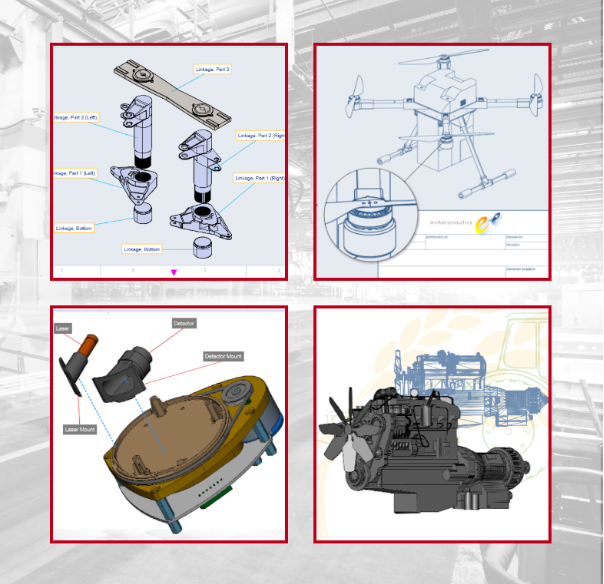
Document viewers will be able to easily access and consume digital instructional content containing precise 2D graphics, narrated animations, and fully interactive embedded 3D models. Interactive digital instructions are proven to drive faster time to task completion, and reduce error count.
- Create end-to-end digital work instruction documents
- Leverage 2D drawing, image editing, and 3D visualization
- Create 3D model animations with text-to-speech narration
- Collaborate with teams on document creation
- Deliver fully interactive instructional experiences
|
About
HyCanvas is a browser-based visual creation platform for making graphics, presentations, videos, whiteboards, documents, spreadsheets, and print designs. Its editor combines drawing, text, templates, media assets, brand kits, and export tools in a shared workspace. Users can build slide decks with presenter controls, edit video on a multitrack timeline, and use whiteboards for brainstorming and workshops. Optional AI tools support presentation generation and design tasks when a workspace connects its own provider credentials. HyCanvas runs as a hosted web service or can be self-hosted, keeping designs on infrastructure managed by the customer. Projects can be exported in common formats or saved in HyCanvas’s documented design-file format for later editing or transfer.
|
|||||
Platforms Supported
Windows
Supported
Mac
Supported
Linux
Not Supported
Cloud
Supported
On-Premises
Not Supported
iPhone
Not Supported
iPad
Not Supported
Android
Not Supported
Chromebook
Not Supported
|
Platforms Supported
Windows
Not Supported
Mac
Not Supported
Linux
Supported
Cloud
Supported
On-Premises
Supported
iPhone
Not Supported
iPad
Not Supported
Android
Not Supported
Chromebook
Not Supported
|
|||||
Audience
Enterprise teams seeking to create and deliver fully interactive digital work instructions
|
Audience
Individuals and teams creating visual content, including designers, marketers, educators, and small organizations.
|
|||||
Support
Phone Support
Supported
24/7 Live Support
Supported
Online
Supported
|
Support
Phone Support
Supported
24/7 Live Support
Not Supported
Online
Supported
|
|||||
API
Offers API
Supported
|
API
Offers API
Supported
|
|||||
Screenshots and Videos |
Screenshots and VideosNo images available
|
|||||
Pricing
No information available.
Free Version
Not Supported
Free Trial
Supported
|
Pricing
$0
The self-hosted edition is free. Hosted use starts free; paid plans add hosting-related capacity and services. Customers provide their own AI-provider credentials and pay any applicable provider charges directly.
Free Version
Supported
Free Trial
Not Supported
|
|||||
Reviews/
|
Reviews/
|
|||||
Training
Documentation
Supported
Webinars
Not Supported
Live Online
Supported
In Person
Supported
|
Training
Documentation
Not Supported
Webinars
Not Supported
Live Online
Not Supported
In Person
Not Supported
|
|||||
Company InformationCanvas GFX
Founded: 1986
United States
www.canvasgfx.com/envision
|
Company InformationHyScaler
Founded: 2010
India
hycanvas.com
|
|||||
Alternatives |
Alternatives |
|||||
|
|
||||||
|
|
||||||
|
|
||||||
|
|
||||||
Categories |
Categories |
|||||
Graphic Design Features
Collaboration
Supported
Data Visualization
Supported
Filtering
Supported
Image Database
Supported
Image Editor
Supported
Templates
Supported
CAD Features
2 1/2-Axis Milling
Not Supported
2D Drawing
Supported
3-Axis Milling
Not Supported
3D Modeling
Supported
4-Axis Milling
Not Supported
5-Axis Milling
Not Supported
Civil
Supported
Collaboration
Supported
Database Connectivity
Not Supported
Design Analysis
Not Supported
Design Export
Supported
Document Management
Supported
Electrical
Supported
Hole Making
Not Supported
Mechanical
Supported
Mechatronics
Supported
Presentation Tools
Supported
Simulate Cycles
Not Supported
Spiral Output
Not Supported
Structural Engineering
Supported
Toolpath Simulation
Not Supported
User Defined Cycles
Not Supported
Collaboration Features
Brainstorming
Not Supported
Calendar Management
Not Supported
Chat / Messaging
Supported
Contact Management
Not Supported
Content Management
Supported
Document Management
Supported
Project Management
Supported
Real Time Editing
Supported
Task Management
Not Supported
Version Control
Not Supported
Video Conferencing
Not Supported
Flowchart Features
Collaboration
Supported
Diagramming
Supported
Drag & Drop
Supported
Organizational Charting
Supported
Process Mapping
Supported
Revision Management
Supported
Templates
Supported
Text to Chart
Supported
Vector Graphics Features
2D Drawing
Supported
Animation
Supported
Data Import / Export
Supported
Drag & Drop
Supported
Image Editor
Supported
Image Tracing
Supported
Rendering
Supported
Templates
Supported
|
||||||
Integrations
Amazon Bedrock
Not Supported
Anthropic
Not Supported
AutoCAD
Supported
CATIA
Supported
Competency.ai
Supported
Creo
Supported
DeepSeek
Not Supported
Gemini
Not Supported
Groq
Not Supported
Mistral AI
Not Supported
|
Integrations
Amazon Bedrock
Supported
Anthropic
Supported
AutoCAD
Not Supported
CATIA
Not Supported
Competency.ai
Not Supported
Creo
Not Supported
DeepSeek
Supported
Gemini
Supported
Groq
Supported
Mistral AI
Supported
|
|||||
|
|
|