Related Products
|
||||||
About
Barcode label maker for Publishing Industry is the finest solution for barcode generation:
Step 1: Download and Install the Publisher Barcode Generator for Windows.
Step 2: Launch the software and choose Quick Barcode Mode or Barcode Designing View Mode.
Step 3 (i): In Quick Barcode Mode, user can choose Linear or 2D Barcode font.
(ii): Enter Barcode, Header and Footer value.
(iii): For multiple barcodes enable Batch Processing from the right side.
Step 3 (a): Choose Barcode Designing View Mode to customize the label with General label properties, label background properties and image processing properties.
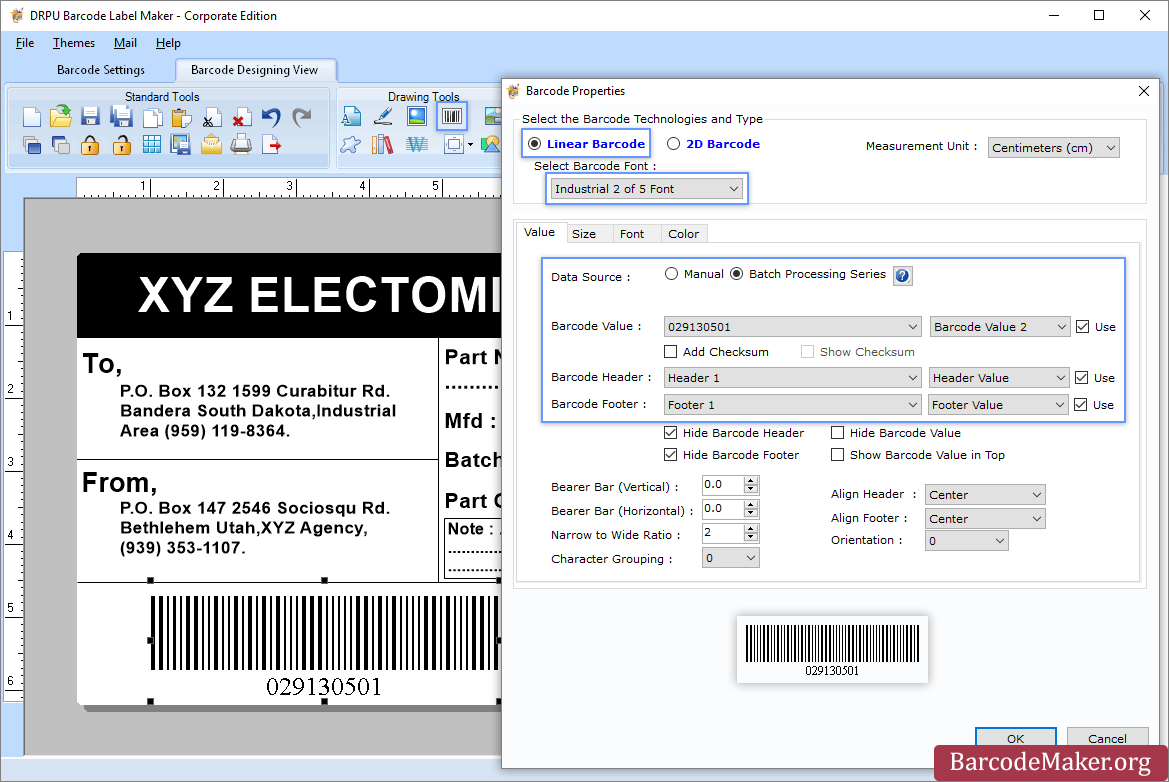
(b): Add Barcode from Drawing Tools tab and go to properties of barcode by double clicking on it.
(c): Now choose Linear or 2D Barcode and also select the barcode font.
(d): Enter the barcode values.
(e): For batch processing, check Batch Processing Series option.
Step 4: Save created barcode labels or tags in a variety of file formats.
|
About
Professional edition of Barcode Label Maker Software generates best quality bulk barcode labels as per your business trade requirements without any expert technical knowledge required. Now with the use of featured program get the barcode images designed and printed by your own on PC in few mouse clicks. All this is possible with the inclusion of Barcode Designing View which uses image designing tools to create any size of label with Barcodes, Text, Shapes, Images shape to get colorful barcode tags, stickers, rolls etc. Specialized and economical solution quickly creates and produce printable barcode images in best quality on your own PC without extra efforts required. Software works with major Linear and 2D barcode fonts to design Trade labels, Retail labels, Ticket labels, Stock labels to fulfill specific business needs. Company Barcode software is used word-wide and provides helping hand for all major commerce areas.
|
|||||
Platforms Supported
Windows
Supported
Mac
Not Supported
Linux
Not Supported
Cloud
Not Supported
On-Premises
Not Supported
iPhone
Not Supported
iPad
Not Supported
Android
Not Supported
Chromebook
Not Supported
|
Platforms Supported
Windows
Supported
Mac
Not Supported
Linux
Not Supported
Cloud
Not Supported
On-Premises
Not Supported
iPhone
Not Supported
iPad
Not Supported
Android
Not Supported
Chromebook
Not Supported
|
|||||
Audience
All types of users, organizations, and industries
|
Audience
Companies that need a barcode label software solution
|
|||||
Support
Phone Support
Not Supported
24/7 Live Support
Supported
Online
Supported
|
Support
Phone Support
Supported
24/7 Live Support
Supported
Online
Supported
|
|||||
API
Offers API
Not Supported
|
API
Offers API
Not Supported
|
|||||
Screenshots and Videos |
Screenshots and Videos |
|||||
Pricing
$50 one-time payment
Free Version
Not Supported
Free Trial
Supported
|
Pricing
$49
Free Version
Not Supported
Free Trial
Supported
|
|||||
Reviews/
|
Reviews/
|
|||||
Training
Documentation
Supported
Webinars
Not Supported
Live Online
Not Supported
In Person
Not Supported
|
Training
Documentation
Supported
Webinars
Not Supported
Live Online
Not Supported
In Person
Not Supported
|
|||||
Company InformationBarcodeMaker.org
India
www.barcodemaker.org
|
Company InformationTrade Label Software
India
www.tradelabelsoftware.com
|
|||||
Alternatives |
Alternatives |
|||||
|
|
||||||
|
|
|
|||||
Categories |
Categories |
|||||
Integrations
No info available.
|
Integrations
No info available.
|
|||||
|
|
|