TFORMer DesignerTEC-IT Datenverarbeitung
|
||||||
Related Products
|
||||||
About
Barcode label maker for Publishing Industry is the finest solution for barcode generation:
Step 1: Download and Install the Publisher Barcode Generator for Windows.
Step 2: Launch the software and choose Quick Barcode Mode or Barcode Designing View Mode.
Step 3 (i): In Quick Barcode Mode, user can choose Linear or 2D Barcode font.
(ii): Enter Barcode, Header and Footer value.
(iii): For multiple barcodes enable Batch Processing from the right side.
Step 3 (a): Choose Barcode Designing View Mode to customize the label with General label properties, label background properties and image processing properties.
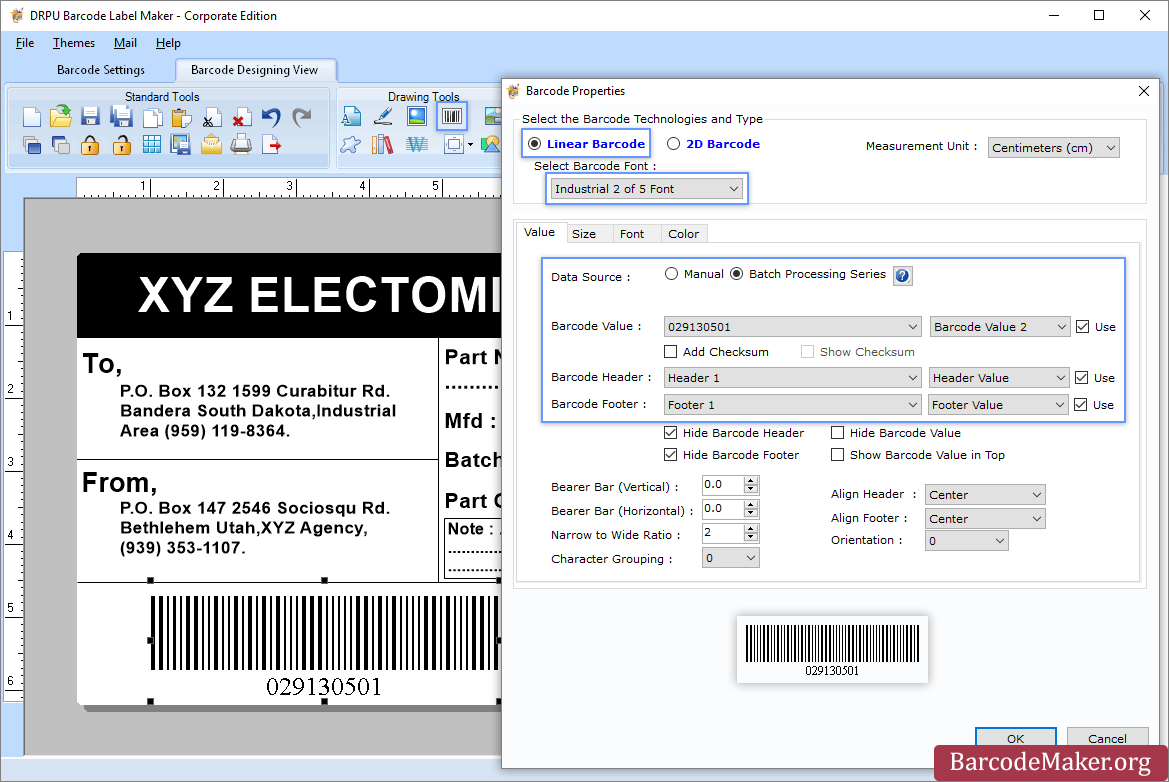
(b): Add Barcode from Drawing Tools tab and go to properties of barcode by double clicking on it.
(c): Now choose Linear or 2D Barcode and also select the barcode font.
(d): Enter the barcode values.
(e): For batch processing, check Batch Processing Series option.
Step 4: Save created barcode labels or tags in a variety of file formats.
|
About
TFORMer Designer is very easy to use. Create labels and forms within seconds! The clear and straight-forward graphical user interface simplifies your work with features like redo/undo, WYSIWYG, advanced text formatting (rich text), preview and output with imported or manually entered data. TFORMer Designer includes a full-featured barcode generator with support for more than 100 barcode symbologies. Special barcode printers or hardware add-ons like barcode SIMMs and barcode DIMMs are not required. Start immediately with ready-to-use labels and industry compliant forms. The included label templates can be used in an instant and eliminate time consuming design efforts completely. Examples: VDA-4902 Labels, AIAG, AMES-T, Galia, Odette, GTL Transport Labels, GS1 Logistics Labels and many more.
|
|||||
Platforms Supported
Windows
Supported
Mac
Not Supported
Linux
Not Supported
Cloud
Not Supported
On-Premises
Not Supported
iPhone
Not Supported
iPad
Not Supported
Android
Not Supported
Chromebook
Not Supported
|
Platforms Supported
Windows
Supported
Mac
Not Supported
Linux
Not Supported
Cloud
Not Supported
On-Premises
Not Supported
iPhone
Not Supported
iPad
Not Supported
Android
Not Supported
Chromebook
Not Supported
|
|||||
Audience
All types of users, organizations, and industries
|
Audience
Label Printing solution for companies
|
|||||
Support
Phone Support
Not Supported
24/7 Live Support
Supported
Online
Supported
|
Support
Phone Support
Supported
24/7 Live Support
Not Supported
Online
Supported
|
|||||
API
Offers API
Not Supported
|
API
Offers API
Not Supported
|
|||||
Screenshots and Videos |
Screenshots and Videos |
|||||
Pricing
$50 one-time payment
Free Version
Not Supported
Free Trial
Supported
|
Pricing
€360 one-time payment
Free Version
Supported
Free Trial
Not Supported
|
|||||
Reviews/
|
Reviews/
|
|||||
Training
Documentation
Supported
Webinars
Not Supported
Live Online
Not Supported
In Person
Not Supported
|
Training
Documentation
Supported
Webinars
Not Supported
Live Online
Supported
In Person
Not Supported
|
|||||
Company InformationBarcodeMaker.org
India
www.barcodemaker.org
|
Company InformationTEC-IT Datenverarbeitung
Founded: 1996
Austria
www.tec-it.com
|
|||||
Alternatives |
Alternatives |
|||||
|
|
|
|||||
|
|
||||||
|
|
||||||
|
|
|
|||||
Categories |
Categories |
|||||
Barcoding Features
Barcode Generation
Supported
Barcode Scanning
Not Supported
Custom Labels
Supported
Inventory Management
Not Supported
Label Templates
Supported
Receiving Labels
Not Supported
RFID
Not Supported
Serial Number Tracking
Not Supported
Shipping Labels
Supported
|
||||||
Integrations
No info available.
|
Integrations
No info available.
|
|||||
|
|
|