| BarcodeMaker.org | OpenLabelMaker | |||||
|---|---|---|---|---|---|---|
Related Products
|
||||||
BarcodeMaker.org:
About
Barcode label maker for Publishing Industry is the finest solution for barcode generation:
Step 1: Download and Install the Publisher Barcode Generator for Windows.
Step 2: Launch the software and choose Quick Barcode Mode or Barcode Designing View Mode.
Step 3 (i): In Quick Barcode Mode, user can choose Linear or 2D Barcode font.
(ii): Enter Barcode, Header and Footer value.
(iii): For multiple barcodes enable Batch Processing from the right side.
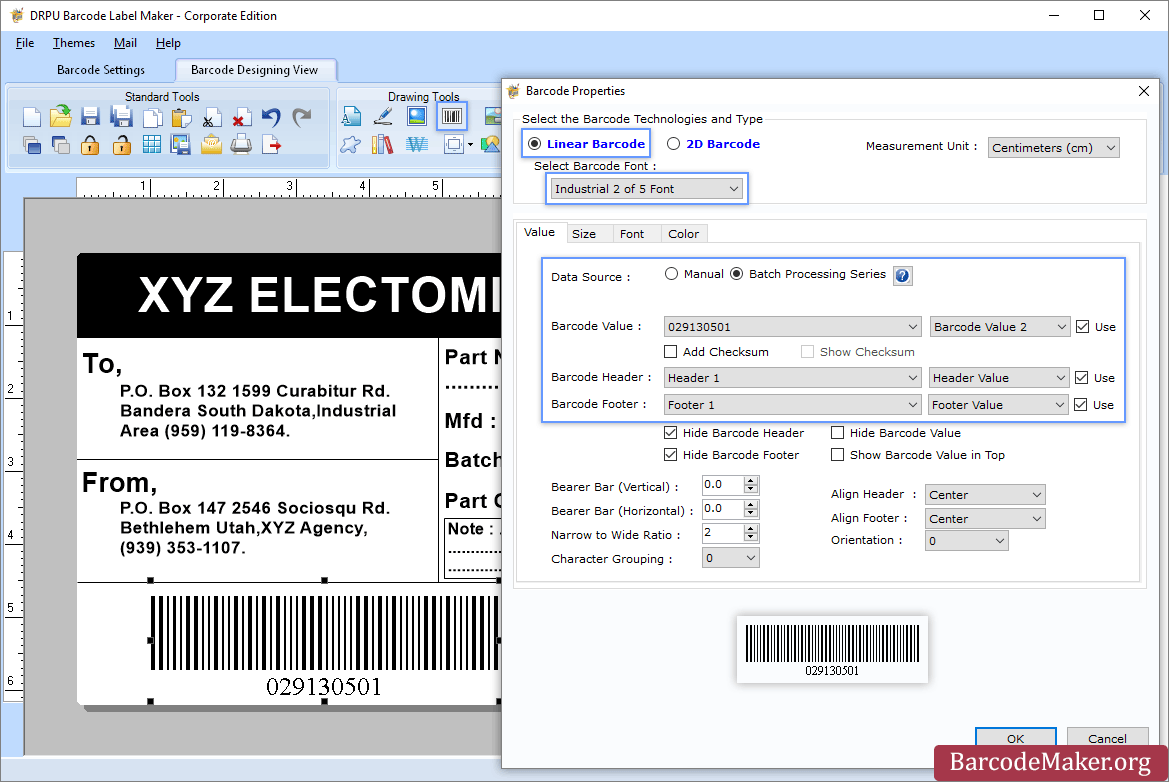
Step 3 (a): Choose Barcode Designing View Mode to customize the label with General label properties, label background properties and image processing properties.
(b): Add Barcode from Drawing Tools tab and go to properties of barcode by double clicking on it.
(c): Now choose Linear or 2D Barcode and also select the barcode font.
(d): Enter the barcode values.
(e): For batch processing, check Batch Processing Series option.
Step 4: Save created barcode labels or tags in a variety of file formats.
|
OpenLabelMaker:
About
OpenLabelMaker is a free online label designer compatible with any printer (DYMO, Brother, Avery, Zebra, Rollo). Design labels with a drag-and-drop editor, generate barcodes and QR codes, and choose from 150+ fonts. Everything runs locally in your browser.
|
|||||
BarcodeMaker.org:
Platforms Supported
Windows
Supported
Mac
Not Supported
Linux
Not Supported
Cloud
Not Supported
On-Premises
Not Supported
iPhone
Not Supported
iPad
Not Supported
Android
Not Supported
Chromebook
Not Supported
|
OpenLabelMaker:
Platforms Supported
Windows
Not Supported
Mac
Not Supported
Linux
Not Supported
Cloud
Supported
On-Premises
Not Supported
iPhone
Not Supported
iPad
Not Supported
Android
Not Supported
Chromebook
Not Supported
|
|||||
BarcodeMaker.org:
Audience
All types of users, organizations, and industries
|
OpenLabelMaker:
Audience
OpenLabelMaker is built for small-business owners, e-commerce sellers, makers, office admins, and home users who need professional-looking labels without installing bloated software or paying for a desktop suite.
|
|||||
BarcodeMaker.org:
Support
Phone Support
Not Supported
24/7 Live Support
Supported
Online
Supported
|
OpenLabelMaker:
Support
Phone Support
Not Supported
24/7 Live Support
Not Supported
Online
Supported
|
|||||
BarcodeMaker.org:
API
Offers API
Not Supported
|
OpenLabelMaker:
API
Offers API
Not Supported
|
|||||
BarcodeMaker.org:
Screenshots and Videos |
OpenLabelMaker:
Screenshots and VideosNo images available
|
|||||
BarcodeMaker.org:
Pricing
$50 one-time payment
Free Version
Not Supported
Free Trial
Supported
|
OpenLabelMaker:
Pricing
$5/month
Free Version
Supported
Free Trial
Supported
|
|||||
BarcodeMaker.org:
Reviews/
|
OpenLabelMaker:
Reviews/
|
|||||
BarcodeMaker.org:
Training
Documentation
Supported
Webinars
Not Supported
Live Online
Not Supported
In Person
Not Supported
|
OpenLabelMaker:
Training
Documentation
Supported
Webinars
Not Supported
Live Online
Not Supported
In Person
Not Supported
|
|||||
BarcodeMaker.org:
Company InformationBarcodeMaker.org
India
www.barcodemaker.org
|
OpenLabelMaker:
Company InformationOpenLabelMaker
Founded: 2026
Netherlands
openlabelmaker.com
|
|||||
BarcodeMaker.org:
Alternatives |
OpenLabelMaker:
Alternatives |
|||||
|
BarcodeMaker.org:
|
OpenLabelMaker:
|
|||||
| BarcodeMaker.org: |
OpenLabelMaker:
|
|||||
| BarcodeMaker.org: |
OpenLabelMaker:
|
|||||
|
BarcodeMaker.org:
|
OpenLabelMaker:
|
|||||
BarcodeMaker.org:
Categories |
OpenLabelMaker:
Categories |
|||||
BarcodeMaker.org:
Integrations
No info available.
|
OpenLabelMaker:
Integrations
No info available.
|
|||||
|
BarcodeMaker.org:
|
OpenLabelMaker:
|