Related Products
|
||||||
About
Barcode label maker for Publishing Industry is the finest solution for barcode generation:
Step 1: Download and Install the Publisher Barcode Generator for Windows.
Step 2: Launch the software and choose Quick Barcode Mode or Barcode Designing View Mode.
Step 3 (i): In Quick Barcode Mode, user can choose Linear or 2D Barcode font.
(ii): Enter Barcode, Header and Footer value.
(iii): For multiple barcodes enable Batch Processing from the right side.
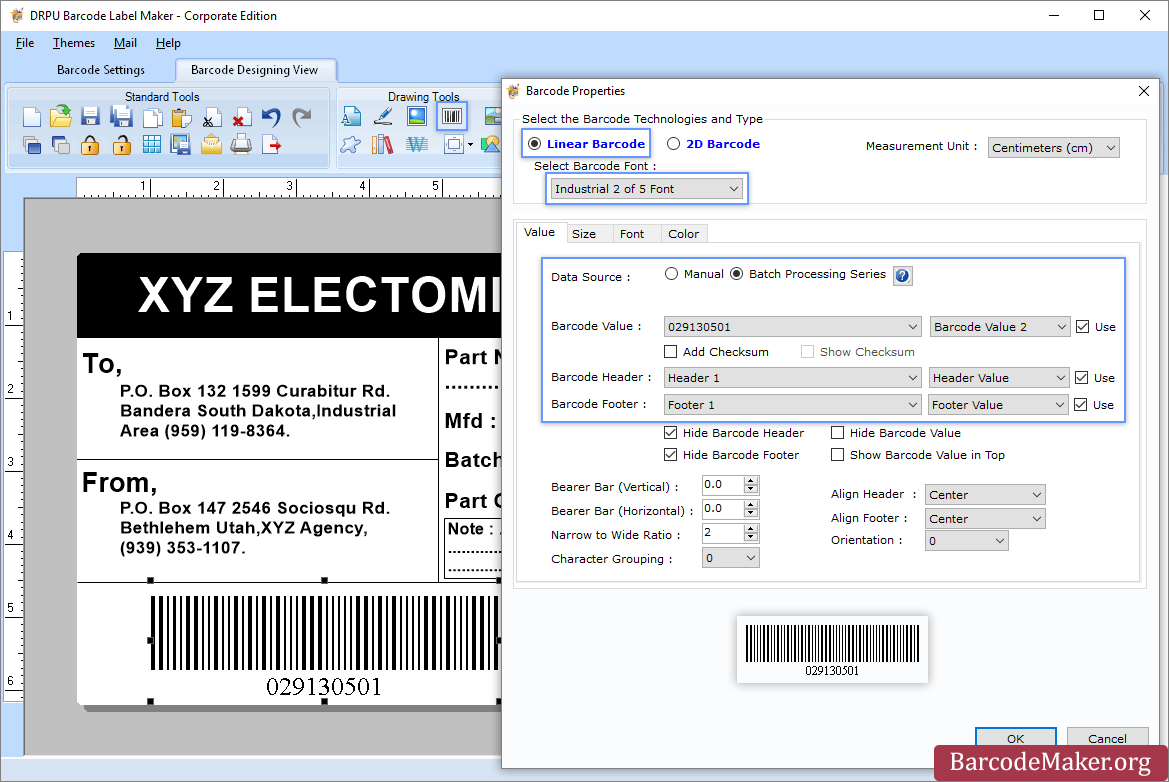
Step 3 (a): Choose Barcode Designing View Mode to customize the label with General label properties, label background properties and image processing properties.
(b): Add Barcode from Drawing Tools tab and go to properties of barcode by double clicking on it.
(c): Now choose Linear or 2D Barcode and also select the barcode font.
(d): Enter the barcode values.
(e): For batch processing, check Batch Processing Series option.
Step 4: Save created barcode labels or tags in a variety of file formats.
|
About
The best Label printing software to automatically generate barcodes and QR codes from any data source with a WYSIWYG interface! With the Labeljoy Barcode software it is possible to create custom barcodes quickly and easily. You just have to import or type a code and then click “OK”. Use the Professional Barcode Printing Software to generate QR Codes offline or online using our QR Code generator tool. With Labeljoy you can generate (25 different types of barcodes) for every commodity sector such as Code 39, Ean13, ITF14, UPC, Code 93, Interleaved 2/5, Codabar and many other types. Alternatively, you can use our online Barcode Generator. Create custom product labels, price tags, or barcode labels for your business by importing codes from external data sources. Labeljoy is a software for creating and printing all kinds of labels for numerous applications, like folders, badges, cards or shipping labels and whenever you need to create printouts containing text, images and barcodes.
|
|||||
Platforms Supported
Windows
Supported
Mac
Not Supported
Linux
Not Supported
Cloud
Not Supported
On-Premises
Not Supported
iPhone
Not Supported
iPad
Not Supported
Android
Not Supported
Chromebook
Not Supported
|
Platforms Supported
Windows
Supported
Mac
Not Supported
Linux
Not Supported
Cloud
Not Supported
On-Premises
Not Supported
iPhone
Not Supported
iPad
Not Supported
Android
Not Supported
Chromebook
Not Supported
|
|||||
Audience
All types of users, organizations, and industries
|
Audience
Companies and businesses seeking a solution to print barcode labels
|
|||||
Support
Phone Support
Not Supported
24/7 Live Support
Supported
Online
Supported
|
Support
Phone Support
Supported
24/7 Live Support
Not Supported
Online
Supported
|
|||||
API
Offers API
Not Supported
|
API
Offers API
Not Supported
|
|||||
Screenshots and Videos |
Screenshots and Videos |
|||||
Pricing
$50 one-time payment
Free Version
Not Supported
Free Trial
Supported
|
Pricing
$39 one-time payment
Free Version
Supported
Free Trial
Supported
|
|||||
Reviews/
|
Reviews/
|
|||||
Training
Documentation
Supported
Webinars
Not Supported
Live Online
Not Supported
In Person
Not Supported
|
Training
Documentation
Supported
Webinars
Not Supported
Live Online
Not Supported
In Person
Supported
|
|||||
Company InformationBarcodeMaker.org
India
www.barcodemaker.org
|
Company InformationLabelJoy
Italy
www.labeljoy.com
|
|||||
Alternatives |
Alternatives |
|||||
|
|
|
|||||
|
|
||||||
|
|
||||||
|
|
|
|||||
Categories |
Categories |
|||||
Barcoding Features
Barcode Generation
Supported
Barcode Scanning
Not Supported
Custom Labels
Supported
Inventory Management
Not Supported
Label Templates
Supported
Receiving Labels
Not Supported
RFID
Not Supported
Serial Number Tracking
Not Supported
Shipping Labels
Supported
|
||||||
Integrations
No info available.
|
Integrations
No info available.
|
|||||
|
|
|