Barcode GeneratorInsight Works
|
||||||
Related Products
|
||||||
About
Barcode label maker for Publishing Industry is the finest solution for barcode generation:
Step 1: Download and Install the Publisher Barcode Generator for Windows.
Step 2: Launch the software and choose Quick Barcode Mode or Barcode Designing View Mode.
Step 3 (i): In Quick Barcode Mode, user can choose Linear or 2D Barcode font.
(ii): Enter Barcode, Header and Footer value.
(iii): For multiple barcodes enable Batch Processing from the right side.
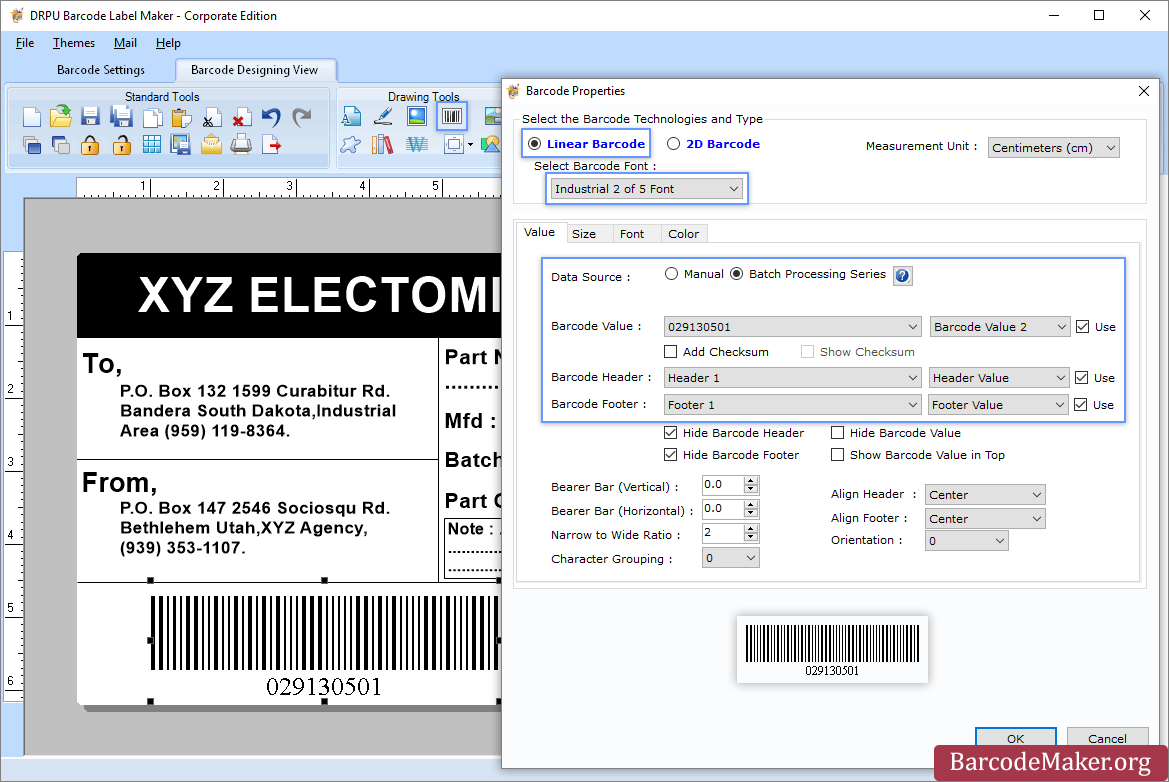
Step 3 (a): Choose Barcode Designing View Mode to customize the label with General label properties, label background properties and image processing properties.
(b): Add Barcode from Drawing Tools tab and go to properties of barcode by double clicking on it.
(c): Now choose Linear or 2D Barcode and also select the barcode font.
(d): Enter the barcode values.
(e): For batch processing, check Batch Processing Series option.
Step 4: Save created barcode labels or tags in a variety of file formats.
|
About
Insight Works’ Barcode Generator PowerTool for Business Central empowers businesses to integrate 1D and 2D barcodes into their reports, fostering efficiency and interoperability with existing hardware and third-party applications. The app is designed for technically proficient users. It offers sample layouts, custom reporting capabilities, and the flexibility to enhance documents such as invoices, warehouse receipts, production orders, and more with various barcode formats.
- 1D and 2D Barcode Support: Add linear and Data Matrix barcodes to reports for efficient data processing.
- Wide Barcode Compatibility: Supports formats including QR Code, Code 128, GS1-128, and more, ensuring interoperability with hardware and apps.
- Customizable Reporting: Modify or create reports like invoices and production orders to include barcodes tailored to your needs.
- Warehouse Optimization: Streamlines stock tracking and inventory management when paired with WMS Express or Warehouse Insigh
|
|||||
Platforms Supported
Windows
Supported
Mac
Not Supported
Linux
Not Supported
Cloud
Not Supported
On-Premises
Not Supported
iPhone
Not Supported
iPad
Not Supported
Android
Not Supported
Chromebook
Not Supported
|
Platforms Supported
Windows
Supported
Mac
Not Supported
Linux
Not Supported
Cloud
Supported
On-Premises
Not Supported
iPhone
Not Supported
iPad
Not Supported
Android
Not Supported
Chromebook
Not Supported
|
|||||
Audience
All types of users, organizations, and industries
|
Audience
Organizations that use Dynamics 365 Business central and need a barcode solution
|
|||||
Support
Phone Support
Not Supported
24/7 Live Support
Supported
Online
Supported
|
Support
Phone Support
Not Supported
24/7 Live Support
Not Supported
Online
Supported
|
|||||
API
Offers API
Not Supported
|
API
Offers API
Not Supported
|
|||||
Screenshots and Videos |
Screenshots and Videos |
|||||
Pricing
$50 one-time payment
Free Version
Not Supported
Free Trial
Supported
|
Pricing
Free
Barcode Generator is a free app for Dynamics 365 Business Central.
Free Version
Supported
Free Trial
Supported
|
|||||
Reviews/
|
Reviews/
|
|||||
Training
Documentation
Supported
Webinars
Not Supported
Live Online
Not Supported
In Person
Not Supported
|
Training
Documentation
Supported
Webinars
Not Supported
Live Online
Not Supported
In Person
Not Supported
|
|||||
Company InformationBarcodeMaker.org
India
www.barcodemaker.org
|
Company InformationInsight Works
Founded: 2008
Canada
www.dmsiworks.com
|
|||||
Alternatives |
Alternatives |
|||||
|
|
||||||
|
|
||||||
|
|
||||||
|
|
||||||
Categories |
Categories |
|||||
Barcoding Features
Barcode Generation
Supported
Barcode Scanning
Supported
Custom Labels
Not Supported
Inventory Management
Not Supported
Label Templates
Not Supported
Receiving Labels
Not Supported
RFID
Not Supported
Serial Number Tracking
Not Supported
Shipping Labels
Not Supported
|
||||||
Integrations
Microsoft Dynamics 365 Business Central
Not Supported
|
||||||
|
|
|