CodeREADrSkycore
|
||||||
Related Products
|
||||||
About
Barcode label maker for Publishing Industry is the finest solution for barcode generation:
Step 1: Download and Install the Publisher Barcode Generator for Windows.
Step 2: Launch the software and choose Quick Barcode Mode or Barcode Designing View Mode.
Step 3 (i): In Quick Barcode Mode, user can choose Linear or 2D Barcode font.
(ii): Enter Barcode, Header and Footer value.
(iii): For multiple barcodes enable Batch Processing from the right side.
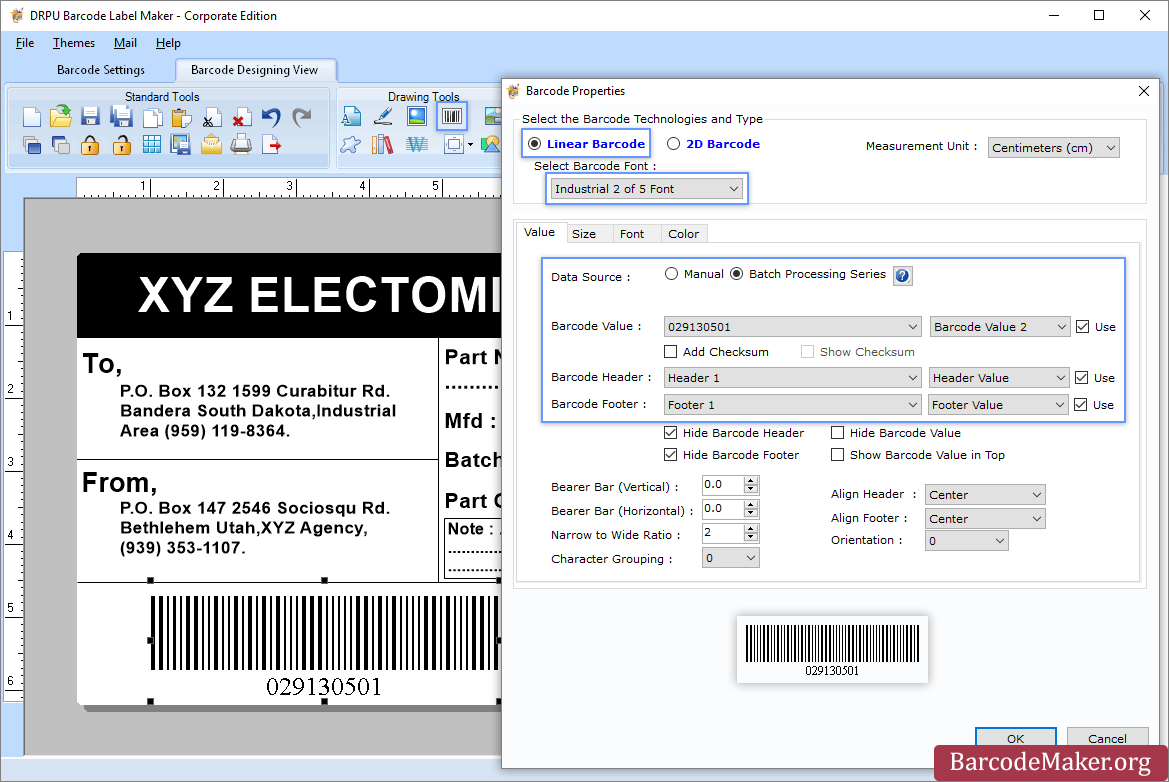
Step 3 (a): Choose Barcode Designing View Mode to customize the label with General label properties, label background properties and image processing properties.
(b): Add Barcode from Drawing Tools tab and go to properties of barcode by double clicking on it.
(c): Now choose Linear or 2D Barcode and also select the barcode font.
(d): Enter the barcode values.
(e): For batch processing, check Batch Processing Series option.
Step 4: Save created barcode labels or tags in a variety of file formats.
|
About
The barcode scanner app can be installed on smartphones, tablets or rugged mobile computers to scan barcodes, collect data and upload that data to a database. The cloud-based barcode system is used to centrally manage app users, configure data collection workflows for your barcode scanning devices, and store, organize, export and integrate your barcode scan data with your other business systems. The app will scan barcodes effortlessly. You can also validate scans against an existing database. The scan data can be sent to the cloud where you can export in a CSV format, or with the API. The scans can also be sent directly to your server. The app works with smartphones, tablets, scan sleds, and Android-based mobile computers. Scan barcodes with the built-in camera, a hardware imager or a Bluetooth-connected barcode scanner accessory.
|
|||||
Platforms Supported
Windows
Supported
Mac
Not Supported
Linux
Not Supported
Cloud
Not Supported
On-Premises
Not Supported
iPhone
Not Supported
iPad
Not Supported
Android
Not Supported
Chromebook
Not Supported
|
Platforms Supported
Windows
Not Supported
Mac
Not Supported
Linux
Not Supported
Cloud
Supported
On-Premises
Not Supported
iPhone
Supported
iPad
Supported
Android
Supported
Chromebook
Not Supported
|
|||||
Audience
All types of users, organizations, and industries
|
Audience
Anyone in need of a barcode scanning system
|
|||||
Support
Phone Support
Not Supported
24/7 Live Support
Supported
Online
Supported
|
Support
Phone Support
Supported
24/7 Live Support
Not Supported
Online
Supported
|
|||||
API
Offers API
Not Supported
|
API
Offers API
Supported
|
|||||
Screenshots and Videos |
Screenshots and Videos |
|||||
Pricing
$50 one-time payment
Free Version
Not Supported
Free Trial
Supported
|
Pricing
$14.99 per month
Free Version
Supported
Free Trial
Supported
|
|||||
Reviews/
|
Reviews/
|
|||||
Training
Documentation
Supported
Webinars
Not Supported
Live Online
Not Supported
In Person
Not Supported
|
Training
Documentation
Supported
Webinars
Not Supported
Live Online
Not Supported
In Person
Not Supported
|
|||||
Company InformationBarcodeMaker.org
India
www.barcodemaker.org
|
Company InformationSkycore
United States
www.codereadr.com
|
|||||
Alternatives |
Alternatives |
|||||
|
|
|
|||||
|
|
||||||
|
|
|
|||||
Categories |
Categories |
|||||
Barcoding Features
Barcode Generation
Supported
Barcode Scanning
Supported
Custom Labels
Not Supported
Inventory Management
Supported
Label Templates
Not Supported
Receiving Labels
Not Supported
RFID
Supported
Serial Number Tracking
Supported
Shipping Labels
Not Supported
|
||||||
Integrations
Axis LMS
Not Supported
PassKit
Not Supported
Wufoo
Not Supported
Zapier
Not Supported
|
Integrations
Axis LMS
Supported
PassKit
Supported
Wufoo
Supported
Zapier
Supported
|
|||||
|
|
|