Arc Search

Arc Search

The Browser Company
+
+
Visit Website

About

Arc Search is the modern, fast, and AI-enabled mobile browsing experience you’ve been waiting for. Features of Arc Search: - Auto-up keyboard to start searching with fewer taps - Always-on ad, tracker, and banner blocking - Browse for Me to summarize many webpages at once and find answers faster - Auto-archive inactive tabs to keep things tidy - Reader mode to minimize distractions

About

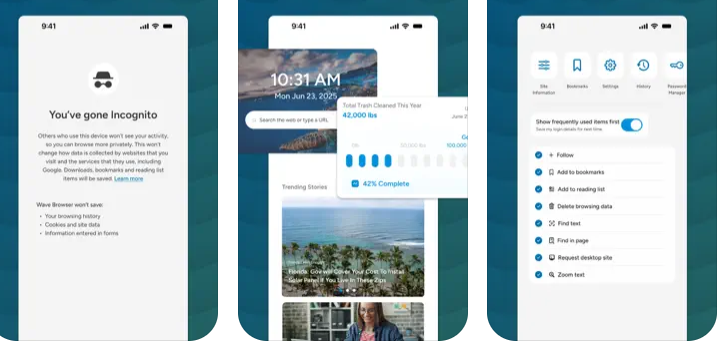
Wave Browser is an efficient, eco-conscious browser that creates a cleaner, more organized, and more meaningful online experience while helping remove ocean plastic through its partnership with 4ocean. Built on the trusted Chromium foundation, Wave Browser brings essential tools directly into the browser so you can work, study, and explore without extra extensions or switching apps. The sidebar keeps your favorite tools within reach, and split view lets you work across two pages at once for effortless research and multitasking. Wave Browser brings together helpful built-in tools that make everyday browsing simpler, keeping you organized, speeding up tasks, and supporting your workflow with features like reading tools, trackers, quick-access messaging, and an AI assistant. If you want efficient built-in tools and a simple way to make a positive impact, Wave Browser aligns with your values. Surf the web. Save the ocean. Make every tab count.

Platforms Supported

Windows
Mac
Linux
Cloud
On-Premises
iPhone
iPad
Android
Chromebook

Platforms Supported

Windows
Mac
Linux
Cloud
On-Premises
iPhone
iPad
Android
Chromebook

Audience

iPhone users interested in an AI-enabled mobile browsing experience

Audience

Individuals interested in a web browser optimized for speed, productivity and environmental impact

Support

Phone Support
24/7 Live Support
Online

Support

Phone Support
24/7 Live Support
Online

API

Offers API

API

Offers API

Screenshots and Videos

Screenshots and Videos

Pricing

Free
Free Version
Free Trial

Pricing

Free
Wave Browser is completely free to use.
Free Version
Free Trial

Reviews/Ratings

Overall 5.0 / 5
ease 5.0 / 5
features 5.0 / 5
design 3.0 / 5
support 3.0 / 5

Reviews/Ratings

Overall 4.9 / 5
ease 5.0 / 5
features 4.9 / 5
design 4.8 / 5
support 4.9 / 5

Pros & Cons from Real Users

Pros

  • Arc Search is one of the newest and most innovative browsers designed to change the way people explore the internet. Instead of bombarding users with dozens of tabs, pop-ups, and ads, Arc Search focuses on speed, simplicity, and artificial intelligence. It’s not just a search tool — it’s a smarter way to browse that saves time, reduces clutter, and makes information easier to understand. 1. Clean, Minimal, and Distraction-Free Interface One of the biggest pros of Arc Search is its design philosophy. The browser opens directly to a search bar, encouraging you to type what you need right away — no messy homepages, no endless icons. The interface is minimalistic and visually calm, helping you stay focused on what actually matters: the content. Its “reader mode” automatically clears ads and pop-ups from pages, letting you read without distractions. It also has a built-in system that automatically archives old tabs, preventing that chaotic tab overload most browsers suffer from. For students, entrepreneurs, and busy professionals, this means a more organized, stress-free experience online. 2. AI-Powered Search and Summarization Arc Search’s standout feature is its artificial intelligence. Instead of showing a list of random websites like traditional browsers, it can automatically read multiple sources and summarize the key information for you. This feature, called “Browse for Me,” basically builds an entire mini-webpage of answers based on your query. For example, if you search for “how to start a clothing business,” Arc Search doesn’t just show links — it gives you a structured summary with tips, steps, and examples. This saves tons of time for students doing research or entrepreneurs analyzing ideas. It’s like having a personal assistant who does the reading for you. 3. Built-in Privacy and Ad Blocking Privacy is another huge advantage. Arc Search comes with automatic ad and tracker blocking, meaning websites can’t easily follow you or collect unnecessary data. This not only makes browsing faster but also safer and less annoying. By removing trackers and pop-ups, Arc Search offers smoother performance and longer battery life on mobile devices. The emphasis on privacy makes it ideal for anyone who values control over their data — whether you’re researching business ideas, handling school projects, or just tired of creepy personalized ads. 4. Speed, Efficiency, and Flow Arc Search is all about efficiency. It eliminates the need to open multiple tabs, compare sources manually, or waste time digging through search results. The AI summarizes everything instantly, so you can find the right answer in seconds. This focus on speed helps maintain your “flow state,” especially when you’re multitasking or brainstorming ideas. The browser’s simple layout and fast loading times make it ideal for people who need quick answers without distractions — perfect for entrepreneurs or students juggling multiple tasks. 5. Modern Design and Forward-Thinking Vision Beyond features, Arc Search represents a new mindset in web browsing. It feels modern, fresh, and creative — a total contrast to the old, bloated browsers we’ve all been using for years. The developers behind it are actively experimenting with new ideas like AI-driven interfaces, adaptive color themes, and built-in productivity tools. For younger users and innovators, this futuristic vibe can be inspiring. It’s not just a browser; it’s a tool that feels like it belongs in the future — something that aligns with people who love tech, design, and entrepreneurship. Conclusion Arc Search stands out because it changes how we interact with information online. Its minimalist design, built-in privacy, AI-powered search summaries, and overall speed make it one of the most refreshing tools in today’s digital world. It’s especially powerful for students, creators, and entrepreneurs who need to gather information quickly and stay organized. While it’s still new and developing, the vision behind Arc Search is clear — to make browsing smarter, faster, and more human.

Cons

  • Lacks features, weak sync, bugs, not fully stable yet.

Pros from Real Users

Pros

  • How could anyone not love Wave Browser? I use it for all of my daily browsing and I honestly don't think I can use any other browser.
  • My favorite thing about the Wave Browser is that it has a mission to help the planet by removing trash from the ocean every time that I search. In addition to that, the browser loads quickly and is easy to navigate. Another favorite feature of mine is that it allows me to track my packages from Amazon right from the browser.
  • I have been using the wave browser for over a year, and I am genuinely impressed by its features-especially the multi-split view, Notes and built in assistant. I use it in both desktop and mobile, and it performs exceptionally well in both.
  • This is one of the best browsers available on the market. I am able to browse the internet without any advertisements, thanks to the built-in ad blocker. It automatically blocks all ads and pop-ups, which saves me a lot of time. The browser also has AI integration that helps me get answers with just one click. Additionally, I can access all my social media accounts in one place.
  • It's a very interesting browser that has no usage restrictions. I like it because I can use it on my computer without complications, and when I travel to other countries I use it without problems. I like its interface and the short learning curve for being able to use it.
  • I love the friendliness of the features of Wave Browser. It is an exceptional browser that has a remarkable customer support team.
  • To be honest, Wave Browser is not different from other web browsers so it is easy to use as others, it allows screen capture and I'm impressed of its translator which supports multiple languages and it's faster compared to any other tool,
  • I am impressed by Wave Browser because it is a reliable and secure browser that meet our expectations. Secondly, Wave Browser is an easy to use browser.
  • I like the following. 1. It's ability to allow private browsing makes it effective and reliable. 2. It's highly customizable making it secure. 3. It's history management is excellent, clear and reliable.
  • Wave Browser is safe, you can easily find the saved page, share the page and take screenshots directly from it. It also allows you to copy and paste links/URLs and run them

Training

Documentation
Webinars
Live Online
In Person

Training

Documentation
Webinars
Live Online
In Person

Company Information

The Browser Company
Founded: 2019
United States
arc.net

Company Information

Wave Browser
Cayman Islands
wavebrowser.co

Alternatives

Alternatives

Opera Air

Opera Air

Opera
Brave Browser

Brave Browser

Brave Software
Brave Browser

Brave Browser

Brave Software
Opera Air

Opera Air

Opera
Opera One

Opera One

Opera Software
Opera One

Opera One

Opera Software

Categories

Categories

Wave Browser includes a powerful, free built-in ad blocker that removes intrusive ads, pop-ups, and hidden trackers to create a faster, cleaner, and safer browsing experience. By stopping most unwanted scripts before they load, Wave Browser improves page speed and reduces the risk of malicious activity. Its thoughtful design and smooth interface make browsing feel effortless, while privacy features and security protections help keep your browsing safe. Wave Browser is built to help you move confidently across the web with less noise and greater control.

Wave Browser is built for productivity, combining essential tools with a clean, uncluttered design that helps you stay focused throughout your day. With features like a reading list, bookmarks, price tracking, package tracking, and a versatile converter tool, Wave Browser keeps everything organized without the need for extra apps. The convenient sidebar gives you quick access to tools and apps, while split view lets you work across two pages at once, perfect for studying, researching, comparing, or multitasking efficiently. Wave’s smooth interface creates a workspace that feels natural and streamlined, making it easier to move between tasks. And because each user contributes to verified ocean cleanup, your productivity has purpose, turning everyday browsing into real-world impact.

Wave Browser is an efficient, modern web browser built on Chromium and designed for clarity, safety, and productivity. Its built-in tools and extensions help you work, study, and game with ease, while privacy features and strong security protections keep your browsing safe. Wave’s clean, ocean-inspired interface feels intuitive and comfortable for everyday use. Whether you're researching, creating, or exploring the web, Wave Browser delivers fast, reliable performance in a streamlined experience that stays out of your way. And because every user supports verified ocean cleanup, Wave becomes more than just a browser, it turns each session into a meaningful contribution toward a cleaner planet.

Integrations

Amazon
Chromium
Facebook Messenger
Instagram
JavaScript
WhatsApp

Integrations

Amazon
Chromium
Facebook Messenger
Instagram
JavaScript
WhatsApp
Claim Arc Search and update features and information