
 Download Latest Version
UML-SYSML-with-TRAK.zip (1.9 MB)
Download Latest Version
UML-SYSML-with-TRAK.zip (1.9 MB)

Get an email when there's a new version of umlsysmlwithtrak
| Name | Modified | Size | Downloads / Week |
|---|---|---|---|
| revisions.md | 2025-12-03 | 2.2 kB | |
| readme.md | 2025-12-03 | 12.4 kB | |
| license.txt | 2025-12-03 | 2.0 kB | |
| UML-SYSML-with-TRAK.zip | 2025-12-03 | 1.9 MB | |
| Totals: 4 Items | 1.9 MB | 1 |
The UML / SysML for TRAK project provides UML profiles that enable you to incorporate some TRAK statements into standard UML and SysML diagrams.
TRAK statements are formed from node - connector - node triples and read like sentences e.g. 'Contract governs System' or 'Claim about Software'.
The UML profiles provide additional TRAK node and connector elements to
For example, in a standard Use Case Diagram an Actor can be replaced by a TRAK Resource (Job, Organisation, Physical, Role, Software or System) element.
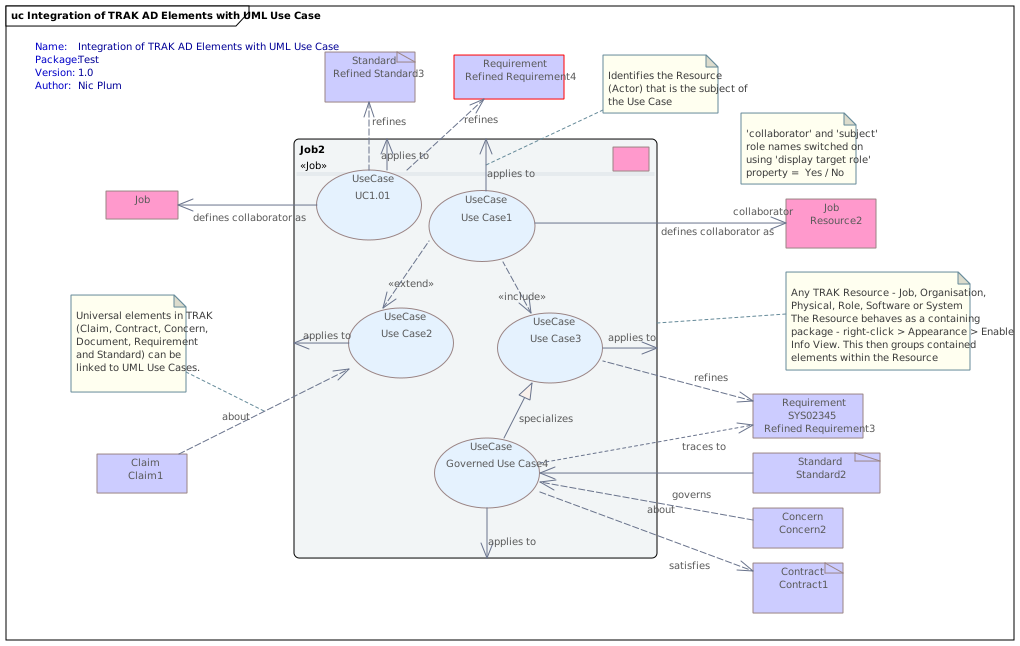
Replacing Actor reduces the typical fragmentation in a SysML or UML model where you have multiple model elements (Actor, Class, Component, Swimlane ... ) representing the same real world entity which introduces potential inconsistencies and frustrates repository-wide queries.
The umlsysmlwithtrak project provides:-
- UML_SYSML_TRAK_MDG.xml file is a compiled MDG plugin for Sparx Systems Enterprise Architect UML modelling tool. It provides the node and connector stereotypes to create UML / SysML diagrams, custom searches, model views and toolboxes.
- bare UML profiles for any UML modelling tool
- UML_TRAK.xml
- SysML_TRAK.xml
Context
Dependencies
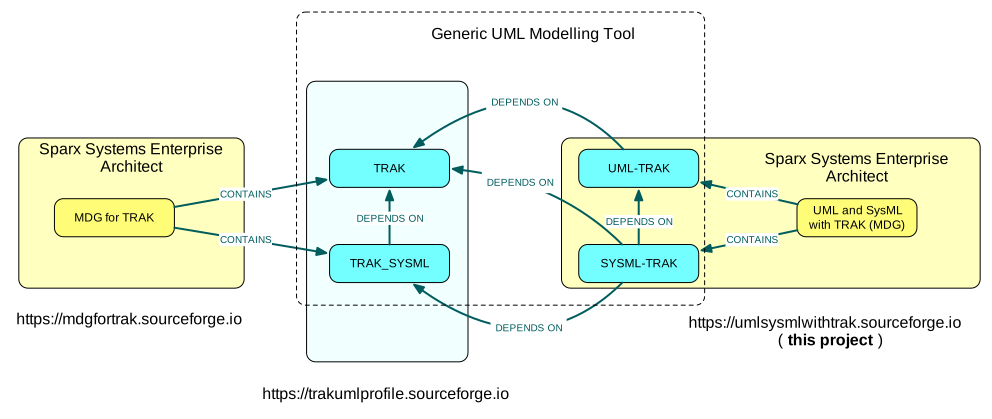
The UML/SysML with TRAK extends two existing UML profiles:-
- the UML profile for TRAK (TRAK) and
- the UML profile for SysML for TRAK (TRAK_SYSML)
- the SysML extends the respective UML (SysML is not an independent language until v2 and later)
For Sparx Systems Enterprise Architect therefore download and install the MDG for TRAK from the mdgfortrak SourceForge project site - https://sf.net/p/mdgfortrak . Each MDG includes the UML profiles for both the UML and the SysML i.e. 2 MDG files in total.
For other UML tools the UML profiles implementing TRAK in the UML and the SysML can be downloaded from the trakumlprofile SourceForge project site - https://sf.net/p/trakumlprofile . Using bare UML profiles there are then 4 files in total - 2 from the trakumlprofile project and 2 from this project.
Features
MDG
The UML / SysML with TRAK MDG provides :-
- custom UML / SysML Class, Use Case and State Diagrams
- custom toolboxes with additional relationships and also TRAK elements for annotation
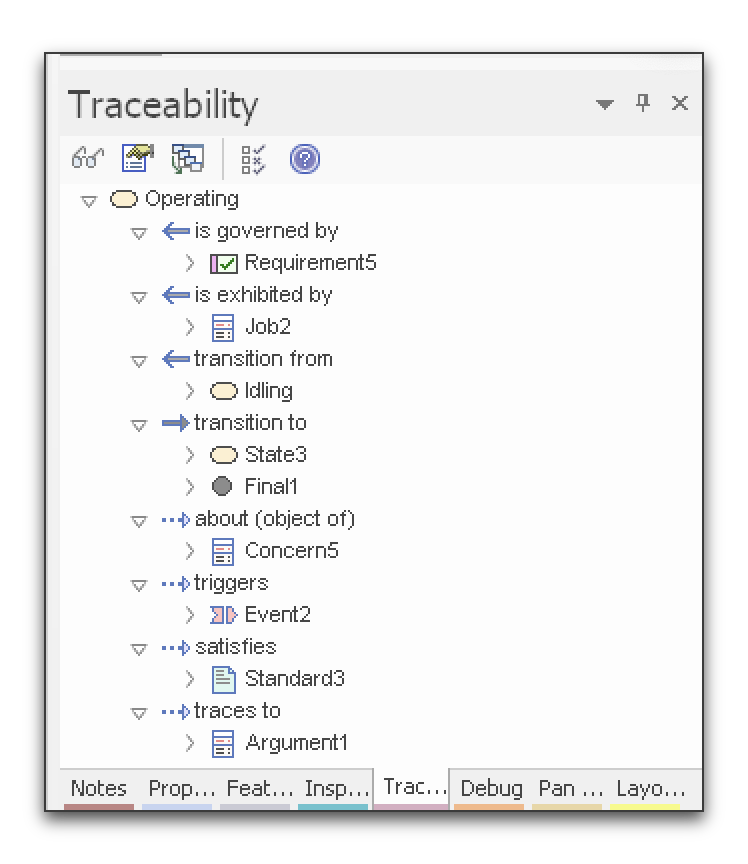
- customised / clear labels in the Traceability pane (rather than 'Association, Realization, Dependency,...')
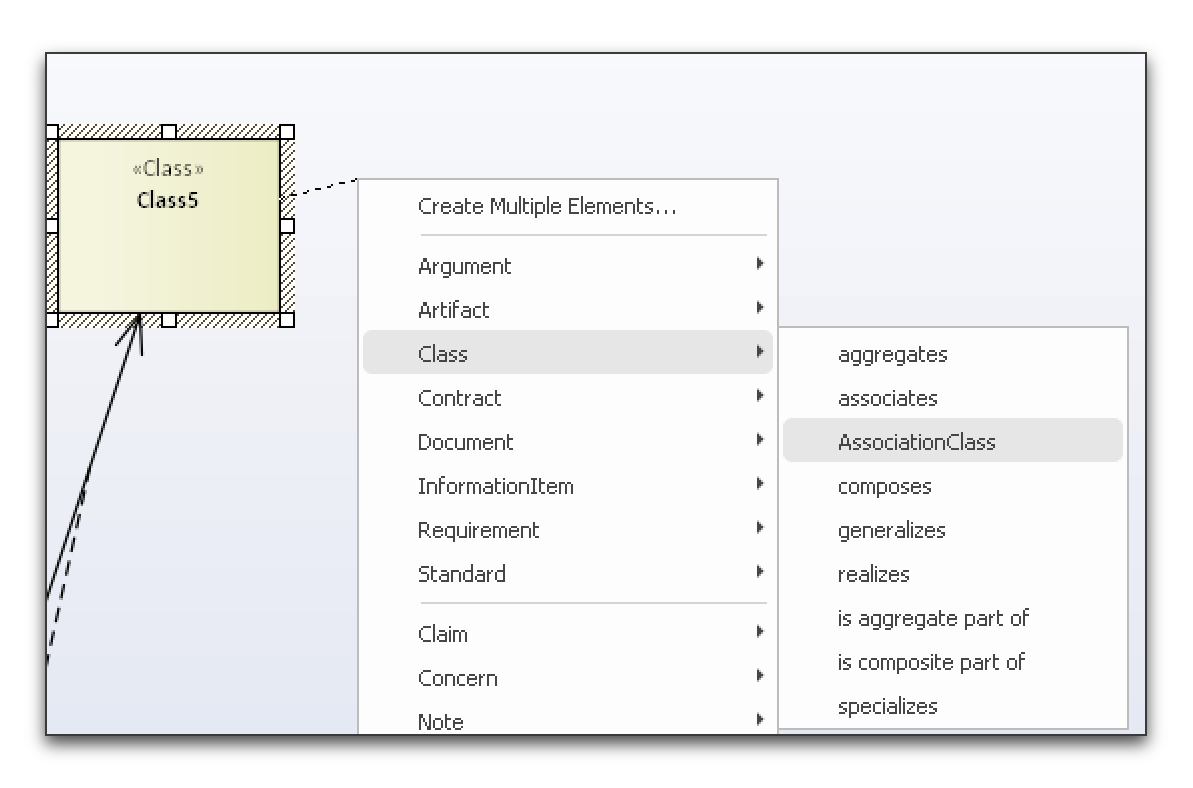
- customised Quicklink suggestions of valid links + element creation based on the selected element
- additional searches for repository management, analysis and potential error-trapping
- Model Views listing elements in the repository, with possible errors, ...
Bare Profiles
The bare UML / SysML profiles provide the extended UML /SysML elements and additional node and connector elements needed to add to UML / SysML Class, Use Case and State Diagrams.
This Release
Initial release 3rd December 2025.
The MDG for Sparx Systems Enterprise Architect includes:-
Cusomised Diagrams
- UML Class Diagram
- UML and SysML State Machine Diagram
- UML and SysML Use Case Diagram
Searches
- All States
- All Use Cases
- Use Cases vs Subject and Collaborating Resources
- All Association Classes
- All Auxiliary Classes
- All Classes
- All Enumerated Values
- All Enumerations
- All Focus Classes
- All Implementation Classes
- All Information Items
- All Interfaces (Provided and Required)
- All Ports
- All Realization Classes
- All Signals
- All Specification Classes
- All Type Classes
- All Utility Classes
- Analysis - Attributes with Enumerated Values
- Analysis - Information Flows
- Analysis - Requirements refined by Use Cases
- Analysis - Resources Exhibiting States
- Quality - Requirements Not Refined by Any Use Case
- Quality - Resources not exhibiting any State
- Quality - Use Cases Not Applied To Resources
- Quality - Use Cases with No Collaborating or Subject Resource
- States NOT exhibited by any Resource
- Use Cases applied to Subject Resources
Model Views
- Analysis
- Attributes with Enumerated Values
- Requirements refined by Use Cases
- Resources exhibiting States
- Use Cases with subject or collaborating Resources
- Quality Control
- Requirements not refined by any Use Case
- Resources not exhibiting any State
- States not exhibited by any Resource
- Use Cases with no collaborating or subject Resource
- Repository Contents
- All Association Classes
- All Auxilliary Classes
- All Classes
- All Enumerated Values
- All Enumerations
- All Focus Classes
- All Implementation Classes
- All Interfaces - Provided and Required
- All Ports
- All Realization Classes
- All Signals
- All Specification Classes
- All Type Classes
- All Use cases
- All Utility Classes
Bare Profiles:
The bare profiles contain the specialised node and connector elements used to create UML / SysML Use Case Diagrams, UML / SysML State Machine Diagrams and UML Class Diagrams.
- UML_TRAK_2025_12_03.xml
- SYSML_TRAK_2025_12_03.xml
Installation
The UML profiles extend existing TRAK profiles. You therefore need to install them for the UML / SysML with TRAK profiles to work.
- Sparx Enterprise Architect - download the MDG for TRAK - see https://sf.net/p/mdgfortrak
- other UML tools - download the UML SysML profile (TRAK_xxx.xml) and SysML profile (TRAK_SYSML.xml) for TRAK - see https://sf.net/p/trakumlprofile
Sparx Systems Enterprise Architect
Create a folder. Tell Enterprise Architect to look in this folder for plugins using Specialize | Manage Technology then clicking on Advanced and then on Add (path).
If adding an updated version you need to uncheck (disable) then check (enable) the TRAK and the TRAK-UML technologoes and then refresh All Perspectives - or quit and restart EA.
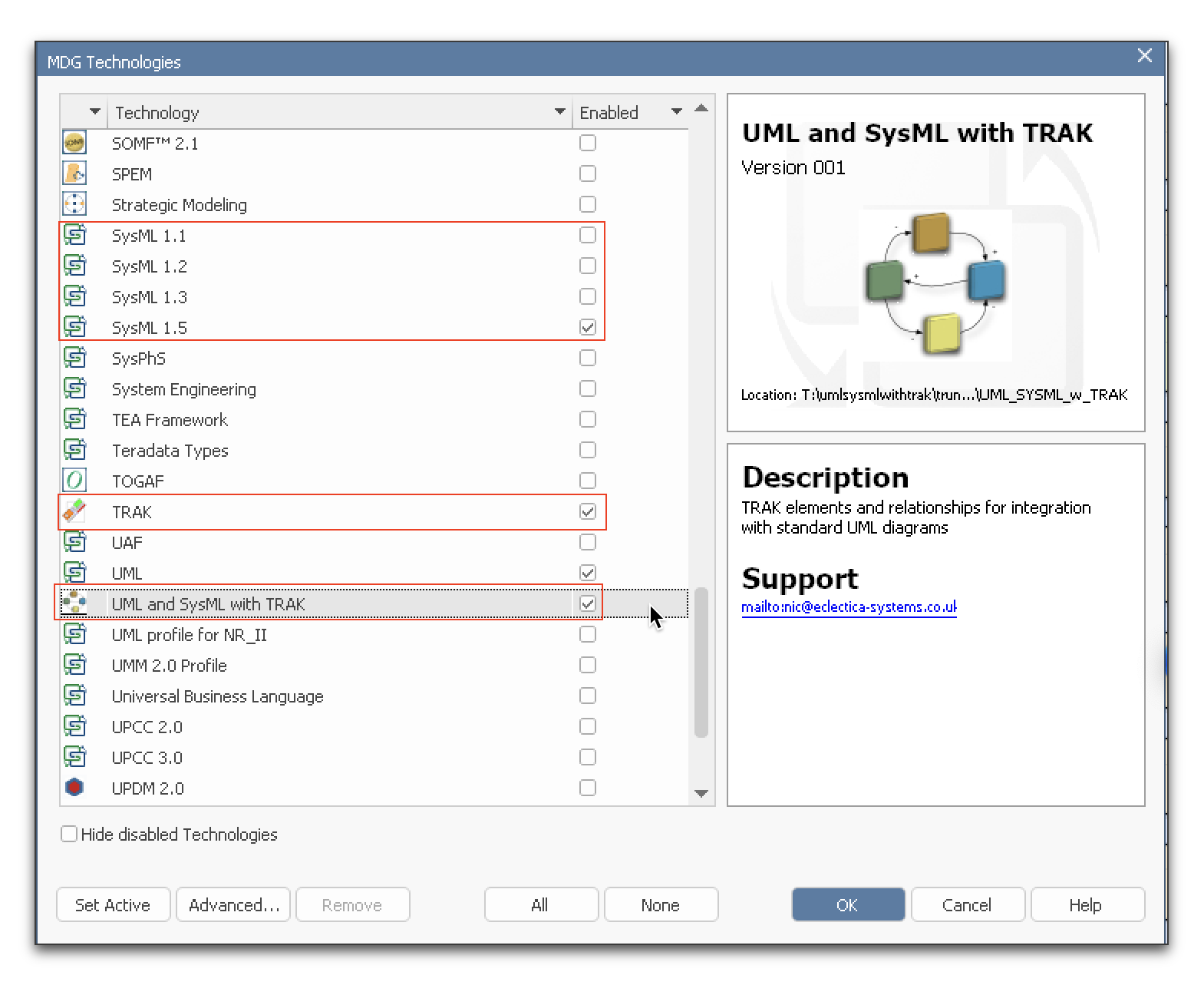
See Manage MDG Technologies | Enterprise Architect User Guide
Other UML Modelling Tools
You need to find the mechanism used to import a file containing the UML profile in the UML modelling tool.
- In NoMagic MagicDraw this is achieved using the Resource Manager
- Eclipse Papyrus. Papyrus User Guide Series. About UML Profiling (PDF) - Profile Applying and Use
Support
On the SourceForge site there is a Tracker where you can submit bugs, feature requests and support requests.
A small Wiki is provided at umlsysmlwithtrak / Wiki / Home.
TRAK on the Internet

See also:
- TRAK Architecture Framework Group on LinkedIn
- TRAK Group on Facebook
- TRAK_AF on Mastodon
- TRAK_AF on Twitter
Implementations of TRAK
- UML profile for TRAK. Provides a set of UML and SysML node and connector elements for any UML modelling tool.
- UML / SysML with TRAK ** this project **. Provides bare profiles (any UML modelling tool) and an MDG for Sparx Systems Enterprise Architect for those wanting to annotate standard UML / SysML Class, Use Case and State Machine diagrams with TRAK elements.
- MDG Technology for TRAK. Provides the views, toolbox palettes of UML and SysML elements, custom searches and context-sensitive linking for Sparx Systems' Enterprise Architect UML modelling tool.(Nic Plum, Eclectica Systems Ltd.)
- TRAK MooD 2010 Template. Provides a template through which TRAK architecture views can be created using Salamander MooD modelling tool and is constrained to use node and connector elements from the TRAK metamodel.(Brian Cliff, VEGA)
- OmniGraffle Stencil for TRAK. A stencil that provides the metamodel node and connector elements for OmniGroup's OmniGraffle ( a Visio-like tool for Mac and iOS).
- TRAK Visio Template. This similarly provides a set of node and connector elements.
Thanks and keep watching this space!
Nic Plum
