


| Name | Modified | Size | Downloads / Week |
|---|---|---|---|
| Parent folder | |||
| twindesk-bin-2.3.0-1-x86_64.pkg.tar.zst | 2026-10-26 | 124.7 MB | |
| README.md | 2026-10-26 | 5.5 kB | |
| TwinDesk v2.3.0 _ Camera Sharing, Phone as Remote and Gamepad, Pictures on the Clipboard source code.tar.gz | 2026-10-26 | 10.6 MB | |
| TwinDesk v2.3.0 _ Camera Sharing, Phone as Remote and Gamepad, Pictures on the Clipboard source code.zip | 2026-10-26 | 11.1 MB | |
| TwinDesk-2.3.0-arm64.dmg | 2026-10-26 | 159.8 MB | |
| TwinDesk-Setup-2.3.0-arm64.exe | 2026-10-26 | 109.4 MB | |
| TwinDesk-Setup-2.3.0.exe | 2026-10-26 | 107.3 MB | |
| TwinDesk-2.3.0-amd64.deb | 2026-10-26 | 91.5 MB | |
| TwinDesk-2.3.0-x86_64.AppImage | 2026-10-26 | 131.8 MB | |
| TwinDesk-2.3.0-full.apk | 2026-10-26 | 25.1 MB | |
| TwinDesk-2.3.0.apk | 2026-10-26 | 25.1 MB | |
| TwinDesk-2.3.0-x64_Intel.dmg | 2026-10-26 | 167.8 MB | |
| Totals: 12 Items | 964.2 MB | 0 | |
TwinDesk 2.3: Camera sharing, your phone as a remote and gamepad, pictures on the clipboard
⬇️ Download
| Device | File |
|---|---|
| Windows (Intel / AMD) | TwinDesk-Setup-2.3.0.exe |
| Windows (ARM) | TwinDesk-Setup-2.3.0-arm64.exe (github.com) |
| Mac (Apple silicon, M1 and later) | TwinDesk-2.3.0-arm64.dmg (github.com) |
| Mac (Intel) | TwinDesk-2.3.0-x64_Intel.dmg (github.com) |
| Linux (any distro) | TwinDesk-2.3.0-x86_64.AppImage (github.com) |
| Linux (Debian / Ubuntu) | TwinDesk-2.3.0-amd64.deb (github.com) |
| Android | TwinDesk-2.3.0.apk |
Already have TwinDesk? The in-app updater picks the right file for your computer.
📷 Camera sharing
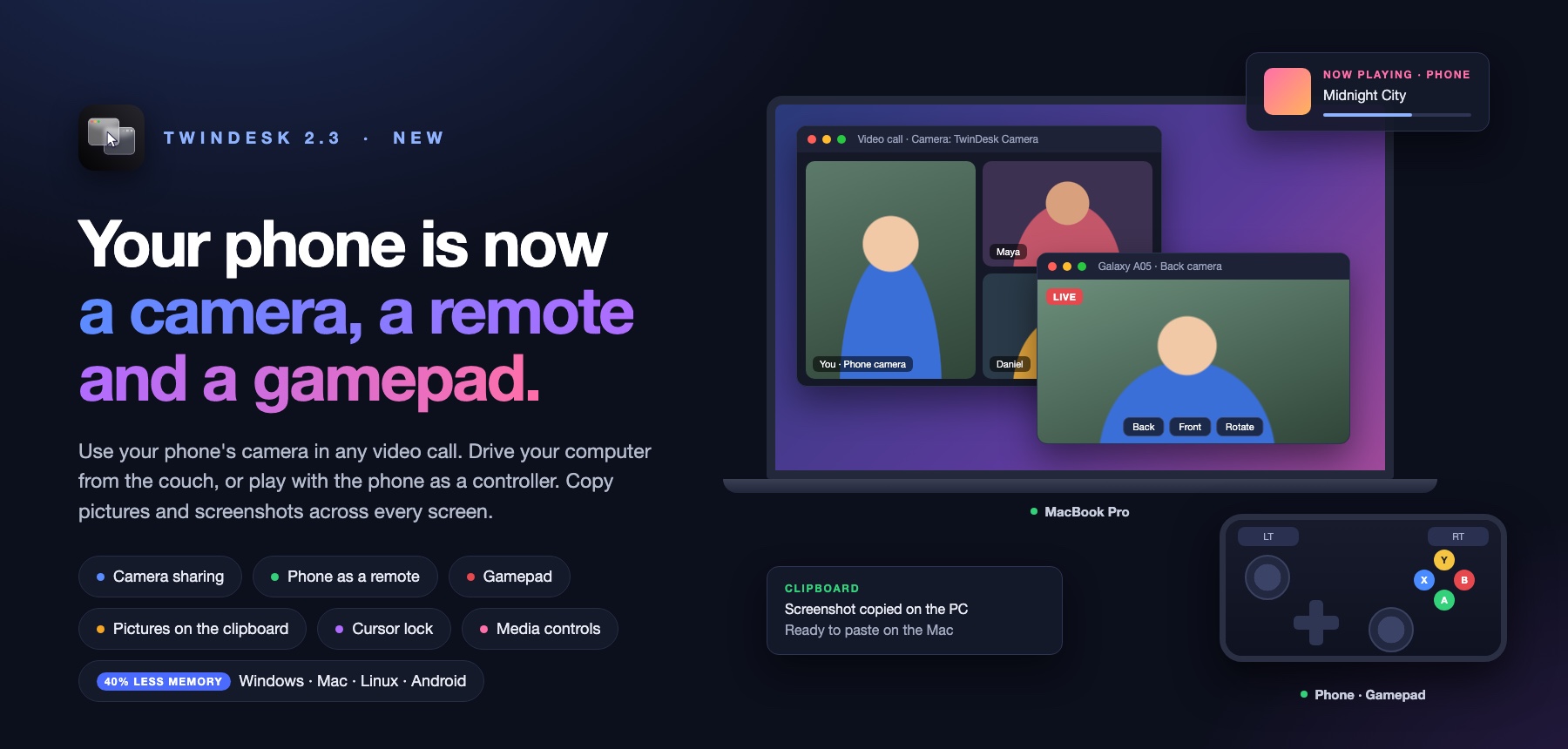
- Your phone's camera on your computer: a new Camera tab shows the phone's back or front camera on the page or in its own window, with Back/Front and Rotate.
- Computer to computer: see the other computer's camera on this one.
- Use it as a webcam: turn on Virtual camera and Zoom, Teams, Meet, the browser and any other app can pick "TwinDesk Camera" (Windows, Mac and Linux). On a Mac it can also go straight into OBS Virtual Camera, the default there.
🎮 Your phone as a remote and a gamepad
- Touchpad and keyboard: a new Remote page turns the phone into a full-screen touchpad for your computer. The pointer glides smoothly, faster flicks go further, and Rotate flips it to landscape.
- Gamepad: laid out like an Xbox controller, with big triggers, two sticks, a D-pad and A B X Y. Keys sets what each control presses.
- Real gamepad (Windows and Linux): with it on, games see the phone as an actual controller instead of key presses.
- As a Bluetooth gamepad: the phone pairs as a Bluetooth game controller with any computer, a Mac included, with no driver and no TwinDesk needed on it.
📋 Clipboard: pictures and screenshots
- Copy pictures both ways: pictures up to 10 MB, between computers and with your phone.
- Screenshots arrive straight away: take one (Win+Shift+S, ⌃⇧⌘4 or your desktop's screenshot tool) and it's on the other device's clipboard right away.
- Paste files into apps: Ctrl+Alt+V (⌃⌥V) now pastes received files into a chat, an email or a document, not only into a folder.
🔔 Notifications
- WhatsApp, Instagram and Telegram: replies from your computer press the app's own Send button, and group messages are summarised.
- App icons on every notification in Recent.
🖱️ Cursor lock
- Keep the pointer on one screen: press Scroll Lock (F14 on a Mac) to keep the pointer on the computer it's on. You can also switch it from the Cursor tab or the tray / menu bar. Each computer has its own lock key.
🎵 Media controls on Overview
- What's playing on your phone: the phone's card on Overview shows its art, title, artist and app, with Previous, Play/Pause, Next and a seek bar.
- Hear the phone's sound on your computer over Bluetooth.
📱 More for your phone
- Touchpad mode for the screen viewer: viewing your computer's screen on the phone works like a laptop touchpad, and a tap clicks.
- Phone windows on Windows: controls in a side panel, Rotate for app windows, and a screenshot button.
- Wireless debugging turns itself off when the computer goes away, if you choose (General › Allow).
💻 More platforms and settings
- Intel Macs: a native Intel download alongside the Apple silicon one.
-
NixOS: a flake and a NixOS module.
-
Received files folder: choose where incoming files go (Downloads until you change it).
⚙️ Under the hood
- TwinDesk uses 40% less memory.
- Modules load lazily: a feature that's off isn't loaded at all.
- Every feature starts off on a fresh install. You turn on what you want. Settings from before are kept.
- Connecting and pairing improved a lot:
- Bluetooth sessions recover after one goes wrong.
- Wi-Fi Direct works when the phone is on another network.
- The phone no longer drops out of discovery until the app restarts.
- A phone with its Wi-Fi on another channel can now connect over Wi-Fi Direct.
- Battery: the phone no longer wakes on every network broadcast, and a locked phone no longer lights up every minute.
Which Android APK?
TwinDesk-2.3.0.apk: install this one on your phone.TwinDesk-2.3.0-full.apk: the same app plus notification access, text messages and mouse and keyboard through Accessibility, which Play Protect blocks in downloaded apps. You don't need to install it yourself: your computer puts it on the phone over wireless debugging, and your settings and pairing stay.
