
| Name | Modified | Size | Downloads / Week |
|---|---|---|---|
| system.xml | 2026-02-03 | 2.6 kB | |
| Product.php | 2026-02-03 | 3.1 kB | |
| acl.xml | 2026-02-03 | 1.7 kB | |
| config.xml | 2026-02-03 | 1.4 kB | |
| di.xml | 2026-02-03 | 1.4 kB | |
| module.xml | 2026-02-03 | 1.3 kB | |
| README.md | 2026-02-03 | 6.8 kB | |
| composer.json | 2026-02-03 | 500 Bytes | |
| registration.php | 2026-02-03 | 1.2 kB | |
| Totals: 9 Items | 20.0 kB | 0 |
Custom Product Attribute Export for Magento 2
This Magento 2 Custom Product Attribute Export Free Extension can be reviewed as a perfect choice with the main purpose of supporting custom attributes in separate columns when exporting products in CSV file. With the development of this module, store admin will find it easier to manage a shop online.
1. Documentation
- Installation guide: Get It Now!
- User Guide: Get It Now!
- Download from our Live site: Magento 2 Custom Product Attribute Export Free Extension
- Get Support: https://bsscommerce.freshdesk.com/support/home/
2. How to install
After finishing the purchasing process, we will immediately send you an email containing the link to download this extension.
- Step 1: Unzip the file.
- Step 2: Create another directory called
app/code/Bss/CustomProductAttributeExport. Then, you put the contents of the extension ZIP file in there. - Step 3: Upload the directory
app/code/Bss/CustomProductAttributeExportinto the root directory of your Magento installation. The root directory of Magento is the directory that contains the directories "app", "bin", "lib" and more. All directories should match the existing directory structure. - Step 4: Go to Magento 2 root directory. Run:
php bin/magento setup:upgrade. - Step 5: Run:
php bin/magento setup:static-content:deploy. - Step 6: Clear all Caches.
3. Detailed Functions
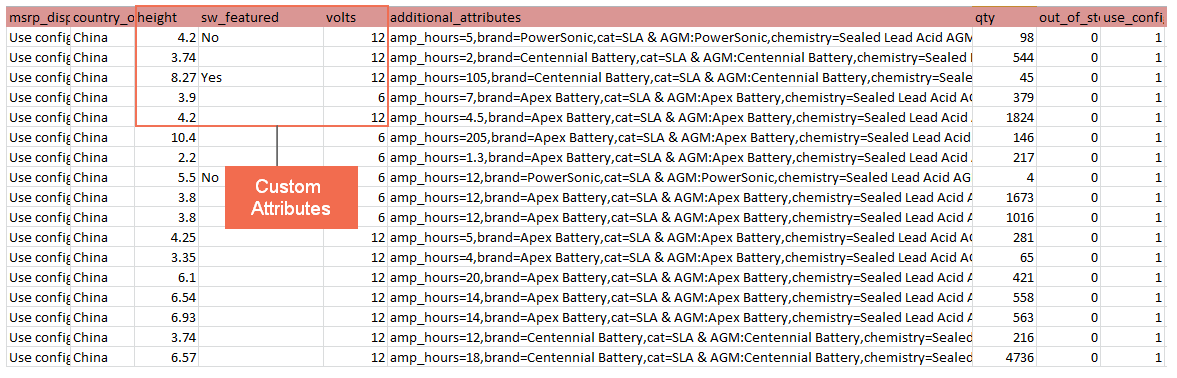
Custom Product Attribute Export for Magento 2 will be a promising module that can improve default Magento 2 with more practical functions. In default Magento 2, all custom attributes still appear in the CSV export file but in one column only. The attributes in this “additional_attributes” column are split up by a comma. That is the reason why this Magento 2 Free Extension is built to deal with the issue quickly. Here are some crucial features of this extension:
- Divide custom attributes into different columns after being exported This function will support custom attributes by showing them in different columns instead of one column like in the default.
- Choose various custom attributes to apply module as demand
This feature allows the store admin to select suitable custom attributes and put them into separate columns when exporting products in the backend.

- Update new custom attributes in module config automatically
Any changes to custom attributes will be up to date immediately in the module configuration.
Full vital features of Magento 2 Custom Product Attributes Export: - Export custom attributes into independent columns of the CSV file. - Select multiple custom attributes to apply the module. - Update new custom attributes in module config automatically.
4. User Guide
Please go to Stores ➨ Configuration ➨ BSSCOMMERCE ➨ Product Export Column and start configuration.
In Enable: Choose Yes to enable the module or choose No to disable it. In Allowed Attribute: Choose the custom product attributes that you want to be in a separate column when exporting products.
5. Other helpful Magento 2 Extensions by BSSCommerce
☞ Import Export Product Attributes: Easily import and export multiple product attributes via a CSV file.
☞ Import Export Product Reviews: Support admin import and export product reviews via a CSV file
☞ Import Export URL Rewrites: Import and export URL rewrites via a CSV file.
☞ Import Export Wishlist Item: Allow admin to import and export wishlist items via a CSV file
☞ Inventory Report: Save quantity changes of your products all the time.
☞ Admin Action Log: Keeps track of all activities in the backend of administrators.
☞ Admin Notification Email: Immediately sends the notification email to the admin whenever a key event happens in your store.
☞ Admin product Preview Plus: Allow admin to get a quick preview of frontend pages from the admin panel.
☞ Shipping and Payment Method per Customer Group: Assign specific shipping and payment methods for each customer group.
☞ Shopping Cart Price Rules per Store View and Catalog Price Rules per Store View: Allow admin to set up different shopping cart rules or catalog rules per store view.
☞ Tax per Store View: Set up different taxes for the same products per store view.
☞ Magento 2 B2B Extension Package: A robust and scalable B2B solution offering features such as company accounts, tiered pricing, quick ordering, approval workflows, customized shipping and payment methods, integrated quote management, and more.
Explore the complete range of Magento 2 extension to streamline product management, enhance store performance, and deliver a better customer experience.

