
 Download Latest Version
0.4.0.zip (1.5 MB)
Download Latest Version
0.4.0.zip (1.5 MB)

Get an email when there's a new version of imgaug
| Name | Modified | Size | Downloads / Week |
|---|---|---|---|
| Parent folder | |||
| 0.4.0.tar.gz | 2020-02-05 | 1.4 MB | |
| 0.4.0.zip | 2020-02-05 | 1.5 MB | |
| README.md | 2020-02-05 | 85.0 kB | |
| Totals: 3 Items | 3.0 MB | 0 | |
Table of Contents
Overview
Release 0.4.0 focused mainly on adding new augmenters and improving
the internal augmentation "backend".
The following augmenters were added (see the overview docs for more details):
ChangeColorTemperature: Gives images a red, orange or blue touch.- New Brightness augmenters:
WithBrightnessChannels,MultiplyAndAddToBrightness,MultiplyBrightness,AddToBrightness. - New Dropout augmenters:
Dropout2d,TotalDropout. RemoveSaturation: Decreases the saturation of colors. Effects are similar toGrayscale.Cartoon: Applies a cartoon-style to images (classical / not-learned).MeanShiftBlur: Blurs images using a mean-shift clustering method. (Note: Very slow.)Jigsaw: Splits the image into rectangular cells and randomly switches some pairs of neighbouring cells. (Note: Does not support bounding boxes, polygons and line strings.)WithPolarWarping: Transforms images to polar coordinate space and applies child augmenters there.SaveDebugImageEveryNBatches: Generates and saves at everyN-th batch a debug image visualizing all inputs within the batch. Useful to gauge strength and effects of augmentations and quickly spot errors in ground truth data (e.g. misaligned bounding boxes).Cutout: Removes rectangular subregions of images. Has some similarity withCoarseDropout.RainandRainLayer: Adds rain-like effects to images.RandAugment: Combination of multiple augmenters. Similar to the paper description. (Note: Can currently only augment images.)Identity: Same asNoop. Does nothing.UniformColorQuantizationToNBits: Quantizes each image array component down toNbits. Similar toUniformColorQuantization. Has the aliasPosterize.Solarize: Invert with threshold.RemoveCBAsByOutOfImageFraction,ClipCBAsToImagePlanes: Augmenters to remove or clip coordinate-based augmentables, e.g. bounding boxes- More blend augmenters:
BlendAlphaMask: Uses batch-wise generated masks for alpha-blending.BlendAlphaSomeColors: Alpha-blends only within image regions having specific randomly chosen colors.BlendAlphaSegMapClassIds: Alpha-blends only within image regions having specific class ids in segmentation maps.BlendAlphaBoundingBoxes: Alpha-blends only within image regions covered by bounding boxes having specific labels.BlendAlphaHorizontalLinearGradient: Alpha-blends using horizontal linear gradients.BlendAlphaVerticalLinearGradient: Analogous.BlendAlphaRegularGrid: Places a regular grid on each image and samples one alpha value per grid cell. Can be used e.g. to achieve coarse dropout.BlendAlphaCheckerboard: Places also a regular grid on each image, but neighbouring cells use alpha values that are inverse to each other.- Shortcuts for
Affine:ScaleX,ScaleY,TranslateX,TranslateY,Rotate,ShearX,ShearY. - Several new crop and pad augmenters:
CenterCropToFixedSize,CenterPadToFixedSize,CropToMultiplesOf,CenterCropToMultiplesOf,PadToMultiplesOf,CenterPadToMultiplesOf,CropToPowersOf,CenterCropToPowersOf,PadToPowersOf,CenterPadToPowersOf,CropToAspectRatio,CenterCropToAspectRatio,PadToAspectRatio,CenterPadToAspectRatio,PadToSquare,CenterPadToSquare,CropToSquare,CenterCropToSquare. - Wrappers around
imagecorruptionspackage (verified to have identical outputs):GaussianNoise,ShotNoise,ImpulseNoise,SpeckleNoise,GaussianBlur,GlassBlur,DefocusBlur,MotionBlur,ZoomBlur,Fog,Frost,Snow,Spatter,Contrast,Brightness,Saturate,JpegCompression,Pixelate,ElasticTransform. The augmenters are accessible viaiaa.imgcorruptlike.<AugmenterName>. - Wrappers around
PILfunctions (verified to have identical outputs):Solarize,Posterize,Equalize,Autocontrast,EnhanceColor,EnhanceContrast,EnhanceBrightness,EnhanceSharpness,FilterBlur,FilterSmooth,FilterSmoothMore,FilterEdgeEnhance,FilterEdgeEnhanceMoreFilterFindEdges,FilterContour,FilterEmboss,FilterSharpen,FilterDetail,Affine. The augmenters are accessible viaiaa.pillike.<AugmenterName>.
Aside from these new augmenters, the following major changes were made:
- Bounding boxes and line strings have now native augmentation methods. Previously, they were converted to keypoints at the start of the augmentation, which meant that child augmenters were unable to use augmentation routines geared towards these two input types as they would merely see a bunch of keypoints.
- Augmentation happens now batchwise. Previously it was done input type-wise. This change should improve performance for batches with different types of inputs by re-using computation results for multiple inputs. It also makes the library more flexible.
- Improved the default parameters of augmenters. Most of them will now
produce medium-strength augmentations when instantiated without and
parameters. E.g.
CoarseDropout()will now produce decent augmentations instead of doing nothing. When using default parameters,Fliplr()andFlipud()will always flip (p=100%).TotalDropout()will always drop everything (p=100%).Grayscale()andRemoveSaturation()will always fully grayscale/desaturate.Rot90()will always rotate once (clockwise).Invert()will always invert all components (p=100%). - Reworked the standard parameters shared by all augmenters.
random_statewas renamed toseed, e.g.Affine(..., seed=1)is now valid. The parameterdeterministicis now deprecated. - Many methods were added to augmentables, e.g.
BoundingBoxesOnImagenow supports index-based access (bbs[0]instead ofbbs.bounding_boxes[0]). - The bounding box drawing methods now also draw each BB's label.
- All augmenters are now tested to be pickle-able without errors.
- The library is now compatible with numpy 1.18 and python 3.8.
- This release fixes two significant bugs in
Affinethat could lead to unaligned outputs. It also fixes significant bugs related to bounding box augmentation and various other issues. The update is recommended. There are now around 5000 unique tests.
Example Images
Brightness
Three new brightness-related augmenters are introduced. The example below
shows AddToBrightness. First image is the input, the others show
AddToBrightness(-100) to AddToBrightness(100).

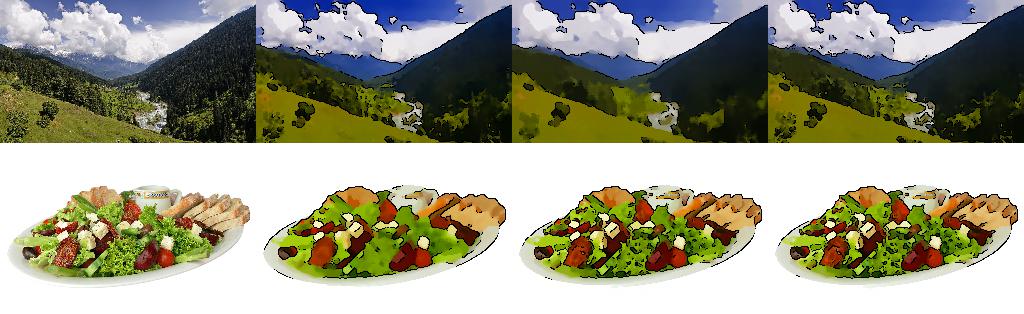
Cartoon
A new cartoon style filter is introduced, shown below. Each row starts with the input image.
ChangeColorTemperature
The color temperature of images can now be modified. The example below
shows ChangeColorTemperature(kelvin=1000) to
ChangeColorTemperature(kelvin=5000), with the first image being the input.

Cutout
Cutout is added to the library. The first row shows the hyperparameters that were used in the corresponding paper. The second row shows two cutout iterations per image, using intensity values, random RGB values and gaussian noise to fill in the pixels. First image in each row is the input.

Dropout2d and TotalDropout
Two new dropout augmenters, Dropout2d and TotalDropout, are added.
The example below shows Dropout2d. First image is the input.

Jigsaw
A jigsaw puzzle augmenter is added. The first row below shows its effects
using a grid size of 5x5. The second row shows 10x10.
First image in each row is the input.

MeanShiftBlur
A mean shift-based blur augmenter is added. First image below shows the input,
followed by MeanShiftBlur(5.0) to MeanShiftBlur(40.0).

Posterize
The example below shows Posterize (aka UniformQuantizationToNBits)
with n_bits=8 to n_bits=1. First image is the input.

Solarize
The example below shows Solarize, which is the same as Invert with a
threshold. First image is the input.
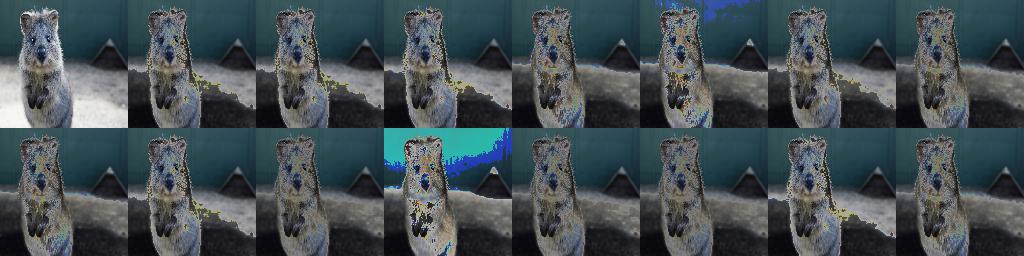
Rain
The example below shows the new Rain augmenter. First image is the input.

RandAugment
This release adds an implementation of RandAugment the following example
shows RandAugment(n=2, m=20). First image is the input.

WithPolarWarping
The example below shows WithPolarWarping(<children>) in combination with
CropAndPad (first row), Affine (second row) and
AveragePooling (third row). First image in each row is the input.

The augmenter supports all input types, but bounding boxes and polygons should be used with caution. (Bounding boxes, because they tend to produce unintuitive results in combination with rotation-like augmentations. Polygons, because they can become invalid under geometric augmentations and will have to be repaired, which can easily mess them up.)
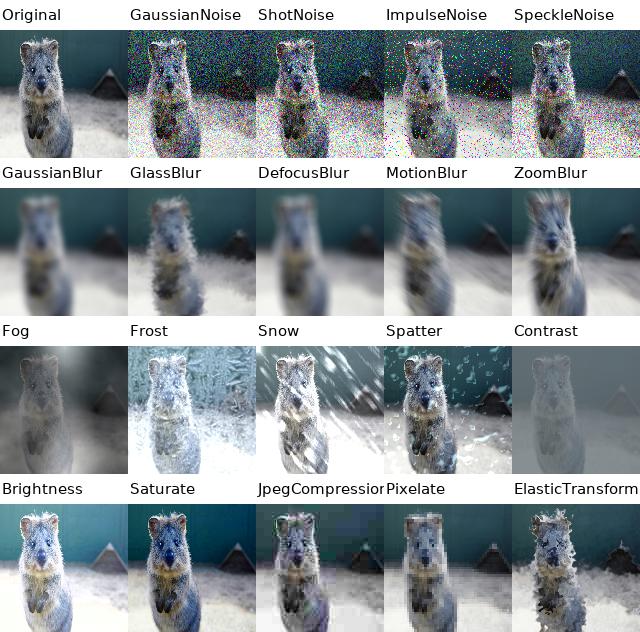
imagecorruptions wrappers
Wrappers around the library imagecorruptions are added, which contains
augmentation methods introduced by Hendrycks and Dietterich - Benchmarking
Neural Network Robustness to Common Corruptions and Surface Variations.
The methods were used in some recent papers. The example below shows their
effects, always with severity=3.
PIL wrappers
Various wrappers around popular PIL methods are added.
The image below shows in the first row Autocontrast, in the second
EnhanceColor (strength of 0.1 to 1.9), the third
EnhanceSharpness (strength of 0.1 to 1.9), the fourth shows
various convolution-based filters (FilterBlur, FilterSmooth,
FilterEdgeEnhance, FilterFindEdges, FilterContour, FilterSharpen,
FilterDetail -- in that order) and the fourth row shows pillike.Affine
with the top-left as the transformation origin.
The first image in each row is the input.

More Blending Augmenters
Various new (alpha-)blending augmenters are introduced in this patch.
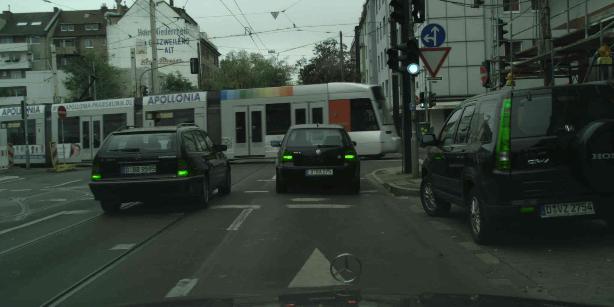
The following example makes use of a segmentation map in which all cars
are marked with a segmentation class id.
It uses roughly
BlendAlphaSegMapClassIds(BlendAlphaSomeColors(AddToHueAndSaturation(...)))
in order to modify some colors within the car classes.
Left is the input image, right is the output:

Note that BlendAlphaSegMapClassIds must be called with all inputs
at the same time, e.g. via augmenters(images=..., segmentation_maps...).
This example changes the train color using
BlendAlphaSegMapClassIds(AddToHueAndSaturation(...)). The train has a
separate class in the segmentation map.

The next example applies blending to some non color-based augmenters. It uses
roughly BlendAlphaSegMapClassIds(AdditiveGaussianNoise(...)) (left)
and BlendAlphaSegMapClassIds(Emboss(...)) (right). The street has a separate
class in the segmentation map.

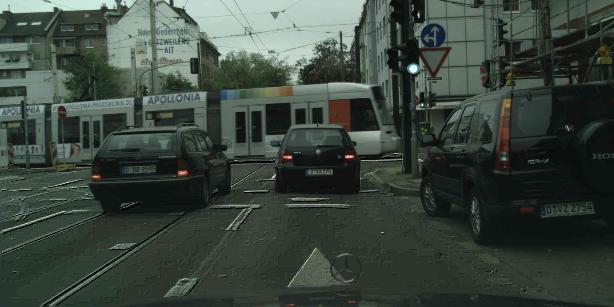
This example shows how blending can be used to achieve dropout effects.
It uses roughly BlendAlphaRegularGrid(Multiply(0.0)) (left) and
BlendAlphaCheckerboard(Multiply(0.0)) (right).


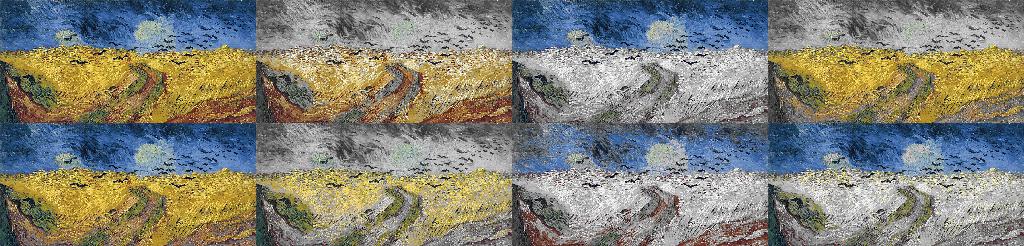
This example shows BlendAlphaSomeColors(RemoveSaturation(1.0)), applied
to a more colorful image:
This release also adds BlendAlphaBoundingBoxes,
BlendAlphaHorizontalLinearGradient and
BlendAlphaVerticalLinearGradient. These are not visualized here.
SaveDebugImageEveryNBatches
A new debug helper -- SaveDebugImageEveryNBatches -- was added.
The example below shows one of its outputs for a batch containing images,
segmentation maps and bounding boxes.
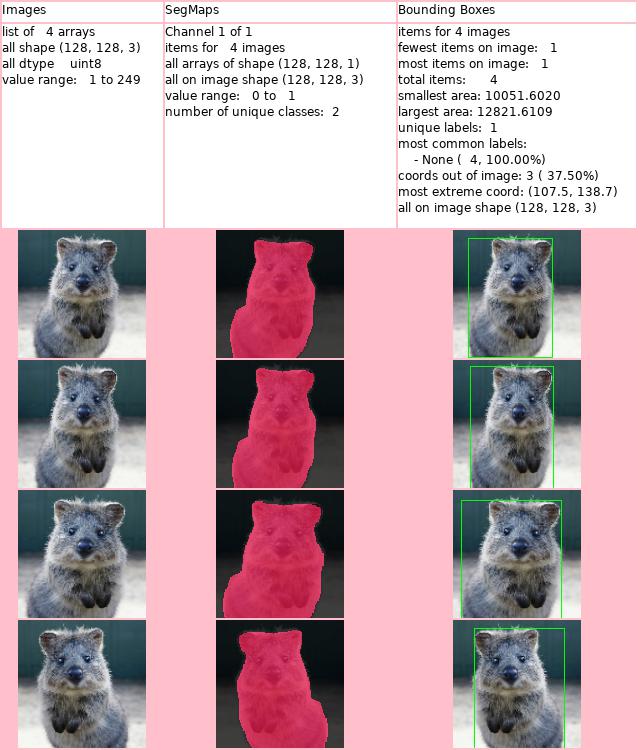
Note that this augmenter must be called with all inputs at the same time,
e.g. via augmenters(images=..., segmentation_maps...) for image + segmap
inputs.
Mixed-Category Patches
Reworked Augmentation Methods #451 #566
The internal backend of the library was changed so that augmentation now
happens batchwise instead of input-type-wise. Child augmenters still have
the option of using input-type-wise augmentation. All calls are now at some
point routed through Augmenter.augment_batch_() and child augmenters are
expected to implement _augment_batch_(). This change allows to re-use
information between different input types within the same batch, which in
turn improves performance and extends the space of possible augmentations.
Note: It is now recommended to use a batch-wise augmentation call. I.e.
use .augment_batch_() or .augment() or .__call__(). These calls provide
all inputs of a batch at the same time and several of the new augmenters now
explicitly require that (e.g. BlendAlphaBoundingBoxes). Example:
:::python
import numpy as np
import imgaug as ia
import imgaug.augmenters as iaa

images = [np.zeros((32, 32, 3), dtype=np.uint8),
          np.zeros((64, 64, 3), dtype=np.uint8)]
bbs = [
    [ia.BoundingBox(x1=0, y1=1, x2=2, y2=3)],
    [ia.BoundingBox(x1=1, y1=2, x2=3, y2=4),
     ia.BoundingBox(x1=2, y1=3, x2=4, y2=5)],
]

bbsois = [ia.BoundingBoxesOnImage(bbs[0], shape=images[0]),
          ia.BoundingBoxesOnImage(bbs[1], shape=images[1])]

aug = iaa.Affine(rotate=(-30, 30))

# No longer recommended:
aug_det = aug.to_deterministic()
images_aug = aug_det.augment_images(images)
bbsois_aug = aug_det.augment_bounding_boxes(bbsois)

# Now recommended:
images_aug, bbs_aug = aug(images=images, bounding_boxes=bbs)
- Added methods:
augmentables.batches.Batch.to_normalized_batch().augmentables.batches.Batch.get_augmentables().augmentables.batches.UnnormalizedBatch.get_augmentables().augmentables.batches.Batch.get_augmentable_names().augmentables.batches.UnnormalizedBatch.get_augmentable_names().augmentables.batches.Batch.to_batch_in_augmentation().augmentables.batches.Batch.fill_from_batch_in_augmentation_().augmentables.batches.UnnormalizedBatch.fill_from_augmented_normalized_batch().augmenters.meta.Augmenter.augment_batch_(), , similar toaugment_batch(), but explicitly works in-place and has aparentparameter.augmenters.meta.Augmenter._augment_batch_().augmentables.polys.recover_psois_().augmentables.utils.convert_cbaois_to_kpsois().augmentables.utils.invert_convert_cbaois_to_kpsois_().augmentables.utils.deepcopy_fast().augmentables.bbs.BoundingBox.from_point_soup().augmentables.bbs.BoundingBoxesOnImages.from_point_soups().- Added method
to_xy_array()to:augmentables.bbs.BoundingBoxesOnImage.augmentables.polys.PolygonsOnImage.augmentables.lines.LineStringsOnImage.
-
Added methods
to_keypoints_on_image(),invert_to_keypoints_on_image_()andfill_from_xy_array_()to:augmentables.kps.KeypointsOnImage.augmentables.bbs.BoundingBoxesOnImage.augmentables.polys.PolygonsOnImage.augmentables.lines.LineStringsOnImage.
-
Added classes:
-
testutils.TemporaryDirectory(context) -
Changed:
- Changed the following methods to be thin wrappers around
augment_batch_():augmenters.meta.Augmenter.augment_images()augmenters.meta.Augmenter.augment_heatmaps().augmenters.meta.Augmenter.augment_segmentation_maps().augmenters.meta.Augmenter.augment_keypoints().augmenters.meta.Augmenter.augment_bounding_boxes().augmenters.meta.Augmenter.augment_polygons().augmenters.meta.Augmenter.augment_line_strings().
- Changed
augment_image(),augment_images(),augment_heatmaps(),augment_segmentation_maps(),augment_keypoints(),augment_bounding_boxes(),augment_polygons()andaugment_line_strings()to returnNoneinputs without change. Previously they resulted in an exception. This is more consistent with the behaviour in the otheraugment_*methods. - Changed
augment_images()to no longer be abstract. It defaults to not changing the input images. - Changed
imgaug.augmentables.BoundingBoxesOnImage.from_xyxy_array()to also accept(N, 2, 2)arrays instead of only(N, 4).
Deprecated:
- Deprecated
imgaug.augmenters.meta.Augmenter.augment_batch(). Use.augment_batch_()instead.
Refactored:
- Refactored most augmenters to use single
_augment_batch_()method.
Other changes:
- Added validation of input arguments to
KeypointsOnImage.from_xy_array(). - Improved validation of input arguments to
BoundingBoxesOnImage.from_xyxy_array().
Reworked Quantization #467
This patch reworked the quantization routines to also support quantization
to N bits instead of N colors in a way that is similar to posterization
in PIL. The patch added corresponding UniformColorQuantizationToNBits
and Posterize augmenters, as well as a quantize_uniform_to_n_bits()
function.
- Added classes:
augmenters.color.UniformColorQuantizationToNBits.-
augmenters.color.Posterize(alias ofUniformColorQuantizationToNBits). -
Added functions:
augmenters.color.quantize_uniform_(), the in-place version ofquantize_uniform().augmenters.color.quantize_uniform_to_n_bits().augmenters.color.quantize_uniform_to_n_bits_().-
augmenters.color.posterize(), an alias ofquantize_uniform_to_n_bits()that produces the same outputs asPIL.ImageOps.posterize(). -
Added parameters:
-
Added
to_bin_centers=Truetoquantize_uniform(), controling whether each bin(a, b)should be quantized toa + (b-a)/2ora. -
Deprecated:
- Renamed
imgaug.augmenters.color.quantize_colors_uniform(image, n_colors)toimgaug.augmenters.color.quantize_uniform(arr, nb_bins). The old name is now deprecated. -
Renamed
imgaug.augmenters.color.quantize_colors_kmeans(image, n_colors)toimgaug.augmenters.color.quantize_kmeans(arr, nb_clusters). The old name is now deprecated. -
Other changes:
- Improved performance of
quantize_uniform()by roughly 10x (small images around 64x64) to 100x (large images around 1024x1024). This also affectsUniformColorQuantization. -
Improved performance of
UniformColorQuantizationby using more in-place functions. -
Fixed:
- Fixed
quantize_uniform()producing wrong outputs for non-contiguous arrays.
Improved Invert #469
Added thresholds to Invert and the corresponding functions. This enables
solarization (inversion with thresholds). The patch also added
a corresponding Solarize augmenter and two solarization functions.
- Added augmenter
imgaug.augmenters.Solarize, a wrapper aroundInvert. - Added function
imgaug.augmenters.arithmetic.solarize(), a wrapper aroundsolarize_(). - Added function
imgaug.augmenters.arithmetic.solarize_(), a wrapper aroundinvert_(). - Added function
imgaug.augmenters.arithmetic.invert_(), an in-place version ofimgaug.augmenters.arithmetic.invert(). - Added parameters
thresholdandinvert_above_thresholdtoimgaug.augmenters.arithmetic.invert() - Added parameters
thresholdandinvert_above_thresholdtoimgaug.augmenters.arithmetic.Invert. - Improved performance of
imgaug.augmenters.arithmetic.invert()andimgaug.augmenters.arithmetic.Invertforuint8images.
All Augmenters are now Pickle-able #493 #575
Ensured that all augmenters can be pickled and un-pickled without errors.
- Added function
imgaug.testutils.runtest_pickleable_uint8_img(). - Fixed
imgaug.augmenters.blur.MotionBlurnot being pickle-able. - Fixed
imgaug.augmenters.meta.AssertLambdanot being pickle-able. - Fixed
imgaug.augmenters.meta.AssertShapenot being pickle-able. - Fixed
imgaug.augmenters.color.MultiplyHueAndSaturationnot supporting all standard RNG datatypes forrandom_state.
Extended Cropping and Padding Augmenters #459
This patch extended the cropping and padding augmenters. It added
augmenters that crop/pad towards multiples of values (e.g. crop the
width until it is a multiple of 2), towards powers of values (e.g.
crop the width until it is one of 1, 2, 4, 8, 16, ...), towards
an aspect ratio (crop the width or height until width/height = 2.0) or
towards a squared size (e.g. crop the width or height until they are equal).
These augmenters are wrappers around CropToFixedSize and
PadToFixedSize. All *FixedSize augmenters also have now corresponding
Center*ToFixedSize aliases, e.g. CenterCropToPowersOf. These
are equivalent to using position="center", e.g. CenterCropToPowersOf
is equivalent to CropToPowersOf(..., position="center").
The following functions were moved. Their old names are now deprecated.
- Moved
imgaug.imgaug.padtoimgaug.augmenters.size.pad - Moved
imgaug.imgaug.pad_to_aspect_ratiotoimgaug.augmenters.size.pad_to_aspect_ratio. - Moved
imgaug.imgaug.pad_to_multiples_oftoimgaug.augmenters.size.pad_to_multiples_of. - Moved
imgaug.imgaug.compute_paddings_for_aspect_ratiotoimgaug.augmenters.size.compute_paddings_to_reach_aspect_ratio. - Moved
imgaug.imgaug.compute_paddings_to_reach_multiples_oftoimgaug.augmenters.size.compute_paddings_to_reach_multiples_of.
The following augmenters were added:
- Added augmenter
CenterCropToFixedSize. - Added augmenter
CenterPadToFixedSize. - Added augmenter
CropToMultiplesOf. - Added augmenter
CenterCropToMultiplesOf. - Added augmenter
PadToMultiplesOf. - Added augmenter
CenterPadToMultiplesOf. - Added augmenter
CropToPowersOf. - Added augmenter
CenterCropToPowersOf. - Added augmenter
PadToPowersOf. - Added augmenter
CenterPadToPowersOf. - Added augmenter
CropToAspectRatio. - Added augmenter
CenterCropToAspectRatio. - Added augmenter
PadToAspectRatio. - Added augmenter
CenterPadToAspectRatio. - Added augmenter
PadToSquare. - Added augmenter
CenterPadToSquare. - Added augmenter
CropToSquare. - Added augmenter
CenterCropToSquare.
All Center<name> augmenters are wrappers around <name> with parameter
position="center".
Added functions:
- Added function
imgaug.augmenters.size.compute_croppings_to_reach_aspect_ratio(). - Added function
imgaug.augmenters.size.compute_croppings_to_reach_multiples_of(). - Added function
imgaug.augmenters.size.compute_croppings_to_reach_powers_of(). - Added function
imgaug.augmenters.size.compute_paddings_to_reach_powers_of().
Other changes:
- Extended augmenter
CropToFixedSizeto supportheightand/orwidthparameters to beNone, in which case the respective axis is not changed. - Extended augmenter
PadToFixedSizeto supportheightand/orwidthparameters to beNone, in which case the respective axis is not changed. - [rarely breaking] Changed
CropToFixedSize.get_parameters()to also return theheightandwidthvalues. - [rarely breaking] Changed
PadToFixedSize.get_parameters()to also return theheightandwidthvalues. - [rarely breaking] Changed the order of parameters returned by
PadToFixedSize.get_parameters()to match the order inPadToFixedSize.__init__() - Changed
PadToFixedSizeto prefer padding the right side over the left side and the bottom side over the top side. E.g. if using a center pad and3columns have to be padded, it will pad1on the left and2on the right. Previously it was the other way round. This was changed to establish more consistency with the various other pad and crop methods. - Changed the projection of pad/crop values between images and non-images to make the behaviour slightly more accurate in fringe cases.
- Improved behaviour of function
imgaug.augmenters.size.compute_paddings_for_aspect_ratio()for zero-sized axes. - Changed function
imgaug.augmenters.size.compute_paddings_for_aspect_ratio()to also support shape tuples instead of only ndarrays. - Changed function
imgaug.augmenters.size.compute_paddings_to_reach_multiples_of()to also support shape tuples instead of only ndarrays.
Fixes:
- Fixed a formatting error in an error message of
compute_paddings_to_reach_multiples_of().
More Choices for Image Blending #462 #556
The available augmenters for alpha-blending of images were significantly extended. There are now new blending augmenters available to alpha-blend acoording to:
- Some randomly chosen colors. (
BlendAlphaSomeColors) - Linear gradients. (
BlendAlphaHorizontalLinearGradient,BlendAlphaVerticalLinearGradient) - Regular grids and checkerboard patterns. (
BlendAlphaRegularGrid,BlendAlphaCheckerboard) - Only at locations that overlap with specific segmentation class
IDs (or the inverse of that). (
BlendAlphaSegMapClassIds) - Only within bounding boxes with specific labels (or the inverse
of that). (
BlendAlphaBoundingBoxes)
This allows to e.g. randomly remove some colors while leaving
other colors unchanged (BlendAlphaSomeColors(Grayscale(1.0))),
to change the color of some objects
(BlendAlphaSegMapClassIds(AddToHue((-256, 256)))), to add
cloud-patterns only to the top of images
(BlendAlphaVerticalLinearGradient(Clouds())) or to apply
augmenters in some coarse rectangular areas (e.g.
BlendAlphaRegularGrid(Multiply(0.0)) to achieve a similar
effect to CoarseDropout or
BlendAlphaRegularGrid(AveragePooling(8)) to pool in equally
coarse image sub-regions).
Other mask-based alpha blending techniques can be achieved by
subclassing IBatchwiseMaskGenerator and providing an
instance of such a class to BlendAlphaMask.
This patch also changes the naming of the blending augmenters as follows:
Alpha->BlendAlphaAlphaElementwise->BlendAlphaElementwiseSimplexNoiseAlpha->BlendAlphaSimplexNoiseFrequencyNoiseAlpha->BlendAlphaFrequencyNoiseThe old names are now deprecated. Furthermore, the parametersfirstandsecond, which were used by all blending augmenters, have now the namesforegroundandbackground.
List of changes:
- Added
imgaug.augmenters.blend.BlendAlphaMask, which uses a mask generator instance to generate per batch alpha masks and then alpha-blends using these masks. - Added
imgaug.augmenters.blend.BlendAlphaSomeColors. - Added
imgaug.augmenters.blend.BlendAlphaHorizontalLinearGradient. - Added
imgaug.augmenters.blend.BlendAlphaVerticalLinearGradient. - Added
imgaug.augmenters.blend.BlendAlphaRegularGrid. - Added
imgaug.augmenters.blend.BlendAlphaCheckerboard. - Added
imgaug.augmenters.blend.BlendAlphaSegMapClassIds. - Added
imgaug.augmenters.blend.BlendAlphaBoundingBoxes. - Added
imgaug.augmenters.blend.IBatchwiseMaskGenerator, an interface for classes generating masks on a batch-by-batch basis. - Added
imgaug.augmenters.blend.StochasticParameterMaskGen, a helper to generate masks fromStochasticParameterinstances. - Added
imgaug.augmenters.blend.SomeColorsMaskGen, a generator that produces masks marking randomly chosen colors in images. - Added
imgaug.augmenters.blend.HorizontalLinearGradientMaskGen, a linear gradient mask generator. - Added
imgaug.augmenters.blend.VerticalLinearGradientMaskGen, a linear gradient mask generator. - Added
imgaug.augmenters.blend.RegularGridMaskGen, a checkerboard-like mask generator where every grid cell has a random alpha value. - Added
imgaug.augmenters.blend.CheckerboardMaskGen, a checkerboard-like mask generator where every grid cell has the opposite alpha value of its 4-neighbours. - Added
imgaug.augmenters.blend.SegMapClassIdsMaskGen, a segmentation map-based mask generator. - Added
imgaug.augmenters.blend.BoundingBoxesMaskGen, a bounding box-based mask generator. - Added
imgaug.augmenters.blend.InvertMaskGen, an mask generator that inverts masks produces by child generators. - Changed
imgaug.parameters.SimplexNoiseandimgaug.parameters.FrequencyNoiseto also accept(H, W, C)sampling shapes, instead of only(H, W). - Refactored
AlphaElementwiseto be a wrapper aroundBlendAlphaMask. - Renamed
AlphatoBlendAlpha.Alphais now deprecated. - Renamed
AlphaElementwisetoBlendAlphaElementwise.AlphaElementwiseis now deprecated. - Renamed
SimplexNoiseAlphatoBlendAlphaSimplexNoise.SimplexNoiseAlphais now deprecated. - Renamed
FrequencyNoiseAlphatoBlendAlphaFrequencyNoise.FrequencyNoiseAlphais now deprecated. - Renamed arguments
firstandsecondtoforegroundandbackgroundinBlendAlpha,BlendAlphaElementwise,BlendAlphaSimplexNoiseandBlendAlphaFrequencyNoise. - Changed
imgaug.parameters.handle_categorical_string_param()to allow parametervalid_valuesto beNone. - Fixed a wrong error message in
imgaug.augmenters.color.change_colorspace_().
Added
Unwrapped Bounding Box Augmentation #446
The bounding box augmentation was previously a wrapper around keypoint augmentation. Bounding Boxes were simply converted to keypoints at the start of the augmentation and then augmented as keypoints by all called augmenters. This was now changed so that all augmenters receive bounding boxes and can then chose how to augment them. This enables augmentations specific to bounding boxes.
- Added property
coordstoBoundingBox. The property returns an(N,2)numpy array containing the coordinates of the top-left and bottom-right bounding box corners. - Added method
BoundingBox.coords_almost_equals(other). - Added method
BoundingBox.almost_equals(other). - Changed method
Polygon.almost_equals(other)to no longer verify the datatype. It is assumed now that the input is a Polygon. - Added property
itemstoKeypointsOnImage,BoundingBoxesOnImage,PolygonsOnImage,LineStringsOnImage. The property returns the keypoints/BBs/polygons/LineStrings contained by that instance. - Added method
Polygon.coords_almost_equals(other). Alias forPolygon.exterior_almost_equals(other). - Added property
Polygon.coords. Alias forPolygon.exterior. - Added property
Keypoint.coords. - Added method
Keypoint.coords_almost_equals(other). - Added method
Keypoint.almost_equals(other). - Added method
imgaug.testutils.assert_cbaois_equal(). - Added method
imgaug.testutils.shift_cbaoi(). - Added internal
_augment_bounding_boxes()methods to various augmenters. This allows to individually control how bounding boxes are supposed to be augmented. Previously, the bounding box augmentation was a wrapper around keypoint augmentation that did not allow such control. - [breaking] Added parameter
parentstoAugmenter.augment_bounding_boxes(). This breaks ifhookswas used as a positional argument in connection with that method. - [rarely breaking] Added parameter
func_bounding_boxestoLambda. This breaks if one relied on the order of the augmenter's parameters instead of their names. - [rarely breaking] Added parameter
func_bounding_boxestoAssertLambda. This breaks if one relied on the order of the augmenter's parameters instead of their names. - [rarely breaking] Added parameter
check_bounding_boxestoAssertShape. This breaks if one relied on the order of the augmenter's parameters instead of their names.
Unwrapped Line String Augmentation #450
This patch is the same as the bounding box unwrapping above, only applied to line strings.
- Added internal
_augment_line_strings()methods to various augmenters. This allows to individually control how line strings are supposed to be augmented. Previously, the line string augmentation was a wrapper around keypoint augmentation that did not allow such control. - [rarely breaking] Added parameter
func_line_stringstoLambda. This breaks if one relied on the order of the augmenter's parameters instead of their names. - [rarely breaking] Added parameter
func_line_stringstoAssertLambda. This breaks if one relied on the order of the augmenter's parameters instead of their names. - [rarely breaking] Added parameter
check_line_stringstoAssertShape. This breaks if one relied on the order of the augmenter's parameters instead of their names.
Added fit_output to PerspectiveTransform #452 #456
This patch added fit_output to PerspectiveTransform.
- [rarely breaking] PerspectiveTransform has now a
fit_outputparameter, similar toAffine. This change may break code that relied on the order of arguments to__init__. - The sampling code of
PerspectiveTransformwas reworked and should now be faster.
Added ChangeColorTemperature Augmenter #454
This patch added an augmenter and corresponding function to change the color temperature of images. This adds e.g. red, orange or blue tints.
- Added augmenter
imgaug.augmenters.color.ChangeColorTemperature. - Added function
imgaug.augmenters.color.change_color_temperatures_(). - Added function
imgaug.augmenters.color.change_color_temperature_().
Added Brightness Augmenters #455
This patch added brightness-related augmenters. At the core is
WithBrightnessChannels, which converts images to a choice of
colorspaces that have brightness-related channels, extracts these
channels and applies child augmenters to them. E.g. it might
transform to L*a*b* colorspace and extract L, then apply
a child augmenter and convert the modified L*a*b* back to RGB.
- Added augmenter
imgaug.augmenters.color.WithBrightnessChannels. - Added augmenter
imgaug.augmenters.color.MultiplyAndAddToBrightness. - Added augmenter
imgaug.augmenters.color.MultiplyBrightness. - Added augmenter
imgaug.augmenters.color.AddToBrightness. - Added method
imgaug.parameters.handle_categorical_string_param(). - Changed
change_colorspaces_()to accept any iterable ofstrfor argumentto_colorspaces, not justlist.
Added More Dropout Augmenters #458
This patch added more dropout augmenters. Dropout2d randomly zeros
whole channels, while TotalDropout randomly zeros whole images.
The latter augmenter can sometimes be used in connection with
blending operations. (Note though that in these cases it should not be
used with coordinate-based input data, such as bounding boxes, because
it removes that data from examples affected by total dropout. That
breaks the blending operation, which requires the number of coordinates
to be unchanged.)
- Added a new augmenter
Dropout2d, which drops channels in images with a defineable probabilityp. Dropped channels will be filled with zeros. By default, the augmenter keeps at least one channel in each image unaltered (i.e. not dropped). - Added new augmenter
TotalDropout, which sets all components to zero forppercent of all images. The augmenter should be used in connection with e.g. blend augmenters.
Added RemoveSaturation #462
- Added
RemoveSaturation, a shortcut forMultiplySaturation((0.0, 1.0))with outputs similar toGrayscale((0.0, 1.0)).
Added Cartoon Augmenter #463
This patch added a filter to change the style of images to one that looks more cartoon-ish. The filter used classical methods. As such it works well on some images and badly on others. It seems to work better on images that already have rather saturated colors and pronounced edges.
- Added module
imgaug.augmenters.artistic. - Added function
imgaug.augmenters.artistic.stylize_cartoon(image). - Added augmenter
imgaug.augmenters.artistic.Cartoon.
Added MeanShiftBlur Augmenter #466
This patch added a mean shift-based blur filter. Note that it is very slow when using the default parameters (high radius).
- Added function
imgaug.augmenters.blur.blur_mean_shift_(image). - Added augmenter
imgaug.augmenters.blur.MeanShiftBlur.
Added DeterministicList Parameter #475
Added imgaug.parameters.DeterministicList. Upon a request to generate
samples of shape S, this parameter will create a new array of shape S
and fill it by cycling over its list of values repeatedly.
Added Jigsaw Augmenter #476 #577
This patch added a jigsaw puzzle augmenter and corresponding functions.
The augmenter splits each image into a regular grid of cells, then
randomly picks some cells and switches them with one of their
8-neighbours. The process is repeated for N steps per image.
Note: The augmenter will reject batches containing bounding boxes, polygons or line strings.
- Added function
imgaug.augmenters.geometric.apply_jigsaw(). - Added function
imgaug.augmenters.geometric.apply_jigsaw_to_coords(). - Added function
imgaug.augmenters.geometric.generate_jigsaw_destinations().
Added Wrappers around Package PIL #479 #480 #538
This patch added wrapper functions and augmenters around popular
PIL functions. The outputs of these functions and augmenters are
tested to be identical with the ones in PIL. They are intended
for research cases where papers have to be re-implemented as
accurately as possible.
- Added module
imgaug.augmenters.pillike, which contains augmenters and functions corresponding to commonly used PIL functions. Their outputs are guaranteed to be identical to the PIL outputs. - Added the following functions to the module:
imgaug.augmenters.pillike.equalizeimgaug.augmenters.pillike.equalize_imgaug.augmenters.pillike.autocontrastimgaug.augmenters.pillike.autocontrast_imgaug.augmenters.pillike.solarizeimgaug.augmenters.pillike.solarize_imgaug.augmenters.pillike.posterizeimgaug.augmenters.pillike.posterize_imgaug.augmenters.pillike.enhance_colorimgaug.augmenters.pillike.enhance_contrastimgaug.augmenters.pillike.enhance_brightnessimgaug.augmenters.pillike.enhance_sharpnessimgaug.augmenters.pillike.filter_blurimgaug.augmenters.pillike.filter_smoothimgaug.augmenters.pillike.filter_smooth_moreimgaug.augmenters.pillike.filter_edge_enhanceimgaug.augmenters.pillike.filter_edge_enhance_moreimgaug.augmenters.pillike.filter_find_edgesimgaug.augmenters.pillike.filter_contourimgaug.augmenters.pillike.filter_embossimgaug.augmenters.pillike.filter_sharpenimgaug.augmenters.pillike.filter_detailimgaug.augmenters.pillike.warp_affine- Added the following augmenters to the module:
imgaug.augmenters.pillike.Solarizeimgaug.augmenters.pillike.Posterize. (Currently alias forimgaug.augmenters.color.Posterize.)imgaug.augmenters.pillike.Equalizeimgaug.augmenters.pillike.Autocontrastimgaug.augmenters.pillike.EnhanceColorimgaug.augmenters.pillike.EnhanceContrastimgaug.augmenters.pillike.EnhanceBrightnessimgaug.augmenters.pillike.EnhanceSharpnessimgaug.augmenters.pillike.FilterBlurimgaug.augmenters.pillike.FilterSmoothimgaug.augmenters.pillike.FilterSmoothMoreimgaug.augmenters.pillike.FilterEdgeEnhanceimgaug.augmenters.pillike.FilterEdgeEnhanceMoreimgaug.augmenters.pillike.FilterFindEdgesimgaug.augmenters.pillike.FilterContourimgaug.augmenters.pillike.FilterEmbossimgaug.augmenters.pillike.FilterSharpenimgaug.augmenters.pillike.FilterDetailimgaug.augmenters.pillike.Affine
Added Identity #481
This patch added an identity function augmenter (Identity), which is
the same as Noop and will replace the latter one in the long run.
- [rarely breaking] Added
imgaug.augmenters.meta.Identity, an alias ofNoop.Identityis now the recommended augmenter for identity transformations. This change can break code that explicitly relied on exactlyNoopbeing used, e.g. viaisinstancechecks. - Renamed parameter
noop_if_topmosttoidentity_if_topmostin methodimgaug.augmenters.meta.Augmenter.remove_augmenters(). The old name is now deprecated.
Added Shearing on the Y-Axis to Affine #482
Affine was changed to now also support shearing on the y-axis.
Previously, only the x-axis was supported. Use e.g.
Affine(shear={"y": (-20, 20)) now.
- [rarely breaking] Extended
Affineto also support shearing on the y-axis (previously, only x-axis was possible). This feature can be used via e.g.Affine(shear={"x": (-30, 30), "y": (-10, 10)}). If instead a single number is used (e.g.Affine(shear=15)), shearing will be done only on the x-axis. If a singletuple,listorStochasticParameteris used, the generated samples will be used identically for both the x-axis and y-axis (this is consistent with translation and scaling). To get independent random samples per axis use the dictionary form.
Added Wrappers around Affine #484
This patch added a few convenience wrappers around Affine.
- Added
imgaug.augmenters.geometric.ScaleX. - Added
imgaug.augmenters.geometric.ScaleY. - Added
imgaug.augmenters.geometric.TranslateX. - Added
imgaug.augmenters.geometric.TranslateY. - Added
imgaug.augmenters.geometric.Rotate. - Added
imgaug.augmenters.geometric.ShearX. - Added
imgaug.augmenters.geometric.ShearY.
Added More Methods to Remove Out-of-Image Augmentables #487
This patch extended the methods to handle coordinate-based augmentables,
e.g. bounding boxes, that are partially/fully outside of the image plane.
They can now more easily be dropped if more than p% of their areas is
outside of the image plane.
The patch also adds augmenters to remove and clip coordinate-based augmentables that are outside of the image plane.
-
Added
Keypoint.is_out_of_image(). -
Added
BoundingBox.compute_out_of_image_area(). -
Added
Polygon.compute_out_of_image_area(). -
Added
Keypoint.compute_out_of_image_fraction() - Added
BoundingBox.compute_out_of_image_fraction(). - Added
Polygon.compute_out_of_image_fraction(). -
Added
LineString.compute_out_of_image_fraction(). -
Added
KeypointsOnImage.remove_out_of_image_fraction(). - Added
BoundingBoxesOnImage.remove_out_of_image_fraction(). - Added
PolygonsOnImage.remove_out_of_image_fraction(). -
Added
LineStringsOnImage.remove_out_of_image_fraction(). -
Added
KeypointsOnImage.clip_out_of_image(). -
Added
imgaug.augmenters.meta.RemoveCBAsByOutOfImageFraction. Removes coordinate-based augmentables (e.g. BBs) that have at least a specified fraction of their area outside of the image plane. -
Added
imgaug.augmenters.meta.ClipCBAsToImagePlanes. Clips off all parts from coordinate-based augmentables (e.g. BBs) that are outside of the corresponding image. -
Changed
Polygon.areato return0.0if the polygon contains less than three points (previously: exception).
Added Bounding Box to Polygon Conversion #489
- Added method
imgaug.augmentables.bbs.BoundingBox.to_polygon(). - Added method
imgaug.augmentables.bbs.BoundingBoxesOnImage.to_polygons_on_image().
Added Polygon Subdivision #489
- Added method
imgaug.augmentables.polys.Polygon.subdivide(N). The method increases the polygon's corner point count by interpolatingNpoints on each edge with regular distance. - Added method
imgaug.augmentables.polys.PolygonsOnImage.subdivide(N).
Added WithPolarWarping Augmenter #489
This patch added an augmenter to transform images to polar coordinates and apply child augmenters within that space. This leads to interesting effects in combination with augmenters that affect pixel locations, such as cropping or affine transformations.
- Added augmenter
imgaug.augmenters.geometric.WithPolarWarping, an augmenter that applies child augmenters in a polar representation of the image.
Added Convenient Access Methods to Coordinate-Based Augmentables #495 #541
This patch added various magic functions to coordinate-based augmentables that make their usage more convenient. Example:
:::python
import imgaug as ia
bb1 = ia.BoundingBox(x1=0, y1=1, x2=2, y2=3)
bb2 = ia.BoundingBox(x1=1, y1=2, x2=3, y2=4)
bbsoi = ia.BoundingBoxesOnImage([bb1, bb2])

print(bbsoi[0])  # prints now str(bb1)
print(len(bbsoi))  # prints now 2
for bb in bbsoi:  # looping is now supported
    print(bb)
- Added module
imgaug.augmentables.base. - Added interface
imgaug.augmentables.base.IAugmentable, implemented byHeatmapsOnImage,SegmentationMapsOnImage,KeypointsOnImage,BoundingBoxesOnImage,PolygonsOnImageandLineStringsOnImage. - Added ability to iterate over coordinate-based
*OnImageinstances (keypoints, bounding boxes, polygons, line strings), e.g.bbsoi = BoundingBoxesOnImage(bbs, shape=...); for bb in bbsoi: .... would iterate now overbbs. - Added implementations of
__len__methods to coordinate-based*OnImageinstances, e.g.bbsoi = BoundingBoxesOnImage(bbs, shape=...); print(len(bbsoi))would now print the number of bounding boxes inbbsoi. - Added ability to iterate over coordinates of
BoundingBox(top-left, bottom-right),PolygonandLineStringviafor xy in obj: .... - Added ability to access coordinates of
BoundingBox,PolygonandLineStringusing indices or slices, e.g.line_string[1:]to get an array of all coordinates except the first one. - Added property
Keypoint.xy. - Added property
Keypoint.xy_int.
Added SaveDebugImageEveryNBatches Augmenter #502
This patch added a debug augmenter SaveDebugImageEveryNBatches that
visualizes a whole batch and saves the corresponding image to a directory.
The visualization happens at every Nth batch. The plot contains
a visualization of all images within the batch, as well as all additional
input data (e.g. segmentation maps or bounding boxes overlayed with
images). The plot also contains various additional information, such as
observed value ranges (min/max values) of images, observed labels of
bounding boxes or observed segmentation classes.
The augmenter can be used during training to evaluate the strength of augmentations, whether all data is still aligned (e.g. bounding box positions match object positions) and whether the data statistics match the expectations (e.g. no segmentation map classes missing).
The augmenter might be useful even if no augmentation is actually performed.
- Added module
imgaug.augmenters.debug. - Added function
imgaug.augmenters.debug.draw_debug_image(). The function draws an image containing debugging information for a provided set of images and non-image data (e.g. segmentation maps, bounding boxes) corresponding to a single batch. The debug image visualizes these informations (e.g. bounding boxes drawn on images) and offers relevant information (e.g. actual value ranges of images, labels of bounding boxes and their counts, etc.). - Added augmenter
imgaug.augmenters.debug.SaveDebugImageEveryNBatches. Augmenter corresponding todraw_debug_image(). Saves an image at every n-th batch into a provided folder.
Added Multi-Channel cvals in pad() #502
Improved imgaug.augmenters.size.pad() to support multi-channel values
for the cval parameter (e.g. RGB colors).
Added Wrappers around Package imagecorruptions #530
Added wrappers around the functions from package
bethgelab/imagecorruptions.
The functions in that package were used in some recent papers and are added
here for convenience.
The wrappers produce arrays containing values identical to the output
arrays from the corresponding imagecorruptions functions when called
via the imagecorruptions.corrupt() (verified via unittests).
The interfaces of the wrapper functions are identical to the
imagecorruptions functions, with the only difference of also supporting
seed parameters.
- Added module
imgaug.augmenters.imgcorruptlike. Thelikesignals that the augmentation functions do not have to wrapimagecorruptionsinternally. They merely have to produce the same outputs. - Added the following functions to module
imgaug.augmenters.imgcorruptlike:apply_gaussian_noise()apply_shot_noise()apply_impulse_noise()apply_speckle_noise()apply_gaussian_blur()apply_glass_blur()(improved performance over original function)apply_defocus_blur()apply_motion_blur()apply_zoom_blur()apply_fog()apply_snow()apply_spatter()apply_contrast()apply_brightness()apply_saturate()apply_jpeg_compression()apply_pixelate()apply_elastic_transform()
- Added function
imgaug.augmenters.imgcorruptlike.get_corruption_names(subset). Similar toimagecorruptions.get_corruption_names(subset), but returns a tuple(list of corruption method names, list of corruption method functions), instead of only the names. - Added the following augmenters to module
imgaug.augmenters.imgcorruptlike:GaussianNoiseShotNoiseImpulseNoiseSpeckleNoiseGaussianBlurGlassBlurDefocusBlurMotionBlurZoomBlurFogFrostSnowSpatterContrastBrightnessSaturateJpegCompressionPixelateElasticTransform
- Added context
imgaug.random.temporary_numpy_seed().
Added Cutout Augmenter #531 #570
This patch added Cutout augmentation, similar to the paper proposal.
The augmetner has some similarity with CoarseDropout.
- Added
imgaug.augmenters.arithmetic.apply_cutout_(), which replaces in-place a single rectangular area with a constant intensity value or a constant color or gaussian noise. See also the paper about Cutout. - Added
imgaug.augmenters.arithmetic.apply_cutout(). Same asapply_cutout_(), but copies the input images before applying cutout. - Added
imgaug.augmenters.arithmetic.Cutout.
Added in-place Methods for Coordinate-based Augmentables #532
This patch added for many already existing methods corresponding in-place variations. They are now used throughout the library, improving the performance of augmentation in the case of e.g. bounding boxes.
- Added
Keypoint.project_(). - Added
Keypoint.shift_(). - Added
KeypointsOnImage.on_(). - Added setter for
KeypontsOnImage.items. - Added setter for
BoundingBoxesOnImage.items. - Added setter for
LineStringsOnImage.items. - Added setter for
PolygonsOnImage.items. - Added
KeypointsOnImage.remove_out_of_image_fraction_(). - Added
KeypointsOnImage.clip_out_of_image_fraction_(). - Added
KeypointsOnImage.shift_(). - Added
BoundingBox.project_(). - Added
BoundingBox.extend_(). - Added
BoundingBox.clip_out_of_image_(). - Added
BoundingBox.shift_(). - Added
BoundingBoxesOnImage.on_(). - Added
BoundingBoxesOnImage.clip_out_of_image_(). - Added
BoundingBoxesOnImage.remove_out_of_image_(). - Added
BoundingBoxesOnImage.remove_out_of_image_fraction_(). - Added
BoundingBoxesOnImage.shift_(). - Added
imgaug.augmentables.utils.project_coords_(). - Added
LineString.project_(). - Added
LineString.shift_(). - Added
LineStringsOnImage.on_(). - Added
LineStringsOnImage.remove_out_of_image_(). - Added
LineStringsOnImage.remove_out_of_image_fraction_(). - Added
LineStringsOnImage.clip_out_of_image_(). - Added
LineStringsOnImage.shift_(). - Added
Polygon.project_(). - Added
Polygon.shift_(). - Added
Polygon.on_(). - Added
Polygon.subdivide_(). - Added
PolygonsOnImage.remove_out_of_image_(). - Added
PolygonsOnImage.remove_out_of_image_fraction_(). - Added
PolygonsOnImage.clip_out_of_image_(). - Added
PolygonsOnImage.shift_(). - Added
PolygonsOnImage.subdivide_(). - Switched
BoundingBoxesOnImage.copy()to a custom copy operation (away from modulecopymodule). - Added parameters
bounding_boxesandshapeto BoundingBoxesOnImage.copy()`. - Added parameters
bounding_boxesandshapeto BoundingBoxesOnImage.deepcopy()`. - Switched
KeypointsOnImage.copy()to a custom copy operation (away from modulecopymodule). - Switched
PolygonsOnImage.copy()to a custom copy operation (away from modulecopymodule). - Added parameters
polygonsandshapeto PolygonsOnImage.copy()`. - Added parameters
polygonsandshapeto PolygonsOnImage.deepcopy()`. - Switched augmenters to use in-place functions for keypoints, bounding boxes, line strings and polygons.
Added Standardized LUT Methods #542
This patch standardized the handling of lookup tables throughout the library.
- Added
imgaug.imgaug.apply_lut(), which applies a lookup table to an image. - Added
imgaug.imgaug.apply_lut_(). In-place version ofapply_lut(). - Refactored all augmenters to use these new LUT functions. This likely fixed some so-far undiscovered bugs in augmenters using LUT tables.
Added Drawing of Bounding Box Labels #545
When drawing bounding boxes on images via BoundingBox.draw_on_image()
or BoundingBoxesOnImage.draw_on_image(), a box containing the label will now
be drawn over each bounding box's rectangle. If the bounding box's label is
set to None, the label box will not be drawn. For more detailed control,
use BoundingBox.draw_label_on_image().
- Added method
imgaug.augmentables.BoundingBox.draw_label_on_image(). - Added method
imgaug.augmentables.BoundingBox.draw_box_on_image(). - Changed method
imgaug.augmentables.BoundingBox.draw_on_image()to automatically draw a bounding box's label.
Added Index-based Access to Coordinate-based *OnImage Instances #547
Enabled index-based access to coordinate-based *OnImage instances, i.e. to
KeypointsOnImage, BoundingBoxesOnImage, LineStringsOnImage and
PolygonsOnImage. This allows to do things like
bbsoi = BoundingBoxesOnImage(...); bbs = bbsoi[0:2];.
- Added
imgaug.augmentables.kps.KeypointsOnImage.__getitem__(). - Added
imgaug.augmentables.bbs.BoundingBoxesOnImage.__getitem__(). - Added
imgaug.augmentables.lines.LineStringsOnImage.__getitem__(). - Added
imgaug.augmentables.polys.PolygonsOnImage.__getitem__().
Added Rain and RainLayer Augmenters #551
Added augmenter(s) to create fake rain effects. They currently seem to work best at around medium-sized images (~224px).
- Added
imgaug.augmenters.weather.Rain. - Added
imgaug.augmenters.weather.RainLayer.
Added round Parameter to Discretize #553
Added the parameter round to imgaug.parameters.Discretize. The parameter
defaults to True, i.e. the default behaviour of Discretize did not change.
Added RandAugment Augmenter #553
Added a RandAugment augmenter, similar to the one described in the paper "RandAugment: Practical automated data augmentation with a reduced search space".
Note: This implementation makes a best guess about some hyperparameters that were neither in the paper nor in the code repsitory clearly defined.
Note: This augmenter differs from the paper implementation by applying a fix to their color augmentations. The ones in the paper's implementation seemed to increase in strength as the magnitude was decreased below a threshold.
Note: This augmenter currently only accepts image inputs. Other input types (e.g. bounding boxes) will be rejected.
- Added module
imgaug.augmenters.collections - Added augmenter
imgaug.augmenters.collections.RandAugment.
Added and Improved Warnings for Probably-Wrong Image Inputs #594
Improved the errors and warnings on image augmentation calls.
augment_image() will now produce a more self-explanatory error
message when calling it as in augment_image(list of images).
Calls of single-image augmentation functions (e.g.
augment(image=...)) with inputs that look like multiple images
will now produce warnings. This is the case for (H, W, C)
inputs when C>=32 (as that indicates that (N, H, W) was
actually provided).
Calls of multi-image augmentation functions (e.g.
augment(images=...)) with inputs that look like single images
will now produce warnings. This is the case for (N, H, W)
inputs when W=1 or W=3 (as that indicates that (H, W, C)
was actually provided.)
- Added an assert in
augment_image()to verify that inputs are arrays. - Added warnings for probably-wrong image inputs in
augment_image(),augment_images(),augment()(and its alias__call__()). - Added module
imgaug.augmenters.base. - Added warning
imgaug.augmenters.base.SuspiciousMultiImageShapeWarning. - Added warning
imgaug.augmenters.base.SuspiciousSingleImageShapeWarning. - Added
imgaug.testutils.assertWarns, similar tounittest'sassertWarns, but available in python <3.2.
Changed
Improved RNG Handling during Polygon Augmentation #447
Changed Augmenter.augment_polygons() to copy the augmenter's RNG
before starting concave polygon recovery. This is done for cleanliness and
should not have any effects for users.
Also removed RNG copies in _ConcavePolygonRecoverer to improve performance.
Pooling Augmenters now Affect Maps #457
Pooling augmenters were previously implemented so that they did not pool
the arrays of maps (i.e. heatmap arrays, segmentation map arrays). Only
the image shape saved within HeatmapsOnImage.shape and
SegmentationMapsOnImage.shape were updated. That was done because the library
can handle map arrays that are larger than the corresponding images and hence
no pooling was necessary for the augmentation to work correctly. This was now
changed and pooling augmenters will also pool map arrays
(if keep_size=False). The motiviation for this change is that the old
behaviour was unintuitive and inconsistent with other augmenters (e.g. Crop).
Affine Translation Precision #489
Removed a rounding operation in Affine translation that would unnecessarily
round floats to integers. This should make coordinate augmentation overall
more accurate.
Affine.get_parameters() and translate_px/translate_percent #508
Changed Affine.get_parameters() to always return a tuple (x, y, mode)
for translation, where mode is either px or percent,
and x and y are stochastic parameters. y may be None if the same
parameter (and hence samples) are used for both axes.
Removed Outdated "Don't Import from this Module" Messages #539
The docstring of each module in imgaug.augmenters previously included a
suggestion to not directly import from that module, but instead use
imgaug.augmenters.<AugmenterName>. That was due to the categorization
still being unstable. As the categorization has now been fairly stable
for a long time, the suggestion was removed from all modules. Calling
imgaug.augmenters.<AugmenterName> instead of
imgaug.augmenters.<ModuleName>.<AugmenterName> is however still the
preferred way.
Standardized shift() Interfaces of Coordinate-Based Augmentables #548
The interfaces for shift operations of all coordinate-based
augmentables (Keypoints, BoundingBoxes, LineStrings, Polygons)
were standardized. All of these augmentables have now the same
interface for shift operations. Previously, Keypoints used
a different interface (using x and y arguments) than the
other augmentables (using top, right, bottom, left
arguments). All augmentables use now the interface of Keypoints
as that is simpler and less ambiguous. Old arguments are still
accepted, but will produce deprecation warnings. Change the
arguments to x and y following x=left-right and
y=top-bottom.
[breaking] This breaks if one relied on calling shift() functions of
BoundingBox, LineString, Polygon, BoundingBoxesOnImage,
LineStringsOnImage or PolygonsOnImage without named arguments.
E.g. bb = BoundingBox(...); bb_shifted = bb.shift(1, 2, 3, 4);
will produce unexpected outputs now (equivalent to
shift(x=1, y=2, top=3, right=4, bottom=0, left=0)),
while bb_shifted = bb.shift(top=1, right=2, bottom=3, left=4) will still
work as expected.
- Added arguments
x,ytoBoundingBox.shift(),LineString.shift()andPolygon.shift(). - Added arguments
x,ytoBoundingBoxesOnImage.shift(),LineStringsOnImage.shift()andPolygonsOnImage.shift(). - Marked arguments
top,right,bottom,leftinBoundingBox.shift(),LineString.shift()andPolygon.shift()as deprecated. This also affects the corresponding*OnImageclasses. - Added function
testutils.wrap_shift_deprecation().
Simplified Standard Parameters of Augmenters #567 #595
The patch changed the standard parameters shared by all augmenters to a
reduced and more self-explanatory set. Previously, all augmenters
shared the parameters name, random_state and deterministic.
The new parameters are seed and name.
deterministic was removed as it was hardly ever used and because
it caused frequently confusion with regards to its meaning. The
parameter is still accepted but will now produce a deprecation
warning. Use <augmenter>.to_deterministic() instead.
Reminder: to_deterministic() is necessary if you want to get
the same samples in consecutive augmentation calls. It is not
necessary if you want your generated samples to be dependent on
an initial seed or random state as that is always the case
anyways. To use non-random initial seeds, use either
the seed parameter (augmenter-specific seeding) or
imgaug.random.seed() (global seeding, affects only augmenters
for which the seed parameter was not explicitly provided).
random_state was renamed to seed as providing a seed value
is the more common use case compared to providing a random state.
Many users also seemed to be unaware that random_state accepted
seed values. The new name should make this more clear.
The old parameter random_state is still accepted, but will
likely be deprecated in the future.
[breaking] This patch breaks if one relied on the order of
name, random_state and deterministic. The new order is now
seed=..., name=..., random_state=..., deterministic=... (with the
latter two parameters being outdated or deprecated)
as opposed to previously
name=..., deterministic=..., random_state=....
Improved Default Values of Augmenters #582
[breaking] Most augmenters had previously default values that
made them equivalent to identity functions. Users had to explicitly
change the defaults to proper values in order to "activate"
augmentations. To simplify the usage of the library, the default
values of most augmenters were changed to medium-strength
augmentations. E.g.
Sequential([Affine(), UniformVoronoi(), CoarseDropout()])
should now produce decent augmentations.
A few augmenters were set to always-on, maximum-strength augmentations. This is the case for:
Grayscale(always fully grayscales images, useGrayscale((0.0, 1.0))for random strengths)RemoveSaturation(same asGrayscale)Fliplr(always flips images, useFliplr(0.5)for 50% probability)Flipud(same asFliplr)TotalDropout(always drops everything, useTotalDropout(0.1)to drop everything for 10% of all images)Invert(always inverts images, useInvert(0.1)to invert 10% of all images)Rot90(always rotates exactly once clockwise by 90 degrees, useRot90((0, 3))for any rotation)
These settings seemed to better match user-expectations.
Such maximum-strength settings however were not chosen for all
augmenters where one might expect them. The defaults are set to
varying strengths for, e.g. Superpixels (replaces only some
superpixels with cellwise average colors), UniformVoronoi (also
only replaces some cells), Sharpen (alpha-blends with variable
strength, the same is the case for Emboss, EdgeDetect and
DirectedEdgeDetect) and CLAHE (variable clip limits).
Note: Some of the new default values will cause issues with
non-uint8 inputs.
Note: The defaults for per_channel and keep_size were not
adjusted. It is currently still the default behaviour of all
augmenters to affect all channels in the same way and to resize
their outputs back to the input sizes.
The exact changes to default values are listed below.
imgaug.arithmetic
Addvalue:0->(-20, 20)
AddElementwisevalue:0->(-20, 20)
AdditiveGaussianNoisescale:0->(0, 15)
AdditiveLaplaceNoisescale:0->(0, 15)
AdditivePoissonNoisescale:0->(0, 15)
Multiplymul:1.0->(0.8, 1.2)
MultiplyElementwise:mul:1.0->(0.8, 1.2)
Dropout:p:0.0->(0.0, 0.05)
CoarseDropout:p:0.0->(0.02, 0.1)size_px:None->(3, 8)min_size:4->3- Default for
size_pxis only used if neithersize_percentnorsize_pxis provided by the user.
CoarseSaltAndPepper:p:0.0->(0.02, 0.1)size_px:None->(3, 8)min_size:4->3- Default for
size_pxis only used if neithersize_percentnorsize_pxis provided by the user.
CoarseSalt:p:0.0->(0.02, 0.1)size_px:None->(3, 8)min_size:4->3- Default for
size_pxis only used if neithersize_percentnorsize_pxis provided by the user.
CoarsePepper:p:0.0->(0.02, 0.1)size_px:None->(3, 8)min_size:4->3- Default for
size_pxis only used if neithersize_percentnorsize_pxis provided by the user.
SaltAndPepper:p:0.0->(0.0, 0.03)
Salt:p:0.0->(0.0, 0.03)
Pepper:p:0.0->(0.0, 0.05)
ImpulseNoise:p:0.0->(0.0, 0.03)
Invert:p:0->1
JpegCompression:compression:50->(0, 100)
imgaug.blend
BlendAlphafactor:0->(0.0, 1.0)
BlendAlphaElementwisefactor:0->(0.0, 1.0)
imgaug.blur
GaussianBlur:sigma:0->(0.0, 3.0)
AverageBlur:k:1->(1, 7)
MedianBlur:k:1->(1, 7)
BilateralBlur:d:1->(1, 9)
MotionBlur:k:5->(3, 7)
imgaug.color
MultiplyHueAndSaturation:mul_hue:None->(0.5, 1.5)mul_saturation:None->(0.0, 1.7)- These defaults are only used if the user provided neither
mulnormul_huenormul_saturation.
MultiplyHue:mul:(-1.0, 1.0)->(-3.0, 3.0)
AddToHueAndSaturation:value_hue:None->(-40, 40)value_saturation:None->(-40, 40)- These defaults are only used if the user provided neither
valuenorvalue_huenorvalue_saturation.
Grayscale:alpha:0->1
imgaug.contrast
GammaContrast:gamma:1->(0.7, 1.7)
SigmoidContrast:gain:10->(5, 6)cutoff:0.5->(0.3, 0.6)
LogContrast:gain:1->(0.4, 1.6)
LinearContrast:alpha:1->(0.6, 1.4)
AllChannelsCLAHE:clip_limit:40->(0.1, 8)tile_grid_size_px:8->(3, 12)
CLAHE:clip_limit:40->(0.1, 8)tile_grid_size_px:8->(3, 12)
convolutional
Sharpen:alpha:0->(0.0, 0.2)lightness:1->(0.8, 1.2)
Emboss:alpha:0->(0.0, 1.0)strength:1->(0.25, 1.0)
EdgeDetect:alpha:0->(0.0, 0.75)
DirectedEdgeDetect:alpha:0->(0.0, 0.75)
imgaug.flip
Fliplr:p:0->1
Flipud:p:0->1
imgaug.geometric
Affine:scale:1->{"x": (0.9, 1.1), "y": (0.9, 1.1)}translate_percent: None ->{"x": (-0.1, 0.1), "y": (-0.1, 0.1)}rotate:0->(-15, 15)shear:0->shear={"x": (-10, 10), "y": (-10, 10)}- These defaults are only used if no affine transformation parameter was set by the user. Otherwise the not-set parameters default again towards the identity function.
PiecewiseAffine:scale:0->(0.0, 0.04)nb_rows:4->(2, 4)nb_cols:4->(2, 4)
PerspectiveTransform:scale:0->(0.0, 0.06)
ElasticTransformation:alpha:0->(0.0, 40.0)sigma:0->(4.0, 8.0)
Rot90:k:(no default)->k=1
imgaug.pooling
AveragePooling:k:(no default)->(1, 5)
MaxPooling:k:(no default)->(1, 5)
MinPooling:k:(no default)->(1, 5)
MedianPooling:k:(no default)->(1, 5)
imgaug.segmentation
Superpixels:p_replace:0.0->(0.5, 1.0)n_segments:100->(50, 120)
UniformVoronoi:n_points:(no default)->(50, 500)p_replace:1.0->(0.5, 1.0).
RegularGridVoronoi:n_rows:(no default)->(10, 30)n_cols:(no default)->(10, 30)p_drop_points:0.4->(0.0, 0.5)p_replace:1.0->(0.5, 1.0)
RelativeRegularGridVoronoi: Changed defaults fromn_rows_frac:(no default)->(0.05, 0.15)n_cols_frac:(no default)->(0.05, 0.15)p_drop_points:0.4->(0.0, 0.5)p_replace:1.0->(0.5, 1.0)
imgaug.size
CropAndPad:percent:None->(-0.1, 0.1)- This default is only used if the user has provided
neither
pxnorpercent.
Pad:percent:None->(0.0, 0.1)- This default is only used if the user has provided
neither
pxnorpercent.
Crop:percent:None->(0.0, 0.1)- This default is only used if the user has provided
neither
pxnorpercent.
setup.py Now Accepts any opencv-* Installation #586
setup.py was changed so that it now accepts opencv-python,
opencv-python-headless, opencv-contrib-python and
opencv-contrib-python-headless as valid OpenCV installations.
Previously, only opencv-python-headless was accepted, which
could easily cause conflicts when another one of the mentioned
libraries was already installed.
If none of the mentioned libraries is installed, setup.py
will default to adding opencv-python as a requirement.
Note that this may still cause issues if a single installation
call installs multiple libraries and the order is random.
imgaug will then currently request opencv-python-headless
to be installed, which may differ from what a later installed
library requests. Try to ensure that the other library is installed
first in these cases.
Unified OpenCV Input Normalization #565
Changed various augmenters to use the same normalization for OpenCV inputs. This probably fixes some previously undiscovered bugs.
Renamed In-place Methods #444
- Renamed
Augmenter.reseed()toAugmenter.seed_(). The old name is now deprecated. - Renamed
Augmenter.remove_augmenters_inplace()toAugmenter.remove_augmenters_(). The old name is now deprecated.
Deprecated AffineCv2 #540
Deprecated imgaug.augmenters.geometric.AffineCv2.
Use imgaug.augmenters.geometric.Affine instead. #540
Refactored
Refactored According to pylint Requirements #504
- Refactored all core library files to fulfill (most) pylint requirements.
- [rarely breaking] Renamed
imgaug.augmenters.size.KeepSizeByResize.get_shapes()to_get_shapes(). - Added a project-specific pylint configuration.
Fixed
- Fixed
Resizealways returning anuint8array during image augmentation if the input was a single numpy array and all augmented images had the same shape. #442 #443 - Fixed
Affinecoordinate-based augmentation applying wrong offset when shifting images to/from top-left corner. This would lead to an error of around 0.5 to 1.0 pixels. #446 - Fixed keypoint augmentation in
PiecewiseAffinepotentially being unaligned if aKeypointsOnImageinstance contained no keypoints. #446 - Fixed
imgaug.validation.convert_iterable_to_string_of_types()crashing due to not converting types to strings before joining them. #446 - Fixed
imgaug.validation.assert_is_iterable_of()producing a not well-designed error if the input was not an iterable. #446 - Fixed image normalization crashing when an input ndarray of multiple images
was changed during augmentation to a list of multiple images with different
shapes and the original input ndarray represented a single image or
a collection of 2D
(H,W)images. This problem affectedaugment(),augment_batch()andaugment_batches(). - Fixed a typo in an image normalization error message. #451
- Fixed a problem in
WithChannelsthat could lead random sampling in child augmenters being unaligned between images and corresponding non-image data. #451 - Added aliases to
imgaug.random.RNGfor some outdated numpy random number sampling methods that existed innumpy.random.RandomStatebut not in numpy's new RNG system (1.17+). These old methods are not used inimgaug, but some custom augmenters andLambdacalls may require them when interacting with the providedrandom_stateinstances. #486 - Fixed
Affineproducing unaligned augmentations between images and segmentation maps or heatmaps when usingtranslate_pxand the segmentation map or heatmap had a different height/width than corresponding image. #489 - Fixed a crash in
SnowflakesLayerthat could occur when using values close to1.0forflake_size. #471 - Fixed
MultiplyHueAndSaturationcrashing if the RNG provided viarandom_statewas notNoneorimgaug.random.RNG. #493 - Fixed
CloudLayer.draw_on_image()producing tuples instead of arrays as output forfloatinput images. #540 - Fixed
Affineparametertranslate_pxbehaving liketranslate_percentif a continuous stochastic parameter was provided. Analogouslytranslate_percentwould behave liketranslate_pxif a discrete stochastic parameter was provided. #508 - Fixed code hanging indefinitely when using multicore augmentation on NixOS. #414 #510
- Fixed a deprecation warning and potential crash in python 3.8
related to the use of
collectionsinstead ofcollections.abc. #527 - Fixed deprecated
scipy.fromfunction()being called. #529 - Fixed
imgaug.random.normalize_generator()crashing in numpy 1.18. The function relied onnumpy.random.bit_generator.BitGenerator, which was moved in numpy 1.18 tonumpy.random.BitGeneratorwithout a deprecation period for the old name. #534 - Fixed an issue that could lead to endlessly hanging programs on some OS when using multicore augmentation (e.g. via pool) and augmenters using OpenCV. #535
- Fixed
imgaug.random.seed()not seeding the globalRNGin-place in numpy 1.17+. The (unfixed) function instead created a new globalRNGwith the given seed. This set the seed of augmenters created after theseed()call, but not of augmenters created before theseed()call as they would continue to use the old global RNG. #557 - Fixed
cvalinElasticTransformationresulting in new pixels in RGB images being filled with(cval, 0, 0)instead of(cval, cval, cval). #561 #562 - Fixed some augmenters in module
weathernot transferring seed values or random states that were provided upon creation to child augmenters. #568 - Fixed an inaccuracy in
PerspectiveTransformthat could lead to slightly misaligned transformations between images and coordinate-based augmentables (e.g. bounding boxes). The problem was more significant the smaller the images and larger thescalevalues were. It was also worsened by usingfit_output. #585 - Fixed
KeepSizeByResizepotentially crashing if a single numpy array was provided as the input for an iterable of images (as opposed to a list of numpy arrays). #590