
 Browse Code

Using Equalizer APO?
http://equalizerapo.sourceforge.net/
Are you happy with the filter that you made?
Do you want to make sure that you actually hear the difference and not just think you do?
Take a randomized blind test and find out for sure.
Put the EqABX.exe file where you keep your filters.
by default it's C:\Program Files\EqualizerAPO\config
Name the files that you want to compare A.txt and B.txt
Also create an empty file called test.txt and inlude it in your active configuration in EqualizerAPO.
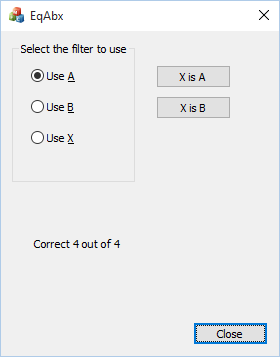
Now run the program and test until you are satisfied.
Features
- A nice simple MFC based GUI for windows
Project Samples
Follow EqABX
Other Useful Business Software
AI-generated apps that pass security review
Retool lets you generate dashboards, admin panels, and workflows directly on your data. Type something like “Build me a revenue dashboard on my Stripe data” and get a working app with security, permissions, and compliance built in from day one. Whether on our cloud or self-hosted, create the internal software your team needs without compromising enterprise standards or control.
Rate This Project
Login To Rate This Project
User Reviews
Be the first to post a review of EqABX!
