


| Name | Modified | Size | Downloads / Week |
|---|---|---|---|
| Parent folder | |||
| CrashSetup-v1.05.exe | 2026-10-25 | 217.1 MB | |
| SHA256SUMS.txt | 2026-10-25 | 88 Bytes | |
| CrashRecomp v1.05_ a single .exe, ultrawide, no shader stutter, updates from the launcher source code.tar.gz | 2026-10-25 | 3.3 MB | |
| CrashRecomp v1.05_ a single .exe, ultrawide, no shader stutter, updates from the launcher source code.zip | 2026-10-25 | 3.5 MB | |
| README.md | 2026-10-25 | 12.6 kB | |
| Totals: 5 Items | 223.9 MB | 0 | |
What's new in v1.05
v1.05 is a single
.exe. Download onlyCrashSetup-v1.05.exe(207 MB) and run it. There is no zip to extract and nothing else to install (no Visual Studio, Python or Git), and it works offline. Up to v1.04 the release was a zip withCrashSetup.exeinside; that zip is gone.
Ultrawide: 21:9, 32:9 and 16:10 with Hor+
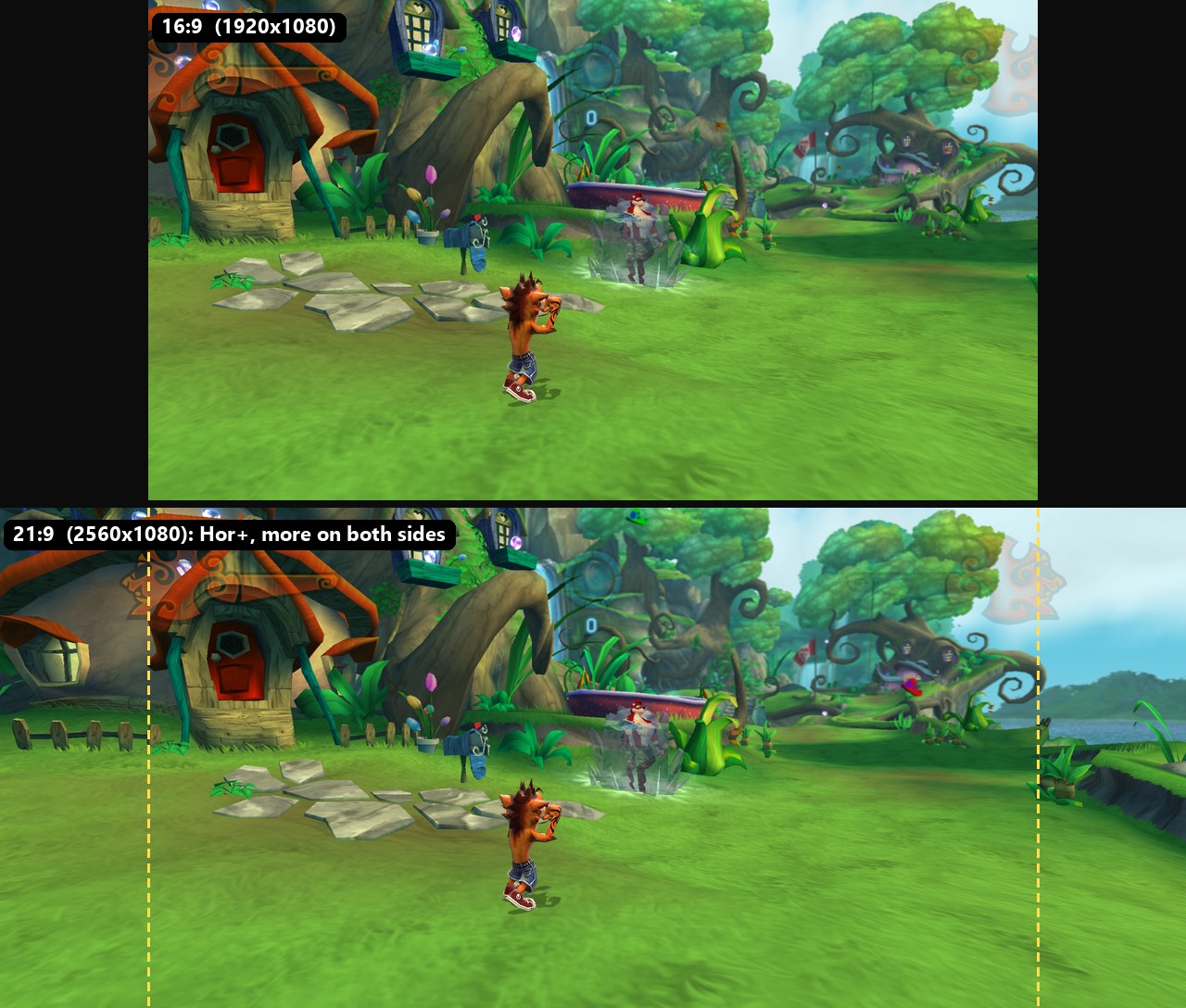
The game was made for 16:9. On a wider screen it now shows more of the world on both sides with the same vertical view (Hor+), instead of stretching the picture or cutting the top and bottom. Above: the same moment in the first level's village at 1920x1080 and at 2560x1080. Crash's whole house on the left and the lake on the right only show up at 21:9.
- 21:9 (2560x1080, 3440x1440, 3840x1600...), 32:9 (3840x1080, 5120x1440...) and 16:10 (1280x800 on the Steam Deck, 1920x1200...). SETTINGS > VIDEO > ASPECT RATIO, also in the launcher. AUTO follows your monitor.
- The HUD and the menus stay at 16:9 in the middle, where the game placed them, so nothing ends up in the corners of your eyes. HUD AT 16:9 = OFF moves the HUD corners to the edges of the screen instead.
- Menu backgrounds fill the screen, and the videos play at 16:9 between black bars.
- The game's culling uses the wider view too, so nothing pops in or out at the old 16:9 edge.
- The window opens at your aspect ratio and fits your monitor.
Now a single installer .exe
CrashSetup-v1.05.exeis the whole install in one file: our code, the build tools (clang, CMake, Ninja, Python) and the libraries (FFmpeg, FSR, DXC, DLSS), compressed inside it. It works offline. Only the optional subtitles and HD AI Remaster are downloaded.- It asks for your game folder first and checks that it is the supported Xbox 360 dump.
- You choose where to install (default
%LOCALAPPDATA%\Programs\Crash of the Titans Definitive Edition, any drive). It shows the space needed and free. At the end it offers a desktop shortcut and a Start menu entry. - The install folder holds only what you play with:
CrashLauncher.exe,CrashOTTDE.exe, the DLLs,game\,userdata\andmods\. The project it is built from stays inCrashRecomp\inside it. - DLSS is installed only on a GPU that runs it, as NVIDIA's own check says. On other GPUs the options offer FSR 3.1, and DLSS shows greyed out as "DLSS (REQUIRES NVIDIA RTX)".
No more shader stutter
The first time an effect appeared, the game used to stop and build it: ~34 ms each with a cold driver cache, about 2.9 s in total in the village with a 1.6 s worst frame, and all of it again after every driver update.
- Each shader part is now compiled once, in the background, then linked in under 1 ms when it is drawn. An optimized version is built on a low-priority thread and takes over when it is ready (Vulkan graphics pipeline libraries).
- The pipelines used in earlier sessions are rebuilt at start. "PREPARING SHADERS... n%" shows only when that takes more than 3 seconds, for example after a driver update.
- Vulkan 1.3 dynamic state cut the shader programs needed in the village from 86 to 50.
- Result on an RTX 5080: 0 hitches after the level loads in the village and in level 3, with a cold cache, after a driver update and with a warm cache, and the same frame rate as before.
- GRAPHICS > SHADER COMPILATION: ASYNCHRONOUS (the default), SYNCHRONOUS (the old way) or AGGRESSIVE (skips only a few colour-only draws while they compile).
Updates from the launcher
The launcher now has UPDATE in its menu. When a new release is out, it shows UPDATE (v1.xx) in gold.
One click downloads only the new installer .exe (no zip, no Git, no browser), checks it against the
release's SHA-256 and installs it over the same folder with the options you have. Your saves, options and
mods stay, and the new version is built from the copy of your game that is already there. At the end, PLAY.
This starts with v1.05: from the next release on, a v1.05 install updates itself with one click.
Fixes
- Vulkan: a draw's uploads are held across submissions. This fixes a case where data could be reused too early (found while investigating black flicker on Intel iGPUs, issue [#3]).
- New GPU safe mode and diagnostics (
[video] gpu_safe_mode,gpu_diagnostics). If you see black frames,tools\gpu_report.batin the repository runs each safe mode in turn and packs the logs for a report. - The swap chain is no longer recreated every frame on drivers that report it as suboptimal.
- The game window answered one of Windows' size messages with an undefined value. It now gives the default answer.
- Subtitles no longer fail to install when the installer sits in the same folder as a newer release's
SHA256SUMS.txt. - A clean install no longer prints compiler warnings or XenonRecomp's harmless "ERROR: __savevmx" lines.
Requirements
Windows 10/11 x64, a GPU with Vulkan 1.3 and an up-to-date driver (for example NVIDIA GTX 900 or newer, AMD RX 400 or newer, Intel Iris Xe / Arc), your Xbox 360 game files, and about 4.3 GB of free space (1.3 GB + the 3 GB copy of your game).
Known issues
- Windows SmartScreen may warn about
CrashSetup-v1.05.exebecause it isn't code-signed. Choose "More info", then "Run anyway". - Linux / Steam Deck via Proton isn't verified yet.
Install: download only CrashSetup-v1.05.exe, run it, choose your game folder and where to install,
and click INSTALL (see the README). Coming from v1.04 or older (the zip): install v1.05 with the new
installer. To keep your saves and settings, copy the old dist\userdata folder over the new install's
userdata\. The optional subtitles and HD AI Remaster downloads are unchanged and stay on the
v1.0 release. The installer fetches them from
there.
Novidades da v1.05
A v1.05 é um
.exesó. Baixe apenas oCrashSetup-v1.05.exe(207 MB) e abra. Não tem zip para descompactar nem mais nada para instalar (nada de Visual Studio, Python ou Git), e funciona offline. Até a v1.04 a release era um zip com oCrashSetup.exedentro; esse zip não existe mais.
Ultrawide: 21:9, 32:9 e 16:10 com Hor+
O jogo foi feito para 16:9. Numa tela mais larga ele agora mostra mais do mundo dos dois lados, com a mesma visão na vertical (Hor+), em vez de esticar a imagem ou cortar em cima e embaixo. Acima: o mesmo momento na vila da primeira fase em 1920x1080 e em 2560x1080. A casa do Crash inteira à esquerda e o lago à direita só aparecem em 21:9.
- 21:9 (2560x1080, 3440x1440, 3840x1600...), 32:9 (3840x1080, 5120x1440...) e 16:10 (1280x800 no Steam Deck, 1920x1200...). SETTINGS > VÍDEO > PROPORÇÃO, também no launcher. AUTO segue o seu monitor.
- O HUD e os menus ficam em 16:9 no meio, onde o jogo os colocou, então nada vai parar no canto do olho. HUD EM 16:9 = DESLIGADO leva os cantos do HUD para as bordas da tela.
- Os fundos dos menus preenchem a tela, e os vídeos passam em 16:9 entre faixas pretas.
- O culling do jogo também usa a visão mais larga, então nada some ou aparece na borda antiga do 16:9.
- A janela abre na proporção escolhida e cabe no seu monitor.
Agora um único .exe de instalação
- O
CrashSetup-v1.05.exeé a instalação inteira num arquivo: o nosso código, as ferramentas de compilação (clang, CMake, Ninja, Python) e as bibliotecas (FFmpeg, FSR, DXC, DLSS), comprimidos dentro dele. Funciona offline. Só as legendas e o HD AI Remaster opcionais são baixados. - Ele pede primeiro a pasta do jogo e confere se é o dump suportado do Xbox 360.
- Você escolhe onde instalar (padrão
%LOCALAPPDATA%\Programs\Crash of the Titans Definitive Edition, qualquer disco). Ele mostra o espaço necessário e o livre. No fim, oferece um atalho na área de trabalho e uma entrada no menu Iniciar. - A pasta instalada tem só o que você usa para jogar:
CrashLauncher.exe,CrashOTTDE.exe, as DLLs,game\,userdata\emods\. O projeto de onde ele é montado fica emCrashRecomp\, dentro dela. - O DLSS só é instalado numa placa que o roda, segundo a checagem da própria NVIDIA. Nas outras, as opções oferecem o FSR 3.1, e o DLSS aparece apagado como "DLSS (REQUER NVIDIA RTX)".
Sem engasgo de shader
Na primeira vez que um efeito aparecia, o jogo parava para montá-lo: ~34 ms cada com o cache do driver frio, cerca de 2,9 s no total na vila com o pior quadro de 1,6 s, e tudo de novo a cada atualização do driver.
- Cada parte de shader agora é compilada uma vez, em segundo plano, e ligada em menos de 1 ms na hora de desenhar. Uma versão otimizada é montada numa thread de baixa prioridade e entra quando fica pronta (graphics pipeline libraries do Vulkan).
- As pipelines usadas nas sessões anteriores são refeitas na abertura. "PREPARANDO SHADERS... n%" só aparece quando isso leva mais de 3 segundos, por exemplo depois de uma atualização do driver.
- O estado dinâmico do Vulkan 1.3 reduziu de 86 para 50 os programas de shader necessários na vila.
- Resultado numa RTX 5080: 0 engasgos depois que a fase carrega, na vila e na fase 3, com o cache frio, depois de uma atualização do driver e com o cache quente, e o mesmo FPS de antes.
- GRÁFICOS > COMPILAÇÃO DE SHADERS: ASSÍNCRONA (o padrão), SINCRONIZADA (o jeito antigo) ou AGRESSIVA (pula só alguns desenhos de cor enquanto compilam).
Atualização pelo launcher
O launcher agora tem ATUALIZAR no menu. Quando sai uma release nova, ele mostra ATUALIZAR (v1.xx) em
dourado. Um clique baixa só o .exe do instalador novo (sem zip, sem Git, sem navegador), confere o
SHA-256 dele com o da release e instala por cima na mesma pasta, com as opções que você já tem. Seus saves,
opções e mods continuam, e a versão nova é montada a partir da cópia do seu jogo que já está lá. No fim,
JOGAR.
Isso começa na v1.05: a partir da próxima release, uma instalação v1.05 se atualiza com um clique.
Correções
- Vulkan: os uploads de um desenho ficam reservados entre os envios. Isso corrige um caso em que os dados podiam ser reaproveitados cedo demais (achado investigando a tela preta piscando em GPUs Intel integradas, issue [#3]).
- Novo modo seguro de GPU e diagnóstico (
[video] gpu_safe_mode,gpu_diagnostics). Se aparecerem quadros pretos, otools\gpu_report.batdo repositório roda cada modo seguro por vez e empacota os logs para o relato. - A swap chain não é mais recriada a cada quadro nos drivers que a marcam como subótima.
- A janela do jogo respondia a uma das mensagens de tamanho do Windows com um valor indefinido. Agora dá a resposta padrão.
- As legendas não falham mais na instalação quando o instalador está na mesma pasta que o
SHA256SUMS.txtde uma release mais nova. - Uma instalação do zero não mostra mais avisos do compilador nem as linhas inofensivas "ERROR: __savevmx" do XenonRecomp.
Requisitos
Windows 10/11 x64, uma placa de vídeo com Vulkan 1.3 e driver atualizado (por exemplo NVIDIA GTX 900 ou mais nova, AMD RX 400 ou mais nova, Intel Iris Xe / Arc), os arquivos do seu jogo do Xbox 360 e cerca de 4,3 GB livres (1,3 GB + a cópia de 3 GB do seu jogo).
Problemas conhecidos
- O Windows SmartScreen pode avisar sobre o
CrashSetup-v1.05.exeporque ele não é assinado. Escolha "Mais informações" e depois "Executar assim mesmo". - Linux / Steam Deck pelo Proton ainda não foi verificado.
Instalação: baixe só o CrashSetup-v1.05.exe, abra, escolha a pasta do jogo e onde instalar, e clique
em INSTALAR (veja o README). Vindo da v1.04 ou anterior (o zip): instale a v1.05 com o instalador novo.
Para manter seus saves e opções, copie a pasta dist\userdata antiga por cima da userdata\ da instalação
nova. Os downloads opcionais de legendas e do HD AI Remaster não mudaram e continuam na
release v1.0. O instalador os baixa de lá.
