YTPlaylistSync Code
A mobile app to sync your local playlistwith your playlists on youtube
Brought to you by:
marinos33

| File | Date | Author | Commit |
|---|---|---|---|
| app | 2022-11-16 |
 Marinos33
|
[4801af] added permission storage for 11+ |
| gradle | 2022-10-28 |
Marinos33
|
[e5b123] init config |
| .gitignore | 2022-10-28 |
Marinos33
|
[f367d8] Update .gitignore |
| LICENSE | 2022-11-16 |
 Marinos33
|
[73d95d] Create LICENSE |
| README.md | 2022-11-16 |
Marinos33
|
[d8a8f5] Update README.md |
| build.gradle | 2022-11-01 |
Marinos33
|
[64051a] added db + coruoutine + di hilt |
| gradle.properties | 2022-10-28 |
Marinos33
|
[e5b123] init config |
| gradlew | 2022-10-28 |
Marinos33
|
[e5b123] init config |
| gradlew.bat | 2022-10-28 |
Marinos33
|
[e5b123] init config |
| settings.gradle | 2022-10-28 |
Marinos33
|
[e5b123] init config |
We are all listening to music at some points. You are probably using Spotify, Youtube premium or other known app to listen your favorite songs.
But what if you could use a open-source application which doesn't require any account or personal information and can also save you from using your precious mobile data.
This app is designed to allow you to download your playlists along with their metadata from Youtube and to keep them up-to-date.
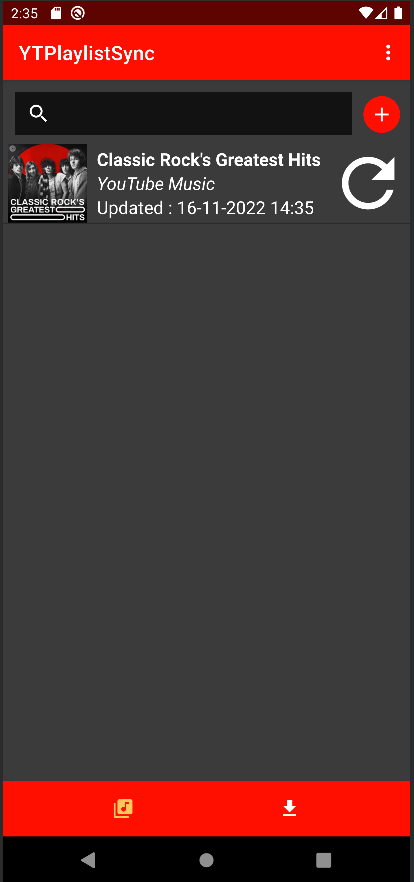
It is made of two screens with simple features.
Here, you can add your playlists and click on the refresh button to download the newly added songs (By default, the already downloaded music won't be download again.). To remove a playlist, swipe to the left and click on the trash button.
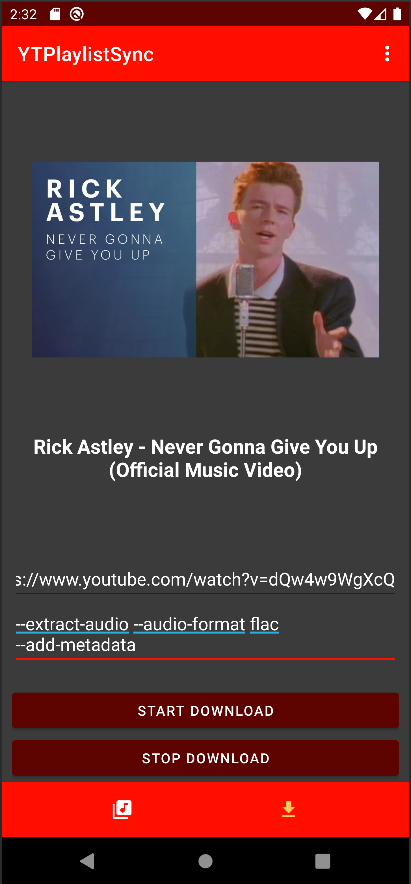
Here, you can download anything with a custom command which will be used to download the content at the inputted URL (for more informations about commands, see the technical section).
This app uses yt-dlp to download the content and ffmpeg to execute the conversions thanks to youtubedl-android package.
So about the command on the download screen, you can input anything that can be used with yt-dlp, except there is two options that are not overridable:
The output will always download the content in the download directory. This is because you don't want to write the full path of android folders. So don't use the command "-o"
Non-ascii characters will always be removed from the filename to prevent error. So the "--restrict-filenames" command will always be applied.
When trying to download or update a playlist, the app will sometimes tell you that It didn't work correctly but in fact everything goes well. It's because yt-dlp is not always updated with the changes from its supported web sites and cannot handle every situation perfectly cause there is too many. By the way, this app was designed to work with Youtube. I don't know what will be the behavior with other supported site of yt-dlp, you may encounter some fortunate (or not) surprise.
If you find any bugs or have any request about an enhancement for the software don't hesitate to add in the Issues tab and I will be glad to try to answer your request.
Contributions are always welcome!
You can open a pull request if you want to help me improve this app.


