
Menu
▾
▴

pipe rule
pipe | ||
|
or
||
view.type = |
or
view.type = ||
This element has no parameters and does not place any interactive or information on the screen. What it does is add a second view on the screen. All elements placed in the command file after this element are placed on the second view. With many elements in the file, this can create a verry tall window. the pipe element makes the window wider, but more compact. the double pipe, || ads a virticle line at the view boundry.
Only use this type once in a file. Yoshi will ignore a second pipe type request.
example:
*.title = Welcome to Yoshi
#*.look = no-border
#*.look = Bordered
#*.look = Floating
#*.look = Modal
#*.x = 50
#*.y = 260
*.bgcolor = 255,232,181

chk.type = checkbox
chk.default = 1
chk.label = This is the first checkbox prompt.
chk.tooltip = Yes, it’s that simple!

chk2.type = checkbox
#chk2.default = 1
chk2.label = This is the second checkbox prompt.
chk2.tooltip = Yes, it’s that simple!

chk3.type = checkbox
chk3.default = 1
chk3.label = This is the third checkbox prompt.
chk3.tooltip = Yes, it’s that simple!

chk4.type = checkbox
chk4.default = 1
chk4.label = This is the fourth checkbox prompt.
chk4.tooltip = Yes, it’s that simple!

view.type = |
#view.type = ||

radio.type = radiobutton
radio.label = How would you like your coffee?
radio.option1 = Black
radio.option2 = With milk
radio.option3 = With milk and sugar
radio.option4 = Only sugar, no milk
radio.default = option1
radio.tooltip = Please make your selection.
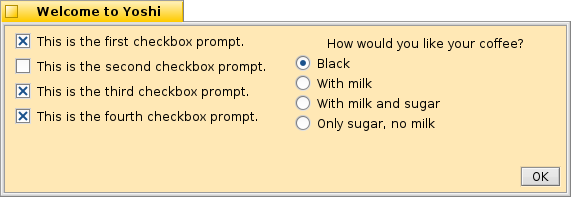
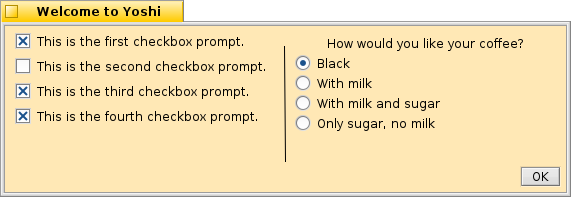
Single and double pipe windows
rule --
--
rule.type = --
This element has no parameters and does not place any interactive or information on the screen. What it does is add a horizontal rule for a visual separation between sections.
example:
*.title = Welcome to Yoshi
#*.look = no-border
#*.look = Bordered
#*.look = Floating
#*.look = Modal
#*.x = 50
#*.y = 260
*.bgcolor = 255,232,181

chk.type = checkbox
chk.default = 1
chk.label = This is the first checkbox prompt.
chk.tooltip = Yes, it’s that simple!

chk2.type = checkbox
#chk2.default = 1
chk2.label = This is the second checkbox prompt.
chk2.tooltip = Yes, it’s that simple!

chk3.type = checkbox
chk3.default = 1
chk3.label = This is the third checkbox prompt.
chk3.tooltip = Yes, it’s that simple!

chk4.type = checkbox
chk4.default = 1
chk4.label = This is the fourth checkbox prompt.
chk4.tooltip = Yes, it’s that simple!

rule.type = --

radio.type = radiobutton
radio.label = How would you like your coffee?
radio.option1 = Black
radio.option2 = With milk
radio.option3 = With milk and sugar
radio.option4 = Only sugar, no milk
radio.default = option1
radio.tooltip = Please make your selection.
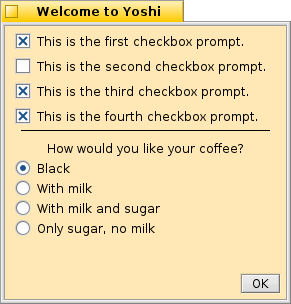
A window with a horizontal rule

