
Menu
▾
▴

Window
Setting up the Window:
yoshi reads a command file to set-up the Window and all the elements. This is the part of the command file for a Window.
*.title = Welcome to Yoshi
#*.look = no-border
#*.look = Bordered
#*.look = Floating
#*.look = Modal
#*.x = 50
#*.y = 260
*.bgcolor = 255,232,181
Note that there is a space on either side of the "=" character.
"*" indicates that this is a Window setting. The "#" is used to comment out , make yoshi ignore, the setting.
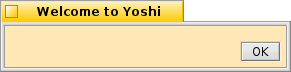
.title will change the Window title ( the default is "Yoshi").
.look has five modes, the default is "Titled" and there is no setting for this look as it is the default.
- no-border - Shows the view without any border or tab. This adds a cancel button to the view.
- Bordered - Simiilar to no-border, but a thin dark border line is added.
- Floating - Simiilar to Titled, but the tab is smaller and the close button has less emphasis
- Modal - Simiilar to Bordered and no-border but a normal window border is used.
.bgcolor Changes background the color of the window. .bgcolor = r,g,b
.x The initial horizontal location of the Window from the left edge of the screen in pixels.
.y The initial vertical location of the Window from the top edge of the screen in pixels.

