WMS for heavy industries Wiki
WMS/YMS designed for heavy industries
Status: Alpha
Brought to you by:
engitex

This WMS software has been designed for the needs of heavy industries operating warehouses. The first beta-user of the software was steel products distributor who owns a yard with 20+ "bins" (a.k.a. zones) and a gantry crane.

The key features of the software that helped our first customer optimize loading/unloading operations in his yard are:
Additionally, there are extra (optional) modules:
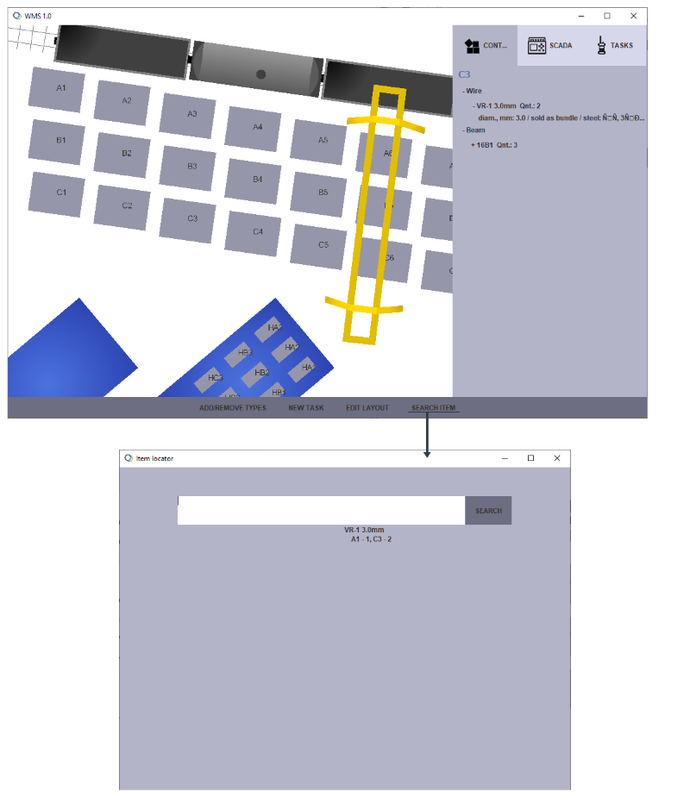
The main window (manager's app) consists of the LAYOUT which is editable and schematically shows the yard/warehouse/storage site with clickable "bins" (zones). On the right there are 3 tabs: CONTENTS, SCADA and TASKS. Content tab shows the items currently stored in the chosen bin. If there are 2 types of wire and 1 type of rebar in the bin, the contents will be shown in a tree-like view with top-level categories (Wire and Beam). Tasks tab shows all tasks created by the manager in the current session. Tasks statuses are updated in real-time.
The three optional modules are not included in the demo and depend heavily on the available hardware, e.g. gantry crane manufacturer, PTZ camera, etc. With this in mind, these modules are made highly customizable.
The purpose of the demo version is to give a feeling of the GUIs and show the task dispatching logic. Other limitations of the demo are listed here: [Demo version].
Check the [Customizations] page for the list of the main customizable settings that have to be set on a case-by-case basis.
Check the [Databases] page to see remarks on database interface.
The software is 100% "on-premises", no cloud-based servers are involved. For better reliability and security, the software can be used with LAN instead of internet.
WMS main manager's UI allows to see the stored items in a chosen bin/zone as well as to search for an item across all bins. The UI reads and writes stock data to the database. Currently SQL database is assumed by default but the database interface class is subject to customizations.
In this screen the contents of C3 bin are shown in the CONTENTS tab. A user can also use SEARCH ITEM option to find all bins where the given type is stored.
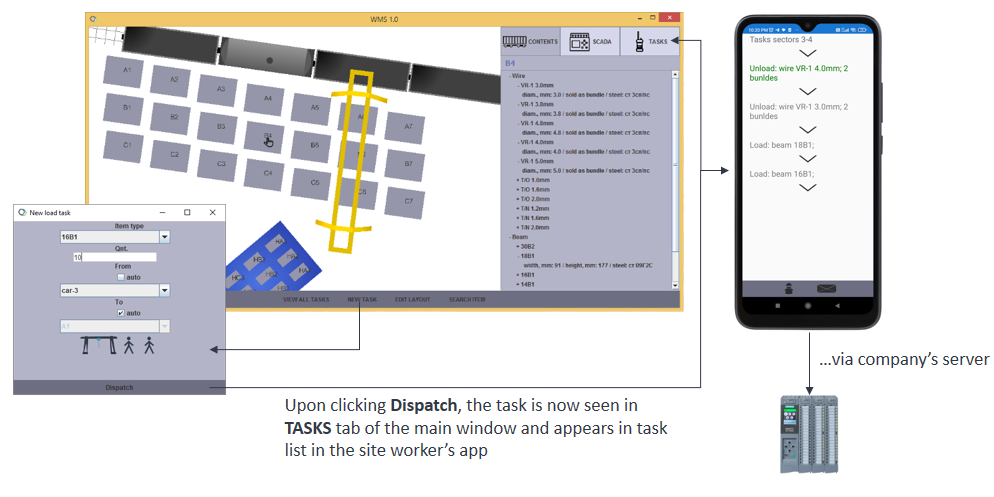
Thus, when a new task is created by a manger, this task is immediately dispatched to a chosen yard worker according to the task distribution policy. The worker will see the task in his task list in the Android app. Then the worker can set task status (e.g. started, step i finished, task finished) and send text messages regarding the task.
If some machinery (e.g. gantry crane) is involved, it will be automatically moved to the location where loading/unloading will take place and then will be automatically moved to the destination. The WMS server (manager's app) communicates the required movements to the crane's PLC.
The desktop (manager's) app has been developed in Java, thus the corresponding Java classes have to be started. To run the user management app use the following command:
java org.engitex.WMS.Users.Users
For testing purposes we have included a few dummy users contained in the users.db
To run the main app:
java org.engitex.WMS.WMS
See [Workflow] page for more.
Wiki: Customizations
Wiki: Databases
Wiki: Demo version
Wiki: Workflow

