How can we add support for expr-fill-color?
Pure Browser based Visualisation for PLCs
Status: Beta
Brought to you by:
benkfra

Hi guys, thanks for this awesome project you created!
We found out that some of the colors are not interpreted by WebVisu.
As we found out, the element "expr-fill-color" is not interpreted.
Here is an XML snippet:
        <element type="simple">
                <simple-shape>rectangle</simple-shape>
                <elem-id>1</elem-id>
                <center>145,70</center>
                <line-width>0</line-width>
                <has-frame-color>true</has-frame-color>
                <has-inside-color>true</has-inside-color>
                <frame-color>0,0,0</frame-color>
                <frame-color-alarm>0,0,0</frame-color-alarm>
                <fill-color>0,255,0</fill-color>
                <fill-color-alarm>255,0,0</fill-color-alarm>
                <expr-fill-color>
                        <expr>
                                <var>.dwFarbe_F1</var>
                        </expr>
                </expr-fill-color>
                <text-align-horz>center</text-align-horz>
                <text-align-vert>center</text-align-vert>
                <font-height>-19</font-height>
                <font-height-point-size>14</font-height-point-size>
                <font-weight>700</font-weight>
                <font-italic>false</font-italic>
                <font-underline>false</font-underline>
                <font-strike-out>false</font-strike-out>
                <font-char-set>0</font-char-set>
                <text-id>5</text-id>
                <font-name>Arial</font-name>
                <font-color>0,0,0</font-color>
                <enable-text-input>false</enable-text-input>
                <text-display>
                        <expr>
                                <var>.rlF1</var>
                        </expr>
                </text-display>
                <text-format><![CDATA[Feuchte:| || || || || |%3.1f| |%%rF]]></text-format>
                <hidden-input>false</hidden-input>
                <rect>10,50,281,91</rect>
        </element>
At the end of the file are the variables:
<variable name=".dwFarbe_F1">4,418284,4,5</variable>
Therefore we wanted to add this functionality, but it its a unclear how/when the variables are interpreted? And the rgb value needs to be somehow converted.
A few hints would be greatly appreciated.
If we get it working we would create a pull-request to give something back..


I will add some info that we already gathered:
The parsing most likely needs to be added in codesys.pp.js at line 741.
I feel like this case is not supported yet, so we could read the variables from xml and look for the correct one at this place, would this work?
I currently have no running system here, but I guess this should be the way:
Hi vali dan,
Thank you for your efforts to contribute a solution to the problem you found.
Unfortunately it is not that easy to implement.
The parsing is only the first half; the continuous evaluation of the variable and the drawing is the other half.
First of all: when can such an expression be specified? How can we determine wether we should use the constant "fill-color" or the expression "expr-fill-color"?
Then we have to pass the expression "expr-fill-color" and probably also "expr-fill-color-alarm" ??? additionally to the register function "registerSimpleShape". This one puts this via "newSimpleShape" into the global array "drawObjects". Of course the two expressions have to be saved there as well.
And finally the current value of the variables must be determined in "drawAllObjects" by calling "evalExpression".
This is because the variable can change its value all the time and not only when the shapes are read for the first time.
Can you provide me with a complete test project? Maybe I can give it a try.
cu
Frank
Hi Frank
Thank you very much for taking your time to answer our question, we really appreciate this.
We spent some time yesterday and figured out the drawing part of it as well.
Regarding your question, the
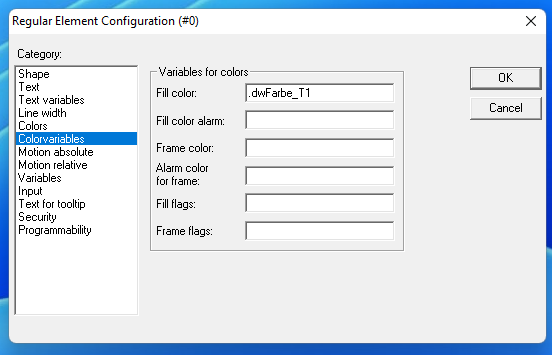
expr-*-color- that always reference variables, are used when one adds variable names to this dialog in CoDeSys Element Configuration - Colorvariables:We only implemented the "Fill Color" variable for now, as this currently suffices.
The parsing code used (codesys.pp.js, inserted at line 742), stores "name: " and then the variable name inside the fill_color, when expr-fill-color is present:
For the dynamic updating we added this code in drawing.pp.js at line 1271. The color value must be converted from dword to rgb(red,green,blue). The value e.g. for yellow is 65535.
Similarly, the code could be extended for the other expr- values.