Virtual MIDI Piano Keyboard Wiki
Virtual MIDI controller for Linux, Windows and OSX
Brought to you by:
plcl


The purpose of alphanumeric computer keyboards is to make it possible to enter text data into programs. In the case of VMPK, instead of text input the keys are used to produce MIDI notes emulating the function of musical keyboards. The usage of computer alphanumeric keyboards in this way is not the intended one, nor it is orthodox, therefore it should not be expected that in VMPK the alphanumeric keyboard will behave as in other programs. For example: in the main window, no control accepts the focus, nor is it possible to change the focus between the different controls located on the toolbars using the Tab key. However, most of the functions (such as changing the octave, the instrument, or the MIDI channel) are accessible via keyboard shortcuts, which are also configurable.
Entering text data requires computer alphanumeric keyboards to be adapted to the user's language, as there are different alphabets in addition to the Latin alphabet. Even within the same alphabet there are different distributions of the characters, such as QWERTY, AZERTY, and QWERTZ. In many languages, there are some keys called "dead" that when pressed do not produce any character but affects the next one. All of the above multiplies the number of possibilities and limitations that must be taken into account when transforming keystrokes into musical notes. An alternative is to use low-level key codes instead of alphabetic signs as the source of the note conversion map. The codes sent by the keyboard hardware and managed by the operating system driver are called scancodes and are the lowest rung on which a program can rely to process keystrokes on the computer keyboard.
Two types of translation maps can be used in VMPK:
In all cases the translation maps are XML files that can be edited in any operating system with the simple text editor that the user prefers. For example, in Windows, you can use notepad.exe, or even better: Notepad++.
This is the structure of the low-level translation map:
    <?xml version="1.0" encoding="UTF-8"?>
    <!DOCTYPE rawkeyboardmap>
    <rawkeymap version="1.0">
        <mapping keycode="11" note="30"/>
        <mapping keycode="12" note="32"/>
        <mapping keycode="13" note="34"/>
        <mapping keycode="15" note="37"/>
        <mapping keycode="16" note="39"/>
        ...
        <mapping keycode="60" note="26"/>
        <mapping keycode="61" note="28"/>
    </rawkeymap>
The "note" attribute corresponds to the MIDI note, and the "keycode" corresponds to the key number (scancodes on Windows, keycodes on X11 and macOS).
There is an editor window in VMPK that also allows you to edit translation maps without leaving the program itself, but this editor has a drawback: it is oriented to MIDI notes, and for this reason it is not possible to assign two different keys to the same note. This is not a problem when editing the XML file using a text editor, since the XML file is key oriented. Several different keys can be translated to the same MIDI note. What is not possible is to translate a key to several notes.
There are several programs that are useful for obtaining the key codes and planning new translation maps.
In the case of Linux, VMPK does not use the scancodes that are produced by the keyboard drivers directly, but uses the so-called 'keycodes' of the X11 keyboard driver, managed through the XCB library. A program to obtain them interatively is 'xev':
    $ xev

    KeyPress event, serial 40, synthetic NO, window 0x6e00001,
        root 0x5ec, subw 0x0, time 12670217, (891,983), root:(959,1140),
        state 0x10, keycode 51 (keysym 0xe7, ccedilla), same_screen YES,
        XLookupString gives 2 bytes: (c3 a7) "ç"
        XmbLookupString gives 2 bytes: (c3 a7) "ç"
        XFilterEvent returns: False
In the previous example, the keycode 51 corresponds to the "Ç" key on the Spanish keyboard. This technique is suitable for obtaining the code for one or a few keys, but to plan a complete layout it is much more practical to print a complete keyboard that includes the key codes. This is possible through the xkbprint program:
    $ xkbprint -color -kc :0 - | ps2pdf - > xkbprint.pdf

    $ xkbprint -kc -lc es_ES :0 - | ps2pdf - > pc105mono.pdf
The last command produces the following output in PDF format, that you can print:

Another graphic and interactive utility is xkeycaps
Windows scan codes, from Wikimedia commons:
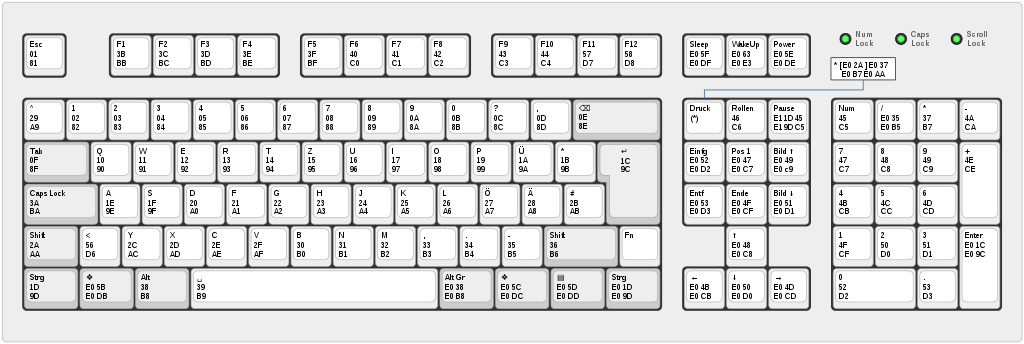
This is an useful web page: http://kbdlayout.info/kbdsp
Another utility: kbdedit
The KeyCodes utility is also available in the AppStore: https://apps.apple.com/us/app/key-codes/id414568915

