Server Dataflow
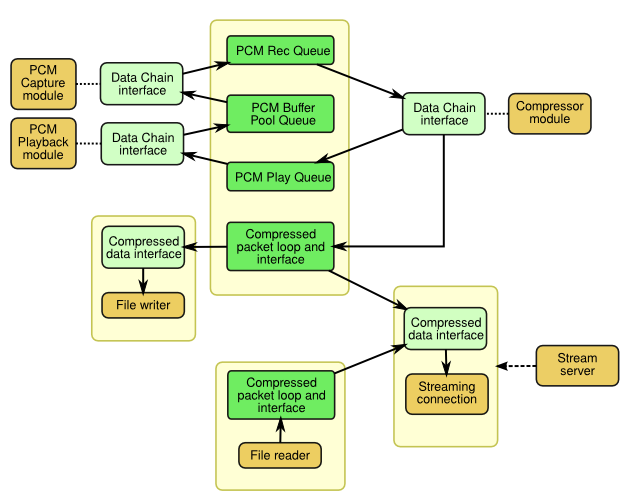
The (informal) diagram below shows the planned flow of data among various objects in the server software. This is a tentative, high-level overview. It lacks detail, and may change later.
The colours of the elements are as follows:
- Green: Data structures holding buffers, compressed audio packets, etc.
- Yellow(ish): "Work" objects which each handle a particular kind of work, such as sound capture or compression.
- Pale Blue-Green: "Interface" objects, which are owned by another object and provide access to some of its functionality in a generic way.
The line styles of the connectors are as follows:
- solid arrow: Shows the flow of (non-control) data between objects, and the direction of the flow.
- dotted: Shows the association of an interface object to an object.
- dashed arrow: Used to indicate that an object creates instances of another object or set of objects as the program runs.
The pale boxes behind/around other elements indicate items that are grouped together in some way, such as being part of the same module or placed within the same larger structure.
Interface Objects
- Data Chain Interface: These provide an interface for passing data such as PCM buffers or compressed audio packets from one object/module to another. They generally have an input, from which items are pulled before use, and an output to which items are sent afterward.
- Compressed data interface: For grabbing (copies of?) packets from a packet loop. Provides a means of specifying the position in the loop to draw from. Also provides access to additional data such as metadata needed for streaming or file output. Can be used to retrieve packets from the loop without removing them, and more than one such interface can access the same loop.
Data Objects
- PCM Rec Queue: Holds PCM buffers filled by the capture module, to be passed to the compressor module.
- PCM Play Queue: Holds PCM buffers to be played after the compressor module is done with them. May be bypassed, in which case the compressor module would push to the buffer pool instead.
- PCM Buffer Pool Queue: Holds PCM buffers that are ready to be refilled by the capture module after they've passed through the other modules in the PCM loop.
- Compressed packet loop and interface (x2): Holds compressed packets from either a file (via a File reader) or the compressor module. The loop holds enough packets to cover the maximum time-shift. Also keeps metadata and information from the compressor needed for streaming or file output.
"Work" Objects
- PCM Capture Module: Captures PCM audio from the sound hardware.
- PCM Playback Module: Plays PCM audio with the sound hardware, for local monitoring. May be bypassed.
- Compressor Module: Compresses PCM audio to create compressed audio packets.
- File Writer: Writes compressed audio to an audio file. Implementation may depend on the implementation of the compressor module being used.
- File Reader: Reads compressed audio from a file, outputting compressed audio packets.
- Streaming Connection: Manages one connected client, processing commands from the client and delivering compressed audio to it. For now, a crude non-standard protocol will work... following an established standard can come later.
- Stream Server: Accepts and cleans up client connections, creating/destroying the corresponding Streaming Connection objects (and related interface objects).
Typical Data Flow
The flow of (mainly audio) data through the server is best considered in two parts: The PCM loop, consisting of the capture, compression, and local playback modules; And the compressed data section which includes the packet loops for buffering and time-shifting, the file reading and writing modules, and the streaming modules.
The PCM Loop
The flow through the PCM loop can vary slightly depending on whether local monitoring is used. When it is, things proceed as follows:
- The PCM Capture Module retrieves an unused buffer from the PCM Buffer Pool Queue, fills the buffer with captured PCM audio data from the sound device, then pushes it into the PCM Rec Queue.
- The Compressor module retrieves the buffer from the PCM Rec Queue, and creates a compressed audio packet. It pushes the original PCM buffer into the PCM Play Queue, and puts the new compressed packet into the main Compressed packet loop and interface.
- The PCM Playback Module gets the PCM buffer from the PCM Play Queue, plays it on the sound device, then pushes it to the PCM Buffer Pool Queue.
- Process repeats from step 1
The sequence is the same if local monitoring is not used, except that the Compressor module pushes the PCM buffer directly to the PCM Buffer Pool Queue instead of the PCM Play Queue, and the PCM Playback module does nothing.
The Compressed Data Section
The heart of the compressed data section is the main Compressed packet loop and interface, which holds enough compressed audio packets to cover the maximum time-shift period. If it holds 15 minutes worth of packets, then streaming or recording of audio from up to 15 minutes ago can be performed. Once the packet loop is full, new packets replace the oldest ones in the loop, maintaining the same total amount of audio data.
There can be any number of Compressed data interface objects linked to the packet loop at any time, each associated with a Streaming connection or a File writer. These can access packets from the loop in sequence, beginning with any packet from the oldest to the most recent in the loop. This allows recording or streaming of audio beginning from any time within the duration covered by the compressed packet loop.
Additional Compressed packet loop and interface objects can exist, associated with open files (from previous recordings) that are being played back to connected clients. In these cases, the Compressed data interface associated with the relevant connection(s) is linked to that additional compressed packet loop rather than the main one.
The Compressed packet loop and interface objects also keep track of metadata and any additional information (besides the compressed audio packets themselves) that is needed for decoding the stream, and provide it on demand (eg. codebooks for Vorbis).



