
Menu
▾
▴


Tree [117b87] main / History
| File | Date | Author | Commit |
|---|---|---|---|
| README.md | 2025-11-06 |
 abrakadabra85-eng
|
[117b87] Update README.md |
Read Me
⚡ Trim Enabler — Enable TRIM on Third-Party SSDs for macOS
❓ What is Trim Enabler?
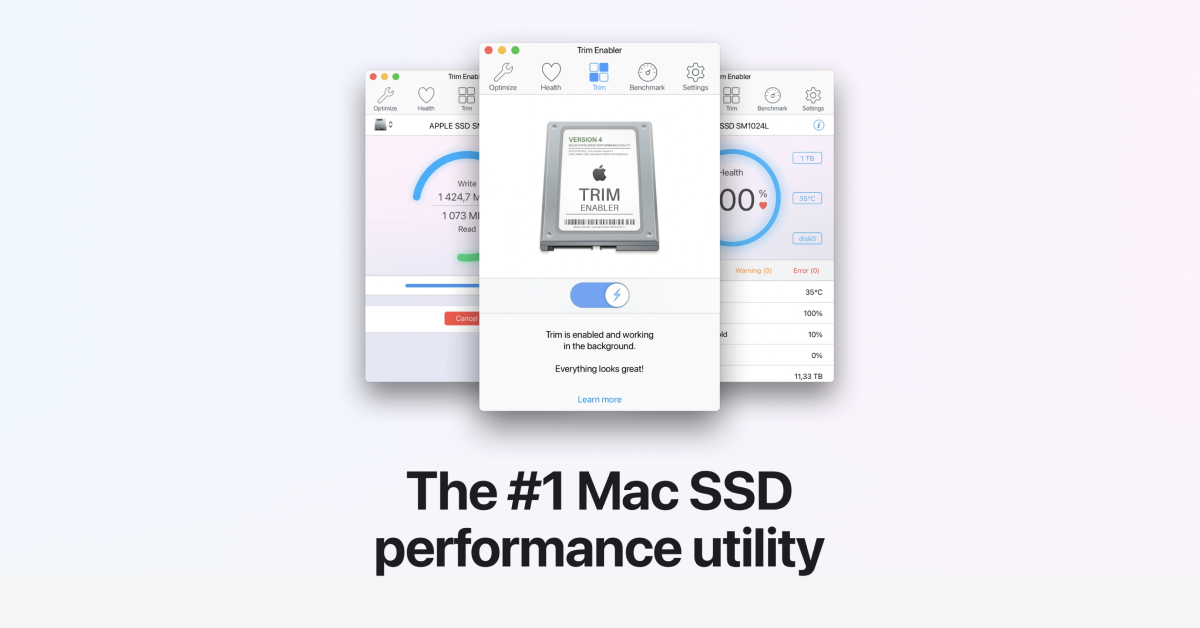
Trim Enabler is a focused macOS utility that helps you activate TRIM on third-party SATA/NVMe SSDs, confirm that it’s working, and monitor drive health. On many non-Apple SSDs, TRIM isn’t enabled by default; without it, background garbage collection is less efficient, write amplification rises, and performance can degrade over time. Trim Enabler lets you safely toggle the system TRIM setting, verify status, and run quick checks so your SSD stays fast and responsive.
Beyond activation, it gives you practical visibility: SMART health metrics, temperature, lifetime writes, and spare blocks help you judge wear and plan backups or replacements. A clean, macOS-native UI offers clear guidance, making the process approachable for both advanced users and those enabling TRIM for the first time. It’s a lightweight tool that focuses on a single mission—SSD longevity and stability—without unnecessary bloat.
ℹ️ About Trim Enabler (Expanded)
Modern SSDs rely on a cooperation between the file system and the flash controller. When files are deleted, the OS can tell the SSD which blocks are no longer in use. With TRIM active, the SSD can proactively erase those blocks during idle time, so the next write is fast and clean. Without TRIM, the controller must first erase blocks during a write, which increases latency and contributes to long-term wear.
Trim Enabler streamlines this by exposing the macOS control that governs TRIM for non-Apple drives and pairing it with sanity checks and health views. After enabling TRIM, you can quickly confirm it’s live, run a short performance test to see improvements under sustained writes, and keep an eye on SMART attributes that correlate with real-world reliability. The app presents plain-language explanations so you understand what you’re changing and why it matters.
It’s designed to respect macOS security: you get clear prompts, and the tool doesn’t run resident background daemons. Support for Apple Silicon and Intel Macs ensures TRIM can be managed on current hardware, including external USB/Thunderbolt SSDs that expose TRIM correctly. For techs and power users, Trim Enabler is an essential step in every SSD install; for everyday users, it’s a simple way to preserve speed over the lifetime of a drive.
⚠️ Note: Enabling TRIM modifies a low-level storage policy. Always keep current backups before changing disk settings, and only enable TRIM on SSDs that advertise TRIM support.

🔑 Key Features
| Feature | Description |
|---|---|
| Enable/Disable TRIM | Toggle macOS TRIM support for third-party SATA/NVMe SSDs. |
| TRIM Verification | Confirm activation with quick status checks. |
| Health Monitoring | View SMART attributes, temperature, lifetime writes, spare blocks. |
| Sanity/Speed Tests | Simple benchmarks to validate performance under sustained I/O. |
| Clear Guidance | Plain-language explanations and safe defaults for non-experts. |
| Apple Silicon Ready | Works on modern M-series and Intel Macs. |
| External SSD Friendly | Supports drives that expose TRIM via USB/Thunderbolt correctly. |
| No Bloat | Lightweight utility focused on storage reliability. |

🚀 Quick Start Guide
- Back up important data (Time Machine or your preferred backup).
- Install and launch Trim Enabler.
- Click Enable TRIM and follow the on-screen instructions.
- Reboot if prompted by macOS.
- Reopen Trim Enabler and verify TRIM status.
- Optionally run a short performance/health check and review SMART data.
🖥 Minimum System Requirements
- OS: macOS 10.13 High Sierra or later
- CPU: Intel or Apple Silicon (M-series)
- RAM: 2 GB minimum (4 GB recommended)
- Storage: SSD that supports TRIM (SATA or NVMe; internal or external with proper bridge)
- Internet: Optional (for updates); not required for TRIM itself
⬇ Get Trim Enabler
🏷 SEO Tags (Extended)
trim enabler • trim enabler mac • enable trim mac • mac ssd trim tool • nvme trim macOS • sata trim mac • mac external ssd trim • apple silicon trim • macbook trimforce • trimforce enable helper • mac ssd optimization • ssd garbage collection mac • ssd write amplification mac • verify trim status mac • smart ssd monitor mac • ssd health macOS • ssd benchmark mac • drive temperature mac • lifetime writes mac • mac storage utilities • disk performance mac • third-party ssd mac • samsung evo trim mac • crucial trim mac • sandisk trim mac • kingston trim mac • thunderbolt ssd trim mac • usb ssd trim mac • nvme health mac • sata health mac • mac maintenance ssd • mac performance tuning storage


