SimplyVBUnit Wiki
Brought to you by:
killian35


Once you have your project group set up, you can begin writing unit-tests for classes in your dll. To begin, you add a new unit-test class to your unit-test project.

Now that the test class has been added to the unit-testing project, the class still needs to be added to the test runner to be included when the tests are run. This is done in the Form_Load event where a new instance of the test class is added to the runner using the AddTest method.
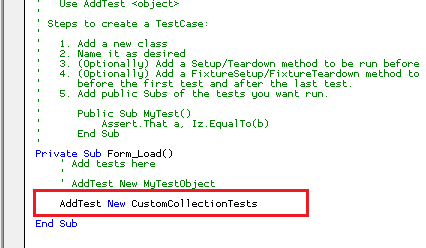
Having added the test class to the runner, it will be included when the tests are run. So now we can add unit-tests in the test class.
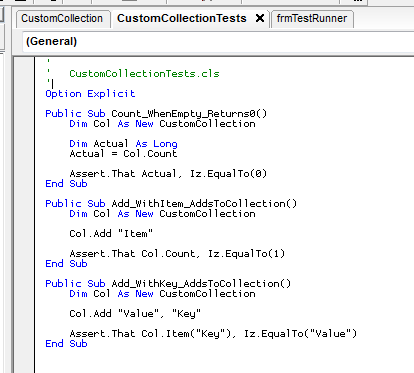
Here we added several tests. These are not all the tests that would be written to test such a class, however in the interest of brevity only a few tests have been written. It is best to write unit-tests in TDD style if possible. However, for the purposes of this wiki, all the tests have been shown at once.
Now the tests require an implementation to pass, so the class under test has a few methods implemented to satisfy these tests.

The CustomCollection class is incomplete. It is only for demonstration purposes.
With the code written, all that is left to do is to run the tests. So pressing F5 or CTRL+F5 to run the unit-tests.
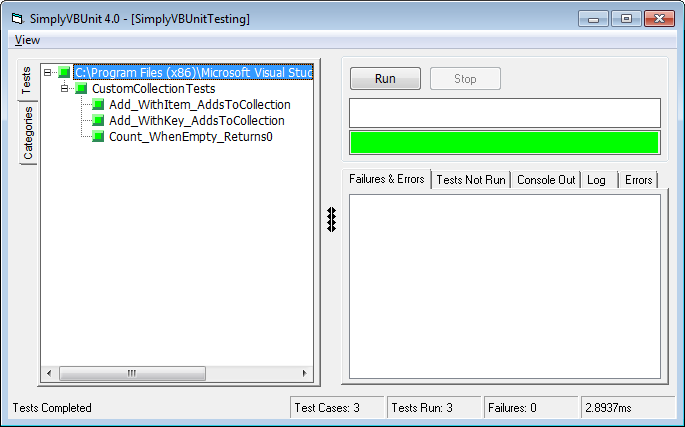
So we have written both unit-tests and class implementation code to show how the process of writing test code can be achieved. Hopefully this mini-tutorial will help get you started with your projects.
