Xshare Code
Brought to you by:
artemis1096

| File | Date | Author | Commit |
|---|---|---|---|
| .mvn | 2025-07-21 |
 pranaydubey272
|
[883312] Login from SQL removed to make it a complete of... |
| screenshot | 2024-11-14 |
 Pranay Dubey
|
[6380cc] Screenshots added for debugging |
| src | 2025-08-17 |
 Jashanpreet Singh
|
[bdd925] Updated Backend(improved UserService file) |
| .gitignore | 2025-07-21 |
pranaydubey272
|
[883312] Login from SQL removed to make it a complete of... |
| README.md | 2025-07-21 |
pranaydubey272
|
[883312] Login from SQL removed to make it a complete of... |
| mvnw | 2025-07-21 |
pranaydubey272
|
[883312] Login from SQL removed to make it a complete of... |
| mvnw.cmd | 2025-07-21 |
pranaydubey272
|
[883312] Login from SQL removed to make it a complete of... |
| pom.xml | 2025-08-16 |
![dependabot[bot]](https://secure.gravatar.com/avatar/48ea49be76d0c68403a7f3df87e3487d?size=16&r=pg&d=https%3A%2F%2Fa.fsdn.com%2Fcon%2Fimages%2Fsandiego%2Ficons%2Fdefault-avatar.png "dependabot[bot]") dependabot[bot]
dependabot[bot]
|
[8ebcad] Bump org.springframework.security:spring-securi... |
XShare Sharing App
XShare is a cross-operating-system file-sharing application developed in Java. It enables secure file transfers between devices over a network using AES encryption. This project features a server-client model, where clients can connect to a central server, select files, and monitor transfer progress through a JavaFX user interface.
Features
Cross-Platform Support: Runs on any OS that supports Java (Windows, macOS, Linux).
Secure Transfers: All files are encrypted using AES for secure sharing.
JavaFX User Interface: Modern, interactive UI for file selection, progress tracking, and client management.
Multi-Threaded Operations: Allows simultaneous file transfers with real-time progress updates.
Drag-and-Drop Support: User-friendly file selection using drag-and-drop.
Server-Client Model: Centralized server managing multiple client connections.
Installation Prerequisites
Java Development Kit (JDK) 8 or later
JavaFX (included in JDK 11 or later, or add manually for earlier versions)
MySQL installed
Installation Steps
Clone the Repository:

git clone https://github.com/Artemis1096/Xshare-Softablitz.git
cd Xshare-Softablitz

Build and Run: Open the project in your preferred IDE, build, and run the application.
How to Use XShare
Network Setup: Connect the sender and receiver devices to the same network.
Start Sharing: Once connected, you’re ready to share files securely!
Troubleshooting JavaFX Errors
If you encounter a JavaFX-related error, follow these steps:
Ensure JavaFX SDK is Added:
    Check that the JavaFX SDK is incorporated in the Project Structure settings of your IDE.

Add VM Options to the Project:
    Set the following VM options (replace <path-to-javafx-sdk> with the actual path to your JavaFX SDK):
--module-path <path-to-javafx-sdk>/lib --add-modules javafx.controls,javafx.fxml

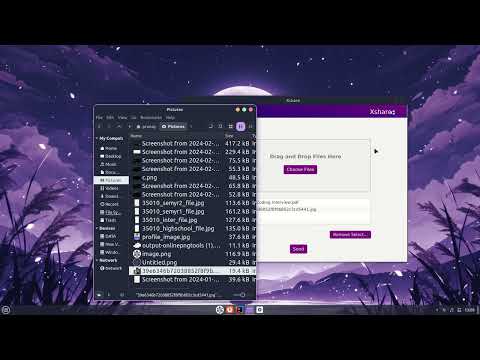
Youtube Demo: