Cannot open Blu-ray movie ISO file
A free file archiver for extremely high compression
Brought to you by:
ipavlov

Hello,
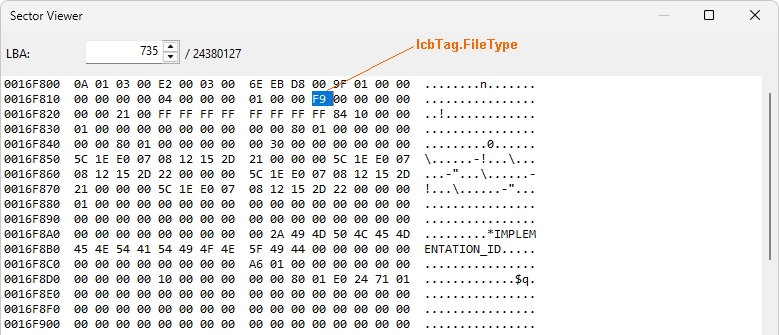
For Blu-ray movie, the IcbTag.FileType may equal to 249 (0xF9) for M2TS files in /BDMV/STREAM/. This is the reason why 7z cannot open most of Blu-ray movie ISOs.
File: \7z\CPP\7zip\Archive\Udf\UdfIn.cpp
Functions: CInArchive::ReadItem
if (fsIndex < 0)
{
if (item.IcbTag.FileType != ICB_FILE_TYPE_METADATA &&
item.IcbTag.FileType != ICB_FILE_TYPE_METADATA_MIRROR)
return S_FALSE;
}
else if (
** item.IcbTag.FileType != ICB_FILE_TYPE_DIR &&
item.IcbTag.FileType != ICB_FILE_TYPE_FILE)**
return S_FALSE;
How to fixed:
Added 249 in line 588:
else if (
item.IcbTag.FileType != ICB_FILE_TYPE_DIR &&
item.IcbTag.FileType != ICB_FILE_TYPE_FILE && item.IcbTag.FileType != 249)
return S_FALSE;
Skip to check FileType.
Reference:
The attachment is the modified UdfIn.cpp.
7z is a great software, thank you.
Best regards,
Mark

Thanks for fix!
And are there any free iso files to dowload to test "249" type?
What about another
DescriptorCRCLengthissue?https://sourceforge.net/p/sevenzip/discussion/45797/thread/7109f1f0d7/?limit=25
Last edit: Igor Pavlov 2026-02-03
Do we need to support such iso files in 7-Zip with such
DescriptorCRCLengthvalues ?Do other UDF programs support them?
I think no need to support such iso file, it doesn't comply with the UDF specification.
YOU_KILL_ME_1_failed.iso is the iso file with "249" type.
YOU_KILL_ME_2_succeed.iso is the iso file created with ImgBurn, which can be open by 7z successfully.
Last edit: Igor Pavlov 2026-02-03
That example was not "good" file.
Are there simple and small examples?
https://www.mediafire.com/file/gn8xipc7z9t56va/THREE_MUSKETEERS.iso/file
Image created with Xreveal "Folder to ISO", the sector 742 has a file type 249.
another small example from 4K UHD "Aza Live" disc:
https://www.mediafire.com/file/p851jmwv7onrlkc/Aza_Live.iso/file
I built a new 7z.dll, it works flawlessly here but doesn't work when I sent it to one user, I don't know why.
If you could build new beta setup, please send the download link to me, thank you.
Last edit: xreveal 2026-02-03
The patch is simple and it works.
The user probably didn't check what exact dll file was used.
You're right - it was my fault!
After cleaning up my testfiles: xreveal's fix works perfectly!!!
http://www.osta.org/specs/pdf/udf260.pdf page 136:
6.11.1 Real-Time Files
A Real-Time file shall be identified by file type 249 in the File Type field of the file's
ICB Tag. A Real-Time file is a file that requires a minimum data-transfer rate when
writing or reading, for example, audio and video data. For these files, special read and
write commands are needed. For example for CD and DVD devices these special
commands can be found in the SCSI-3 MMC command set specification.
ICB_FILE_TYPE_UNKNOWN_OR_VAT150 = 0
ICB_FILE_TYPE_UNALLOCATEDSPACE = 1
ICB_FILE_TYPE_PARTITIONINTEGRITY = 2
ICB_FILE_TYPE_INDIRECT_ENTRY = 3
ICB_FILE_TYPE_DIRECTORY = 4
ICB_FILE_TYPE_SEQUENCE_BYTES = 5
ICB_FILE_TYPE_BLOCK_DEVICE = 6
ICB_FILE_TYPE_CHARACTER_DEVICE = 7
ICB_FILE_TYPE_EXTENDED_ATTR = 8
ICB_FILE_TYPE_FIFO = 9
ICB_FILE_TYPE_C_ISSOCK = 10
ICB_FILE_TYPE_TERMINAL_ENTRY = 11
ICB_FILE_TYPE_SYMBOLIC_LINK = 12
ICB_FILE_TYPE_STREAM_DIRECTORY = 13 / new in UDF 2.00 /
ICB_FILE_TYPE_VAT200 = 248 / new in UDF 2.00 /
ICB_FILE_TYPE_REAL_TIME_FILE = 249 / new in UDF 2.01 /
ICB_FILE_TYPE_METADATA_FILE = 250 / new in UDF 2.50 /
ICB_FILE_TYPE_METADATA_MIRROR_FILE = 251 / new in UDF 2.50 /
ICB_FILE_TYPE_METADATA_BITMAP_FILE = 252 / new in UDF 2.50 /
So what of them are used by real udf files?
Sorry, I don't know, my udf parser ignores the file type in ICB.