
Menu
▾
▴
3 Attachments
#1419 fold line: restrict it to the header text line span
Hello!
It will be useful to reduce the horizontal fold line to the span of visible characters in the header text line (line with the fold point ).
Currently that fold line is as long as the window width, and it is visually obtrusive. It's like dividing the whole page vertically, with little visual connection to the hierarchical structure.
It would be great if the fold line started from indentation position (Ist non-white char), then continue for a length of:
- Option A :
max( len( span of visible characters), DefaultMinimalLength ). - Option B:
DefaultMinimalLength
where DefaultMinimalLength would ideally be choosable by user and is for the cases when the span of visible characters on the fold-point line is very short (like for example when one has just one { by itself ).
I find optionA better looking, but it will be up to you.
Such a feature would satisfy related feature request https://sourceforge.net/p/scintilla/feature-requests/638/ and is related to https://sourceforge.net/p/scintilla/feature-requests/203/
I have prepared some attachements with "before"/ "after" effects




In the pictures, it's assumed the user has chosen a fold-line MinimalLength of 25 characters; that's why you see a
|indicator in the "before" picture and why in "after_A" and "after_B", the fold line it exceeds a bit the visible part ofif (everything_ok()){.EDIT: ignore Option B above; better alternative option in my comment below.
Last edit: Vic 2021-10-12
There is a discontinuity in the display of the document and the horizontal line represents the missing text. Both options look substantially worse to me.
This request appears to be different to [feature-requests:#203]. The appearance isn't the same as [feature-requests:#638].
A patch that implements an option for the request would be OK. The patch should address the case where wrap has been turned on and the folded line has been wrapped into multiple screen lines.
Related
Feature Requests: #203
Feature Requests: #638
Thanks for the quick reply
One detail I missed when making those pictures is that people with style of opening
{on same line will probably choose to use a very small fold-line MinimalLength, and with Option A , the fold line will match the header text nicely.While people with the other style, again with Option A, can choose a large MinimalLength , to make the fold line extend as they wish beyond the
{.Please see attached more example pictures I have prepared.
Many people judge the hierarchy structre based on indentation, and this feature will allow this structure not be obstructed by the fold lines, nor have the lines extent for too long beyond the headers.
You're right, it's only generally related to #203.
But for #634, the current feature will satisfy that (at least in most cases), as they can choose to have a short constant trailing piece of fold-line after the opening
{, and it will almost never cross the guide line without the text on the line above crossing it too.To make it customizable, one variable is enough,
FoldLineSpan, with values:== -1: current behaviour: fold line starts at left end of window and ends at right end of window. It will be the default value.>= 0: fold line starts at 1st non-whitespace char in header text, and extends forFoldLineLen,(EDIT1) where
FoldLineLencan be defined in one of 2 ways:FoldLineSpan}.This is the same as OptionA above, and FoldLineSpan plays the role of minimum length of the fold-line.
FoldLineSpan.Here FoldLineSpan plays the role of length of the trailing piece of fold-line after the last non-whitespace char.
I haven't decided yet which is best; probably 1., but maybe you or others can give their opinions too.
(Then of course will take into account the right-end of window, and wrapping, later...)
Last edit: Vic 2021-10-12
APIs that assign special meanings to some 'magic' values are more difficult than separate APIs. SCI_SETFOLDFLAGS already controls the line drawing so selecting this mode should be done through it. Any modification of the line length can then be done through an API just for that purpose.
https://www.scintilla.org/ScintillaDoc.html#SCI_SETFOLDFLAGS
Thanks for the advice.
Would that be a function (message), like
SCI_SETFOLDLINELENGTH(<unused>, position len)?Last edit: Vic 2021-10-13
Can't be that big so probably an
intinstead of apositionand should go in first parameter (there are ancient archaic reasons for pointers going in the second parameter).The primary API definitions go in Scintilla.iface (scripts/ScintillaAPIFacer.py generates Scintilla.h and some other files) and there should be a getter as well:
Option 1 -- in pictures 1,2,3,4 above;
Option 2 -- in pictures 1,2,5 above
Both options underline at least the whole span of visible chars in header. But Option-1 does not always add a trailing piece (like Option-2) unless the header text is too short and risks being overlooked (like one or few characters).
On the other hand, Option 2 has a more consistent look.
Last edit: Vic 2021-10-13
And not to forget: a completely different alternative to a fold-line, but with same end purpose, would be to change the background color of (or draw a box around? ) the header text , and again with same/similar span options as described above.
There is SC_FOLDFLAG_LINEBEFORE_CONTRACTED for drawing a line above.
Drawing some horizontal lines with random length looks ugly for me.
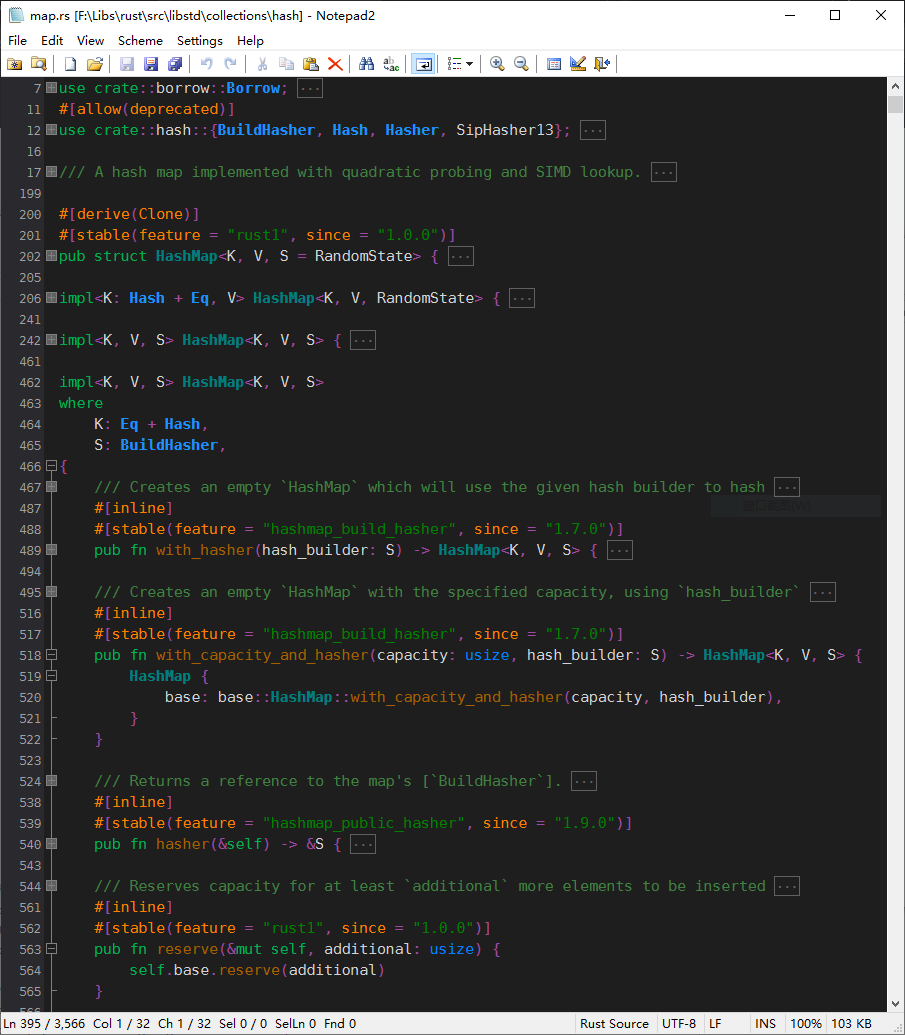
I think what you are looking for is fold display text, something like following screenshot (with fold display text set to three U+00B7 Middle Dot characters):
see https://www.scintilla.org/ScintillaDoc.html#SCI_SETDEFAULTFOLDDISPLAYTEXT and [feature-requests:#1272]
Related
Feature Requests:
#1272The lengths are not random, but are determined by position of last character in the header text line. Just like the position of your
***.In fact, the Option-2 above, with user-chosen fixed length of trailing part of fold-line, is equivalent to the ellipsis, but just with a different looking style.
Thanks for the links though, I didn't know that was possible in Scintilla.
I think the features I'm suggesting here can complement the ellipsis. The advantage of having the fold-line underline the header-text is that, for long header text, you don't need to look at end of the line (or in the fold margin, if not hidden) to figure that there are hidden lines.
Last edit: Vic 2021-10-12