
Menu
▾
▴
#1983 Double tap a word is not working (Notepad++)
closed-fixed
6
2018-02-14
2017-11-24
No
Description of the Issue
This issue was posted to Notepad++ here (https://github.com/notepad-plus-plus/notepad-plus-plus/issues/3895), but they redirected me to post it again here. As the issue you are describing seems to be affecting all text editors that use Scintilla as their text editing component.
After the recent update, when I double click a word, it is no longer highlighted. I have to slow my double-click speed in order to select a word, or I use mouse dragging to select it.
Double click working fine in chrome, edge, eclipse, sublime, and even the default windows notepad!
Steps to Reproduce the Issue
- open notepad++
- try to double-click any word with normal (as usual) speed
Expected Behavior
Selecting the current word and highlight all its occurrences
Actual Behavior
Nothing is happening, no word highlighting, no occurrences highlighting
Debug Information
Notepad++ v7.5.1 (32-bit)
Build time : Aug 29 2017 - 02:35:41
Path : C:\Program Files (x86)\Notepad++\notepad++.exe
Admin mode : OFF
Local Conf mode : OFF
OS : Windows 10 (64-bit)
Plugins : mimeTools.dll NppConverter.dll NppExport.dll
Things I did to resolve the issue
- I tried to uninstall and install the 64-bit version --> still not fixed
- I tried to make a clean uninstall (plugins, setting, and config) and install the 64-bit version --> still not fixed
- I tried to make a clean uninstall again and install the 32-bit version again --> still not fixed
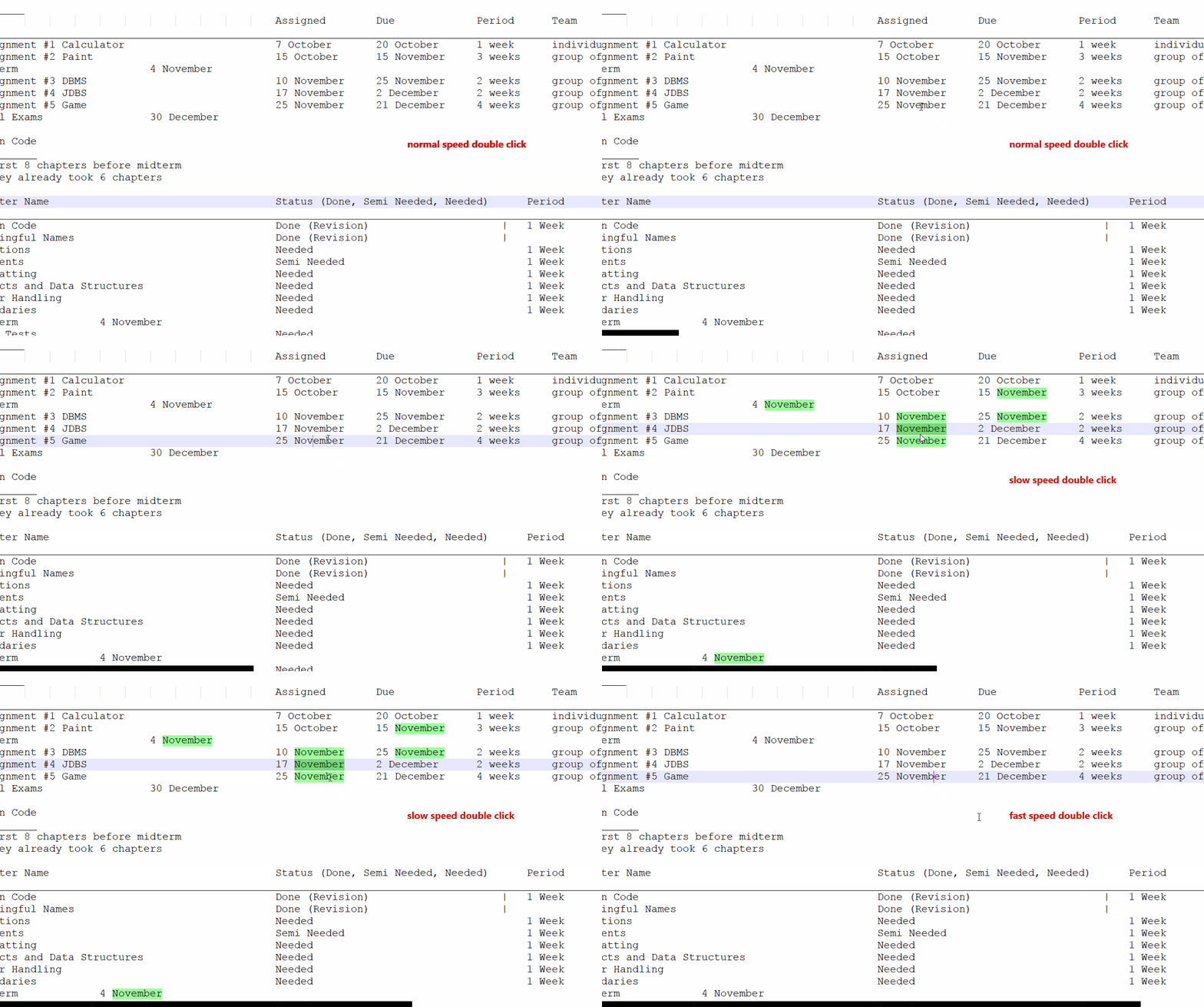
Kindly find a gif showing the issue, this gif contains 3 double clicks: normal, slow, and fast double click on a word.
Normal and fast double click is not working properly on Notepad++, but they work fine in any other program.


I can not reproduce the problem.
The linked Notepad++ report indicates this is a problem with trackpads, not mice. I do not use a trackpad so will leave this to be debugged by others.
Okay, thank you. Till now I am unable to use Notepad++ because it is really frustrating :(
I have the same issue. I can't double-click to select a word in Notepad++, but I can everywhere else. I am also using a trackpad. This issue may have started with the latest Windows update (Win10 16299.64); that's when I noticed it. I can click to select a word in Notepad++ if I click once and then wait the exact exact right amount of time to click again, much slower than a double-click.
Did some more testing: I only have this issue with my Dell XPS, not my Thinkpad. Both are using the latest Notepad++ version and Windows creator update. Double-clicking works fine with the mouse.
Last edit: Tine Bak 2017-12-02
Please note that the issue seems to be with double-tapping, rather than double-clicking. See the Notepad++ bug.
Last edit: Easy Peas 2017-12-07
Yes this is my issue too, I submitted it to Notepad++ and scintilla.
Just noticed this bug in Notepad2 too. It seems to have come after the 1709 update. Weirdly, OneNote seems to be affected by it as well.
Last edit: Steve Baker 2017-12-20
I can repro this issue too. Observed on Dell XPS 13 (9360) with latest Windows 10 (10.0.16299) and latest NP++ (7.5.4). Double tap a word (on touchpad) fails to select any text.
Last edit: Sean P 2018-01-25
http://prntscr.com/ia5egq
Looks like the issue is related to some crazy timing information returned by GetMessageTime
so time between last message and current message gets negative and wraps around as the comparison to doubleclick time is an unsigned one..
These casts for signed comparison seems to fix it
src/Editor.cxx line 4458
The trace shows an WM_LBUTTONDOWN with a timestamp before the previously received WM_LBUTTONUP. A subsequent WM_MOUSEMOVE is timestamped more than 2 seconds earlier.
The "tap twice and drag to multi-select" option appears to be doing something complex here and I haven't been able to decipher it. In this mode, perhaps Scintilla's response to this event sequence should not be to select a word but, instead, to start a range (multi-select) selection.
Casting from an unsigned expression as suggested appears fragile. It may be better to have
Or bundle that expression up as a function.
I think this should be left as word select as this is what i intend to do when double tapping. Unless maybe the word selection is made to happen on buttonUp instead of the second button down, such that down + big move without up is drag select. By the way on my laptop (HP Probook with sinaptics toucpad) now doing double click , but not releasing the touchpad doesnt do word select but drag select, unlike the same action with the mouse.
To me it looks like this tap twice to multi select does this - when you tap and move your finger up it sends the mousedown. but no mouse up for some time, if you again tap then if you release quickly it sends the first mouseup , second mouse down and second mouse up, so its like normal double click (with bad timings ), but if instead of quick release on the second tap you start moving finger windows think you are dragging , never sends the first tap's mouse up or the second tap's mouse down)
another timing option witout the cast
(curTime < lastClickTime+Platform::DoubleClickTime())Also woould it be a good idea instead of this change to wrap the GetMessageTime into a function that returns guaranteed non decrementing time stamps for messages (or at least for similar small a few seconds off events, so that it doesnt stuck when the int milliseconds wrap) ?
As there might be some other places in code that would break with the timestamps not incrementing, and I wouldn't call this a bug in the code, its more like being victim of windows issue of not keeping the same guarantee now with this update.
Last edit: Dimitar Radev 2018-02-05
Committed above fix (with some extra brackets) as [1280ef].
Related
Commit: [1280ef]