
Menu
▾
▴

HowToImportGames
Attachments
scid470-clipboard.png
(41092 bytes)

scid470-file-new-dialog.png
(24994 bytes)
scid470-gamelist-copy-single.png
(66274 bytes)

scid470-gamelist-toolbar-import.png
(115179 bytes)

There is a newer version of this page. You can find it here.
Importing games can be confusing to those new to SCID. The program dates from before the standardization of computer interfaces, therefore it has its quirks. A few words in the right direction and these are soon mastered.
Suppose you have a PGN database of Carlsen's games and you want to annotate some of them. Since SCID opens these files as read-only, all changes made to them shall be lost. So you need to import the games into a database in SCID format.
Here are five ways to import games.
How to Import Games Using Menus
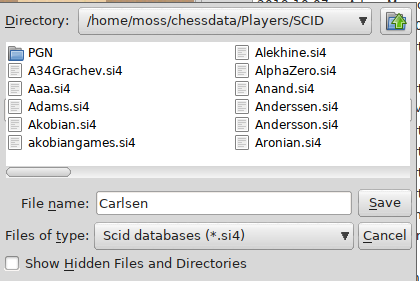
First, create a new database or open a pre-existing one. To create a new one, do File - New - Save. The Database dialog will appear:

You can type any (reasonable) name you want, for instance "carlsen."
NB. See [ScidDatabase] for more information on the format.
Second, now that your new database is [TheActiveDatabase], import your PGN file with Database - Import File(s) of PGN Games...
NB. The very act of importing saves the PGN games in SCID database format. You do not need to make a "Save" or "Save As" click.
You now have a SCID database with (some of) Carlsen's games. Congratulations!
How to Import Games Using the Database Switcher
[TheGameList] window contains a vertical toolbar on the left-hand side. Clicking on the Book icon opens [TheDatabaseSwitcher] inside [TheGameList] window.
The Import PGN Games command can now be reached by a right-click on the destination database in [TheGameList] window:

NB. The database you right-click on does not have to be [TheActiveDatabase]. You can right-click on any open database and import the PGN to that.
How to Import Games Using the Gamelist Window
[TheGameList] can also be used to copy single games from any open database (in SCID or PGN format) to another open SCID database. Simply right-click the any single game on [TheGameList] and click the copy command:

The "merge" option in this submenu adds the selected game as an annotation to the active game in the SCID database. This has various further options such as how many moves to add and whether to include comments.
How to Import Games Using the Clipboard
Use the SCID clipboard. (NB. The clip board, not [TheClipbase].) This method to import whole PGN games is discouraged as its misuse can easily lose you a lot of work. It is safer to use one of the methods above. And this is why:
** The Clipboard overwrites [TheActiveGame] on the [ActiveDatabase].
** SAVING the game will destroy for ever the score, including all annotations and comments.
The work around is to create a new empty game first (Ctrl+N) and only then bring up the clipboard (Ctrl-Shift-I or click "Edit-Paste Clipboard text as PGN game..."). The real purpose of the clipboard is to edit games.

How to Import Games Using Scripts
Perhaps the most insightful thing is to explain a little about the import script. Unix-like versions of SCID come with a small set of helper scripts, one of which is "sc_import", a shell script or small command-line program. When you make the mouse clicks to import a PGN file you are actually running this script. On unix-like operating systems the script can be run like so:
$ /usr/bin/sc_import scid-database pgn-file (pgn-file ...)
(On some systems it is /usr/local/bin/sc_import ...) So in order to import PGN files, the database is specified. Therefore it must already exist. All the games from each pgn in turn are appended or added to it. Of course, this means it can just as well be a brand new and empty database. For that still means it already exists.
Credit
Many thanks to Maurice McCarthy for the tutorial!

