
Menu
▾
▴

Home
speed (1)
reading (1)
eyestrain (1)
relax (1)
ereader (1)
focus (1)
comprehension (1)
java (1)
linux (1)
windows (1)
mac (1)
dry (1)
materials (1)
Welcome to sanoSpeedReading application.
You can simply use a different paradigm to increase your reading focus, and to relax your eyes, by using this application.
below some help about how to use the application:
Ctrl+O: Open file
Ctrl+V : Paste text to the program from clipboard
Down arrow: Next line
Up arrow: Previous line
Page up: -20 lines before current line
Page down: +20 lines after current line
Alt+Page up: -100 lines before current line.
Alt+Page down: + 100 lines after current line.
Alt+Down arrow: Next line without word by word display (fast mode)
Alt+Up arrow: Previous line without word by word display (fast mode)
F5: refresh current line ( useful when you need to read word by word and you feed you missed something)
ESC: clear the screen.
Icons:
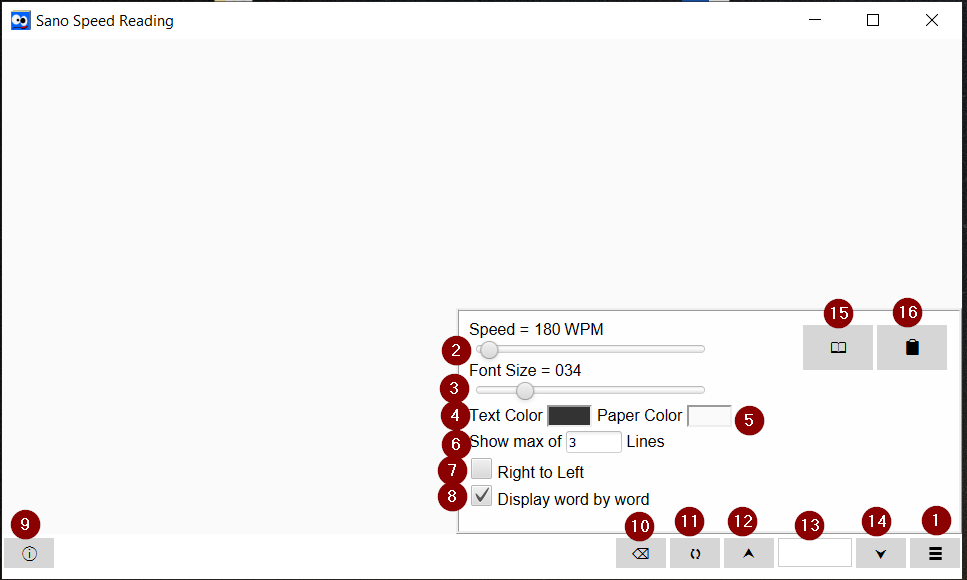
- Main menu
- Reading Speed (word by word mode)
- Font size slider
- Text Color
- Page Color
- Number of lines to be shown (maximum), if you choose 1 , only 1 line to be displayed every time you click next or previous.(default 3)
- Supports Arabic Text (Right to Left) for Arabic users.
- Display each line word by word, depending on Reading speed (point 2)
- About ( opens this page)
- Clear screen
- Re-display the current line, (useful for word by word mode)
- Previous line
- Line Number
- Next line
- Open File
- Paste from Clipboard.
Happy reading :)

