rupy Wiki
Brought to you by:
rupy

This requires latest rupy.
This is how the current client/server tools work in a co-operative solution:
time <----------------  goes forth & back  ------------------>
wait      ↓↓↓↓   ↓↓↓↓↓   ↓↓↓↓   ↓↓↓↓   ↓↓↓↓↓   ↓↓↓↓
loss             ↓↓↓↓↓                 ↓↓↓↓↓                  (CPU)

+--------+    +---------+           +---------+    +---------+
|        | -> |         | ---+----> |         |    |         |
|  brow  |    |  sync1  |    |      |  sync2  | .. |  serv2  |
|        | <- |         | <----+--- |         |    |         |
+--------+    +---------+    | |    +---------+    +---------+
                             | |
                         +---------+
                         |         |
                         |  serv1  |
                         |         |
                         +---------+
brow = sync req (browser)serv = sync res (database)sync = sync req & res (old web-server)The idea is to only wait in the network (no related IO-wait) and to wait for multiple things at the same time:
time <---------------  goes forth & back  --------------->
wait      ↓↓↓↓           ↓↓   ↓↓           ↓↓↓↓

+--------+    +---------+       +---------+    +---------+
|        | -> |         | -+--> |         |    |         |
|  brow  |    |  asyn1  |  |    |  asyn2  | .. |  serv2  |
|        | <- |         | <--+- |         |    |         |
+--------+    +---------+  | |  +---------+    +---------+
                           | |
                           | +---+
                           +---+ |
                               | |
                           +---------+
                           |         |
                           |  serv1  |
                           |         |
                           +---------+
brow = sync req (browser)serv = sync res (database)asyn = asyn req & res (``FUSE``)For this we introduce a new concept; FUSE. With FUSE all threads asyn end-to-end or socket-to-socket if you will, they never wait for anything.
Another way to describe this is time and IO-wait shown in the graph below:
sync req & res (old web-server)asyn req (netflix)asyn req & res (``FUSE``)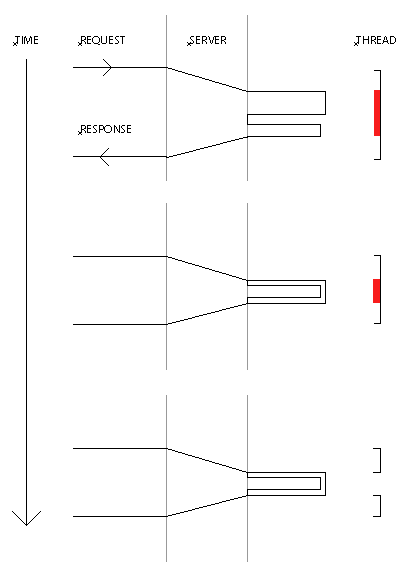
You can imagine that the compounded savings in terms of time and wait are huge, specially when the system grows in concurrency and depth. As a matter of fact, you can't scale at all without asyn req and with asyn req & res you're far better off.
If you want to use µSOA this is the most performant way to build your services network.
You can even use this as a load balancer.
Another use case for this is our cluster database ROOT.
This example fuses data asyn from multiple servers to your browser ASAP on a raspberry pi with zero thread IO-wait:
// TODO: Improve latch.
public static class Fuse extends Service {
    public String path() { return "/fuse"; }

    public void filter(final Event event) throws Event, Exception {
        if(event.push()) {
            Http[] http = (Http[]) event.query().get("http");
            Output out = event.output();
            int done = 0;

            for(int i = 0; i < http.length; i++) {
                if(http[i].print(out)) {
                    done++;
                }
            }

            if(done == http.length) {
                out.println("</body></html>");
                out.finish();
            }

            out.flush();
        }
        else {
            event.query().put("time", System.currentTimeMillis());

            Http[] http = new Http[2];

            String path = "/v1/public/yql" +
            "?q=select%20*%20from%20yahoo.finance.xchange%20where%20pair%20in%20(%22USDSEK%22)" +
            "&format=json&env=store%3A%2F%2Fdatatables.org%2Falltableswithkeys";

            http[0] = new Http("one", "strip.rupy.se", "/?a=martin+kellerman&body", event);
            http[1] = new Http("two", "query.yahooapis.com", path, event);

            for(int i = 0; i < http.length; i++) {
                // The 10 at the end is very important.
                // It means the socket will be kept alive
                // for 10 seconds since last active.
                // This is our Murphy's law solution.
                event.daemon().client().send(http[i].host, http[i], 10);
            }

            event.query().put("http", http);
        }
    }

    public static class Http extends Async.Work {
        private String name;
        private String host;
        private String path;
        private String body;
        private Event event;

        public Http(String name, String host, String path, Event event) {
            this.name = name;
            this.host = host;
            this.path = path;
            this.event = event;
        }

        public boolean print(Output out) throws Exception {
            if(event.query().get(name) instanceof Http) {
                long time = System.currentTimeMillis() - event.big("time");
                System.out.println("  " + name + " " + time + " ms.");
                out.println(body);
                event.query().put(name, "done");
                return true;
            }
            else if(event.query().get(name) instanceof String) {
                return ((String) event.query().get(name)).equals("done");
            }

            return false;
        }

        public void send(Async.Call call) throws Exception {
            call.get(path, "Host: " + host + "\r\n");
        }

        public void read(String body) throws Exception {
            this.body = body;
            event.query().put(name, this);
            System.out.println("  " + name + " success " + event.reply().wakeup());
            // Normally it's better to wakeup the response after all client requests are finished,
            // but we wan't to show you the parts as they complete on-the-fly!
        }

        public void fail(String host, Exception e) throws Exception {
            if(e instanceof Async.Timeout) {
                System.out.println("  " + e);
                event.daemon().client().send(host, this, 10);
            }
            else {
                e.printStackTrace();
                event.query().put("response", e.toString());
                System.out.println("  " + name + " failure " + event.reply().wakeup());
            }
        }
    };
}

