No Gui will be started but you will see a lot of output to stdout and eventually when ProjextX is done parsing your recording you should see the .srt-file in the same directory as the .ts-file
/tmp/ts/20170202_390219[777].srt
I have not yet figured out how to change the output-name of the .srt-file (I don't like getting the [777] part in the file-name) this is added automatically by ProjectX.
Note that this .ini-file is for teletext on Page: 777, if your recording uses another page, change it accordingly in attribute:
SubtitlePanel.TtxPage1=777
A couple of other things to note. I'm extracting teletext from an HD-broadcast with missing timestamps in the teletext-stream. To compensate for this I need to sync the text with the audio-stream to get correct timestamps. I do this with two settings:
I set "stream-types" to process both: audio-data and the teletext stream
I add attribute: SubtitlePanel.rebuildPTS=1
Note! If you have correct timestamps within the teletext-stream itself you may not need these options, saving you time by not parsing the audio-file.
If you would like to refer to this comment somewhere else in this project, copy and paste the following link:

Is it possible to set all options needed for teletext extraction from the CLI or in the ini-file?
Is it possible to set FileterControl options from the CLI, like the following option:

And can you set Collection Properties from the CLI, like the following:
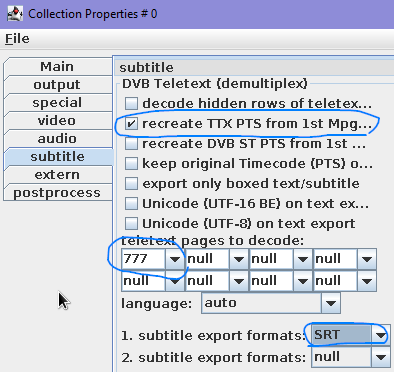
If this isn't possible, is there some way to save these options to the .ini file and have them loaded?
I found the answer, for anyone interested in the same logic.
Steps on Linux:
I have not yet figured out how to change the output-name of the .srt-file (I don't like getting the [777] part in the file-name) this is added automatically by ProjectX.
Note that this .ini-file is for teletext on Page: 777, if your recording uses another page, change it accordingly in attribute:
A couple of other things to note. I'm extracting teletext from an HD-broadcast with missing timestamps in the teletext-stream. To compensate for this I need to sync the text with the audio-stream to get correct timestamps. I do this with two settings:
Note! If you have correct timestamps within the teletext-stream itself you may not need these options, saving you time by not parsing the audio-file.