
Menu
▾
▴
Tree [0064c5] main / History


Read Me
PraktiCalc
A practical calculator with GUI featuring a calculating history, a decimal number converter & dark mode, as well as integration for many dialog tools.
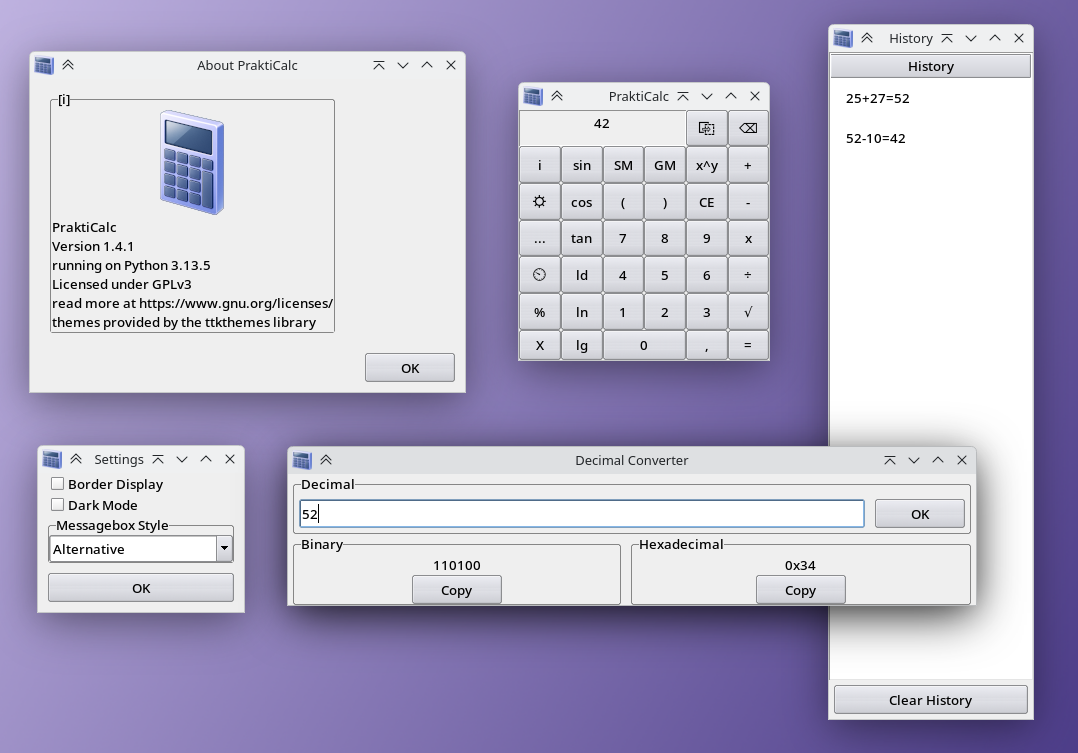
PraktiCalc is a simple calculator written in Python, compatible with Windows 7+ and Linux. MacOS support is also here now, in form of an unsigned .app bundle.
There are not that many actually useful functions provided by PraktiCalc which don't exist in a modern calculator. But you have support and integration for Linux and Windows, especially for messagebox dialog tools like zenity, kdialog and xmessage on Linux and VBS MsgBoxes on Windows.
All that together with number conversion and great DPI scaling, it can be great and it will be even better in the future. Also make sure to use --big if the window is too small.
I plan to continue development after this one-year-break, because it's great for learning. And why develop some testing thing to throw away to learn, when you can put that work to improve an existing project?
Back to the features, you can also use your keyboard to type numbers into the calculator. You can also build it yourself using the build scripts. In theory, you can also even build on Windows Vista, because Python 3.7 is compatible with it, and I keep supporting Python 3.8 because I want Windows 7 compatibility.
Windows XP is basically confirmed to be incompatible, at least because of f-Strings. Building on there won't work.
Get PraktiCalc
You can download PraktiCalc on the right at the Releases section. There should be a few files for each release there:
| file name example | description |
|-----------------------------------------|------------------------------------------------------------------|
| prakticalc-x.x-win-amd64-installer.exe | PraktiCalc Installer for Windows 11 on 64-Bit x86 Processors |
| prakticalc-x.x-win7-amd64-installer.exe | PraktiCalc Installer for Windows 7+ on 64-Bit x86 Processors |
| prakticalc-x.x-win-amd64-portable.exe | PraktiCalc for Windows 11 on 64-Bit x86 Processors (Portable) |
| prakticalc-x.x-win7-amd64-portable.exe | PraktiCalc for Windows 7+ on 64-Bit x86 Processors (Portable) |
| prakticalc-x.x-debian.deb | installable PraktiCalc Debian Package |
| prakticalc-x.x-linux-amd64.AppImage | portable AppImage file for Linux on 64-Bit x86 Processors |
| prakticalc-x.x-linux-aarch64.AppImage | portable AppImage file for Linux on 64-Bit ARM Processors |
| prakticalc-x.x-macos-aarch64.app | portable unsigned App file for MacOS on Apple Silicon Processors |
| Source code (zip) | ZIP archive with the source code |
| Source code (tar.gz) | gzipped tar archive with the source code |
Please note that the MacOS package is unsigned. Look up how to open unsigned Apps on MacOS to use it.
Development tools
If you want to contribute to PraktiCalc and help with development, there are some developer tools for you. Use the Check button to print the values of the calculation variables, or use the more advanced PraktiCalc Console to get values of all global variables and manually execute functions within PraktiCalc. Just start it with the --console argument and use the help command to get started.
Building PraktiCalc
The build scripts will help you to build PraktiCalc into installable packages.
For building on Windows 10 or newer, you need Python with tkinter and the following modules installed via pip: ttkthemes, pyinstaller, simpleeval
For older versions of Windows, you need Python with the same modules and PowerShell 5 or 7-Zip installed. The lastest available Python version is recommended, that being Python 3.8.20 on Windows NT 6 (Windows 7/Vista). Windows Vista is unsupported by PraktiCalc, but should work in theory.
Buildung deb packages required the following dependencies installed via apt from the Debian package sources: python3-tk, python3-ttkthemes, python3-simpleeval. AppImages require the same packages and additionally python3-pyinstaller. appimagetool will be downloaded automatically by the build script.

