I use Owdotnet for a winCE application. When i make the call : adapter = AccessProvider.GetAdapter("DS9097U", "COM1:");
i have this error : Method not found: GetAssemblies System.AppDomain.
I verify that the problem isin mscorelib because in the Compact Framework version there is not this method.
Someone has a solution?
If you would like to refer to this comment somewhere else in this project, copy and paste the following link:
I've still have the same problems with ow.net on Win CE.
I tried do port the sources for .Net Compact Framework, but had no success.
Can anyone send me a ported version or help me with this problem?
If you would like to refer to this comment somewhere else in this project, copy and paste the following link:
On CE, you can only use the new Serial adapter, DS9097U (no braces). No braces will give you the new class that does not rely on TMEX. TMEX is not available on CE. You will to enable this class on about line 127 in AccessProvider.
There is one actual 'bug' in the code that kept me from getting this working until yesterday. On about line 1049 in CommAPI, change from:
this.DCBlength = (uint)Marshal.SizeOf(this);
to:
this.DCBlength = 28;
Finally, if you are not already, create a new Windows Mobile DLL project and copy the source there. The existing code has several features that are not available in CE. It's easier to find these issues in a CE project.
If you would like to refer to this comment somewhere else in this project, copy and paste the following link:
i have try to enable the class as you explain JASONCD in #10 …
recompile the DLL .. but not more lucky … :(
how can we use 1WIRE on winCE device with COM port and DS9097U adapter ?…
PLEASE HELP !
thanks
If you would like to refer to this comment somewhere else in this project, copy and paste the following link:
Anonymous
-
2011-05-31
Use the sources and compile it yourself. That way you will find all the code that is not CE-compatible. Using the precompiled .dll will only give you problems.
If you would like to refer to this comment somewhere else in this project, copy and paste the following link:
in fact, if the OW.NET project need the TMEX driver to work properly …
i don't understand what is the plus !.. we have the same with the MAXIM library !..? no ?
nobody use OW.NET with serialpor COMt instead TMEX drivers ??
the serial port work great on all platform !.. why not use it !..?
thanks for more help .. Please :)
regards
phil
If you would like to refer to this comment somewhere else in this project, copy and paste the following link:
well i try to build my own version of OWdotNET library to work with my DS9097U adapter on COM port of my winCE 6.0 device ( only CF2.0 enable - CF3.5 disable )
( all tests are firstly try on CF3.5, the resultas are same ! )
well i try all suggestion on this thread ( #9 )
when i come to the problem of #2, i comment the line :
I honestly haven't touched this code since I tested it two years ago. Oddly enough, last week we finally decided to use it. I confirmed it still works. I can't provide more info that what I already did with regards to drivers: Create a new Windows Mobile DLL and make the changes I described. Here's how I use it; maybe this will help.
Dim liState As Byte()
Dim loAdapter As DalSemi.OneWire.Adapter.PortAdapter = OneWire.AccessProvider.GetAdapter("DS9097U")
Try
If loAdapter.OpenPort("COM1:") Then
loAdapter.BeginExclusive(True)
loAdapter.SetSearchAllDevices()
loAdapter.TargetFamily(&H21)
Dim loThermochron As OneWire.Container.OneWireContainer21 = New OneWire.Container.OneWireContainer21(loAdapter, loAdapter.GetFirstDeviceContainer.Address)
If loThermochron IsNot Nothing Then
liState = loThermochron.ReadDevice
'Call whatever functions you need.
loThermochron = Nothing
End If
End If
Catch ex As Exception
'
Finally
If loAdapter IsNot Nothing Then
loAdapter.EndExclusive()
loAdapter.FreePort()
loAdapter.Dispose()
loAdapter = Nothing
End If
End Try
If you would like to refer to this comment somewhere else in this project, copy and paste the following link:
i will try your post asap .. in 1 or 2 hours max ! ;) …
i have try to rebuild the dll, but i'm not sure i do all right .. please can you update the repository ?
or send me a link to download the DLL you use on a winCE platform ..
you confirm, i can use CF3.5 ?
Thanks jason for your reply
regards
phil
If you would like to refer to this comment somewhere else in this project, copy and paste the following link:
i try your code with the new DLL compiled like you describe ( i hope ! )
my adapter is on "COM4:"
this is my code :
Imports DalSemi
Public Class Form1
    Dim adapter As DalSemi.OneWire.Adapter.PortAdapter
    Private Sub Form1_Load(ByVal sender As System.Object, ByVal e As System.EventArgs) Handles MyBase.Load
        Dim liState As Byte()
        Dim loAdapter As DalSemi.OneWire.Adapter.PortAdapter = OneWire.AccessProvider.GetAdapter("DS9097U")
        Try
            If loAdapter.OpenPort("COM4:") Then
                loAdapter.BeginExclusive(True)
                loAdapter.SetSearchAllDevices()
                loAdapter.TargetFamily(&H21)
                Dim loThermochron As OneWire.Container.OneWireContainer21 = New OneWire.Container.OneWireContainer21(loAdapter, loAdapter.GetFirstDeviceContainer.Address)
                If loThermochron IsNot Nothing Then
                    liState = loThermochron.ReadDevice
                    'Call whatever functions you need.
                    loThermochron = Nothing
                End If
                ResultsTextBox.Text = "Adapter: " & loAdapter.AdapterName & " Port: " & loAdapter.PortName
            End If
        Catch ex As Exception
            MessageBox.Show("Error:  " & ex.ToString)
        Finally
            If loAdapter IsNot Nothing Then
                loAdapter.EndExclusive()
                loAdapter.FreePort()
                loAdapter.Dispose()
                loAdapter = Nothing
            End If
        End Try
    End Sub
End Class
SODimloAdapterAsDalSemi.OneWire.Adapter.PortAdapter=OneWire.AccessProvider.GetAdapter("DS9097U","COM4")code]or[code]DimloAdapterAsDalSemi.OneWire.Adapter.PortAdapter=OneWire.AccessProvider.GetAdapter("DS9097U","COM4:")[/code]everytimeaproblemtoopentheCOMport(yesi'm sure, it'sCOM4ineed;))whentheFORMload,ireceivethiserror:L'exception System.MissingMethodException n'apasétégéréeMessage="Impossible de charger le type 'Microsoft.Win32.SafeHandles.SafeWaitHandle' à partir de l'assembly 'mscorlib, Version=3.5.0.0, Culture=neutral, PublicKeyToken=969DB8053D3322AC'."StackTrace:àDalSemi.OneWire.Adapter.SerialAdapter.OpenPort(StringPortName)àDalSemi.OneWire.AccessProvider.GetAdapter(StringadapterName,Stringportname)àTestF35_CF35_OW.NET.Form1.Form1_Load(Objectsender,EventArgse)àSystem.Windows.Forms.Form.OnLoad(EventArgse)àSystem.Windows.Forms.Form._SetVisibleNotify(BooleanfVis)àSystem.Windows.Forms.Control.set_Visible(Booleanvalue)àSystem.Windows.Forms.Application.Run(Formfm)àTestF35_CF35_OW.NET.Form1.Main()andthefile"SerialAdapter.cs"opentoline221..icheckthebasicsettingsandseethattheRTSandDTRcontrollinesareenable...theproblemmaybehere,onmyCOM4,theseslinesarenotavailable!!..howcanichangethat?thanksforyourhelp,regardsphil
If you would like to refer to this comment somewhere else in this project, copy and paste the following link:
While I have not tested it, I believe .NET 3.5 should work fine. It is based on .NET 2.0.
I do not know much about the wiring, but I'm pretty sure the DTR and RTS *MUST* be present. They are used to power the DS9097. If possible, try to get it working with your desktop computer to verify the adapter works.
I can't provide any information on your error message.
Something to remember: The CompactFramework will not be around forever. It gets harder every year to find WindowsMobile PocketPC's. We're only attempting to use this for legacy products.
i think that the DTR and RTS are only wired to power up some adapter.
my adapter is powered with an external power and work great with the COM port of my PC.
the library provided by MAXIM and OW.NET work perfectly under CF3.5 on my PC.. but not on my real winCE device with CF3.5 !
in your #20, you say that you use it again .. but on PC ? on winCE device ??
phil
Please can you share your last DLL or better your last full project ( where you apply all modifications you mentionabout OW.NET) ?
If you would like to refer to this comment somewhere else in this project, copy and paste the following link:


I use Owdotnet for a winCE application. When i make the call : adapter = AccessProvider.GetAdapter("DS9097U", "COM1:");
i have this error : Method not found: GetAssemblies System.AppDomain.
I verify that the problem isin mscorelib because in the Compact Framework version there is not this method.
Someone has a solution?
That call is used to load the custome containers, and you can modify the source to not do that.
PortAdapter.cs, line 427
Where can i download the source code for Owdotnet?
Thank
Use a subversion client and download it from the SVN repository.
Hi,
i have the same error while
adapter = DalSemi.OneWire.AccessProvider.GetAdapter("{DS9097U}", "COM1");
are the '{' nessecary?
without the brackets i get an adapterexception.
what do I have to edit for solve this error?
I work with the version from https://owdotnet.svn.sourceforge.net/svnroot/owdotnet/Source/Classes/OWdotNET/tag/0.13.1
greetings, marco
Yes, the curly braces are necessary.
ok, thx
but how can I avoid the "Method not found: GetAssemblies System.AppDomain." error?
I've still have the same problems with ow.net on Win CE.
I tried do port the sources for .Net Compact Framework, but had no success.
Can anyone send me a ported version or help me with this problem?
On CE, you can only use the new Serial adapter, DS9097U (no braces). No braces will give you the new class that does not rely on TMEX. TMEX is not available on CE. You will to enable this class on about line 127 in AccessProvider.
There is one actual 'bug' in the code that kept me from getting this working until yesterday. On about line 1049 in CommAPI, change from:
this.DCBlength = (uint)Marshal.SizeOf(this);
to:
this.DCBlength = 28;
Finally, if you are not already, create a new Windows Mobile DLL project and copy the source there. The existing code has several features that are not available in CE. It's easier to find these issues in a CE project.
Hi Jasoncd,
you speak about a "bug" .. why it is not update in a new version ?
i have the same problem as GIANNIP .. and can't find a solution :(
Please provide more help, i'm totaly stoped on my winCE application ..
can't find my DS9097U adapter on the COM4
thanks, regards
i have try to enable the class as you explain JASONCD in #10 …
recompile the DLL .. but not more lucky … :(
how can we use 1WIRE on winCE device with COM port and DS9097U adapter ?…
PLEASE HELP !
thanks
Use the sources and compile it yourself. That way you will find all the code that is not CE-compatible. Using the precompiled .dll will only give you problems.
it's what i try.. but i'm not C# expert ..
in fact, if the OW.NET project need the TMEX driver to work properly …
i don't understand what is the plus !.. we have the same with the MAXIM library !..? no ?
nobody use OW.NET with serialpor COMt instead TMEX drivers ??
the serial port work great on all platform !.. why not use it !..?
thanks for more help .. Please :)
regards
phil
Hi all readers of this thread ;)
well i try to build my own version of OWdotNET library to work with my DS9097U adapter on COM port of my winCE 6.0 device ( only CF2.0 enable - CF3.5 disable )
( all tests are firstly try on CF3.5, the resultas are same ! )
well i try all suggestion on this thread ( #9 )
when i come to the problem of #2, i comment the line :
then i obtain this error :
the "WIN32" message seem not for winCE ..?
don't know to do now ?..
Please ?
Phil
this image :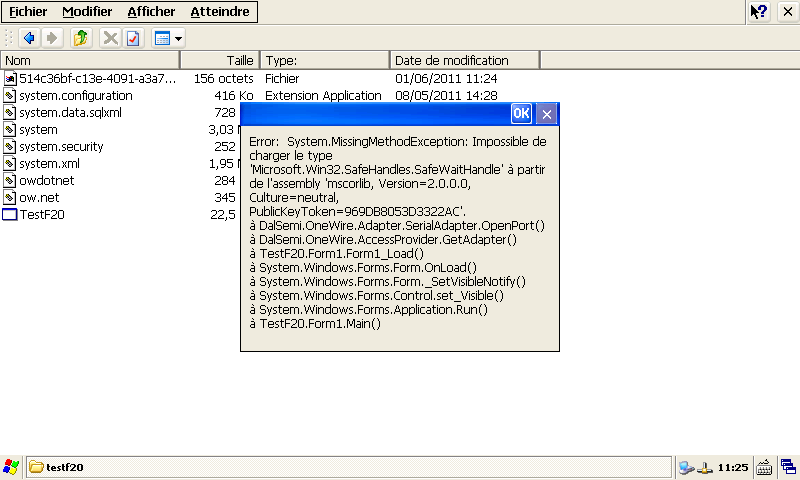
the insert image seem not working ! ?
http://ekofpga.free.fr/CEZoom0%20-%20disable%20InitAssemblyContainerClasses.BMP
i have investigate the schematic or my board and see that the RTS CTS lines are not wired to the SUBD9 COM port connector …
is it a problem with the serial class adapter or OWnet ??
thanks
phil
i precise that my DS9097 is powered by an external power and work great if i use it on my PC.
i think that the RTS ans CTS lines are only used to power up some DIY adapter ..
so it will not be a problem for my question #17..
Well, nobody use OW.NET on winCE device then ?
i'm the only one on this world, who want use 1WIRE on winCE device ???
regards
phil
I honestly haven't touched this code since I tested it two years ago. Oddly enough, last week we finally decided to use it. I confirmed it still works. I can't provide more info that what I already did with regards to drivers: Create a new Windows Mobile DLL and make the changes I described. Here's how I use it; maybe this will help.
Dim liState As Byte()
Dim loAdapter As DalSemi.OneWire.Adapter.PortAdapter = OneWire.AccessProvider.GetAdapter("DS9097U")
Try
If loAdapter.OpenPort("COM1:") Then
loAdapter.BeginExclusive(True)
loAdapter.SetSearchAllDevices()
loAdapter.TargetFamily(&H21)
Dim loThermochron As OneWire.Container.OneWireContainer21 = New OneWire.Container.OneWireContainer21(loAdapter, loAdapter.GetFirstDeviceContainer.Address)
If loThermochron IsNot Nothing Then
liState = loThermochron.ReadDevice
'Call whatever functions you need.
loThermochron = Nothing
End If
End If
Catch ex As Exception
'
Finally
If loAdapter IsNot Nothing Then
loAdapter.EndExclusive()
loAdapter.FreePort()
loAdapter.Dispose()
loAdapter = Nothing
End If
End Try
Well good to have news from you Jason ! :)
i will try your post asap .. in 1 or 2 hours max ! ;) …
i have try to rebuild the dll, but i'm not sure i do all right .. please can you update the repository ?
or send me a link to download the DLL you use on a winCE platform ..
you confirm, i can use CF3.5 ?
Thanks jason for your reply
regards
phil
Jason,
i try your code with the new DLL compiled like you describe ( i hope ! )
my adapter is on "COM4:"
this is my code :
please check the error :
http://ekofpga.free.fr/CEZoom0-OW.NET.BMP
may i try with your DLL please ?
thanks
phil
Jason,
of cours, i have try all possibility like :
While I have not tested it, I believe .NET 3.5 should work fine. It is based on .NET 2.0.
I do not know much about the wiring, but I'm pretty sure the DTR and RTS *MUST* be present. They are used to power the DS9097. If possible, try to get it working with your desktop computer to verify the adapter works.
I can't provide any information on your error message.
Something to remember: The CompactFramework will not be around forever. It gets harder every year to find WindowsMobile PocketPC's. We're only attempting to use this for legacy products.
Also, have a look at this application note that Maxim wrote:
http://www.maxim-ic.com/app-notes/index.mvp/id/4633
They provided their own code. Maybe it could be adapted for the CF; I've not tried it.
Jason,
thanks for your reply.
i think that the DTR and RTS are only wired to power up some adapter.
my adapter is powered with an external power and work great with the COM port of my PC.
the library provided by MAXIM and OW.NET work perfectly under CF3.5 on my PC.. but not on my real winCE device with CF3.5 !
in your #20, you say that you use it again .. but on PC ? on winCE device ??
phil
Please can you share your last DLL or better your last full project ( where you apply all modifications you mentionabout OW.NET) ?