
Menu
▾
▴

Local_to_World_Coordinates
[Home] [Developer_Guide]- hosted at openANTz.com
Local to World Coordinates
This document is designed to explain how to determine the position of an object in World coordinates after it has undergone an arbitrary number of transformations, (glTranslatef, glRotatef and glScalef.)
OpenGL does not provide a mechanism for converting Local coordinates to World coordinates, (nor does it define any such coordinates). It uses something called the 'ModelView Matrix' (M*V), which is a combination of transformed local model coordinates known as a Model Matrix (M) and virtual camera position known as a View Matrix (V).
You can get the World coordinates by determining the Model Matrix, (which contains the World Translate position as well as scale and rotation.) This is achieved by multiplying the inverse camera view V-1 by MV:
V-1 * ( V * M ) == M
Then you have m12 = X , m13 = Y, and m14 = Z (in World Coordinates!)
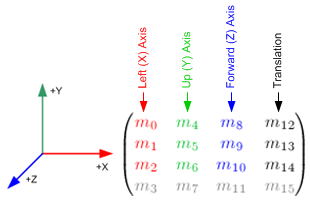
OpenGL Transformation Concepts:
http://www.songho.ca/opengl/gl_transform.html
A good discussion on this method and some other possible techniques can be found here:
http://www.gamedev.net/topic/530565-convert-local-to-world-coords-opengl/
Code Used in ANTz:
//load the identity matrix and position the virtual camera
glLoadIdentity();
gluLookAt ( camNode->translate.x, camNode->translate.y, camNode->translate.z,
camNode->translate.x + camNode->rotateVec.x,
camNode->translate.y + camNode->rotateVec.y,
camNode->translate.z + camNode->rotateVec.z,
upX, upY, upZ );
//now get the virtual Camera Matrix, V
glGetFloatv (GL_MODELVIEW_MATRIX, camData->matrix);
//then invert the matrix V, you can use any standard 4x4 matrix inversion method
npInvertMatrixf (camData->matrix, camData->inverseMatrix);
.....
//transformation code here, multiple glTranslatef(), glRotatef() and glScalef()
.....
//then get your local object ModelView Matrix
glGetFloatv (GL_MODELVIEW_MATRIX, modelView);
//ANTz uses a fast partial matrix multiplication which only calculates m12, m13 and m14
//however, you can use any standard 4x4 Matrix Multiplication routine
npLocalToWorld (&world, camData->inverseMatrix, modelView);
printf("%6.2f %6.2f %6.2f\n", world.x, world.y, world.z );
*camData->matrix, camData->inverseMatrix and modelView are all simple 1D arrays of 16 floats, or a 4x4 matrix however you look at it.
Related

