Opaquer Wiki
.NET obfuscator protecting assemblies from reverse engineering and IP
Brought to you by:
xmlstick


Opaquer. Obfuscate like a beast. Protect like a boss. Powerful protection.

Code obfuscation is a software-protection technique designed to prevent unauthorized reverse engineering.
Its core objectives include detecting attempts to analyze or tamper with the application, resisting such attacks, and modifying program behavior so that, if protection is bypassed, the software degrades in subtle, non-obvious ways.
Key Features of Opaquer .NET Obfuscator for Common .NET Protection Tasks
Blocks reverse engineering attempts
Opaquer transforms IL code into a form that is extremely difficult for humans or automated tools to interpret, effectively preventing source-level reconstruction.
Produces assemblies that cannot be cleanly recompiled
After obfuscation, the resulting IL is intentionally inconsistent and misleading, making recompilation by decompilers nearly impossible.
Supports all .NET application types
Works with any .NET executable, library, or assembly, including console apps, Windows desktop apps, services, and class libraries.
Encrypts all string literals
Sensitive strings - API keys, SQL queries, configuration values - are encrypted and decrypted only at runtime, preventing static extraction.
Compatible with every .NET version, including .NET 10
Full support for .NET Framework 1.0–4.8, .NET Core, .NET 5–10, and all modern runtime variations.
Advanced control flow obfuscation
Opaquer’s control flow transformations disrupt decompilers and deobfuscators by injecting opaque predicates, fake branches, and non-linear execution paths.
Identifier scrambling
Class names, methods, fields, properties, events, and other metadata are renamed to meaningless tokens, removing semantic clues from the codebase.
Comprehensive protection pipeline
Opaquer combines renaming, control flow, string encryption, anti-tampering, and anti-debugging into a unified protection strategy suitable for production builds.
Why You Need Opaquer .NET Obfuscator
You benefit from Opaquer when:
You understand the value of obfuscation and its role in software security.
You recognize that obfuscation is a practical, non-intrusive way to protect intellectual property and sensitive logic.
You know that obfuscation prevents direct source code extraction.
Without protection, .NET assemblies can be decompiled into readable C# or VB.NET within seconds. Opaquer closes that gap.
You have experience applying obfuscation appropriately.
You understand when to obfuscate, what to protect, and how to integrate obfuscation into your build and deployment workflow.
Your organization evaluates the risk of code exposure consistently.
You operate in an environment where protecting proprietary algorithms, licensing logic, or business rules is a recognized security requirement.
You need a reliable, automated protection step in your CI/CD pipeline.
Opaquer’s command-line interface and build-friendly design make it easy to integrate into modern DevOps processes.
You want long-term maintainability and compatibility.
Opaquer’s support for legacy and cutting-edge .NET versions ensures your protection strategy remains stable as your application evolves.
Opaquer is designed for 64-bit operating systems and works under the Microsoft® .NET
Software Requirements:
To work effectively with Opaquer, your system should meet or exceed the following modern PC-software requirements:
Operating System:
Windows 10 (latest updates recommended)
Windows 11 (all editions supported)
Processor: 1.6 GHz or faster, dual-core or better (Modern Intel/AMD processors easily exceed this)
Memory (RAM)
Minimum: 4 GB
Recommended: 8 GB or more for smooth multitasking and large project builds
Storage: At least 20 GB of available disk space
(SSD strongly recommended for faster build and obfuscation operations)
Graphics: No dedicated GPU required
(Opaquer does not rely on hardware acceleration)
Display: Minimum resolution: 1280×720
Recommended: 1920×1080 or higher for comfortable UI usage
Additional Recommendations
Latest .NET SDKs installed for your target frameworks
Visual Studio 2026 or newer for best integration
Stable internet connection for features that rely on cloud-based virtualization and license validation
Run Opaquer. The tool has 3 main menu items: "Open Assembly", "Save Settings", and "Obfuscate".
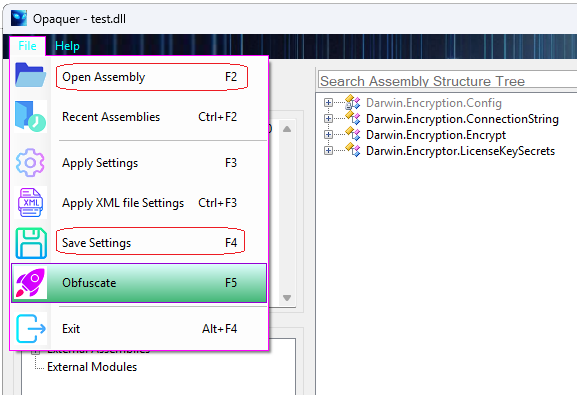
Open your .NET assembly by using "Open" dialog box. On the Details Tab page you able to browse main assembly properties and the assembly structure as well.
Adjust your assembly obfuscation preferences by using all of presented tab pages.
Click the "Save Settings" button to store the obfuscation settings as the preferred settings to be used when opening this assembly next time when you will use Opaquer again.
Also the stored Settings may be used for command-line obfuscation in batch MS-DOS mode. Learn more about Opaquer console usage.
If you have saved pre-stored Settings just click F3 button and select from pop-up list an assembly you would like to open for obfuscation. It will populate the assembly into Opaquer interface with all previously stored specific preferences.
Push "Obfuscate" (or F5 button). The duration of the operation depends on two primary factors:
More complex protection profiles will take longer to complete, while lighter configurations will finish more quickly.
The Opaquer main window is split into several tab pages. The first page is Details Tab page. By using the page you able to browse main assembly properties and the assembly structure as well.
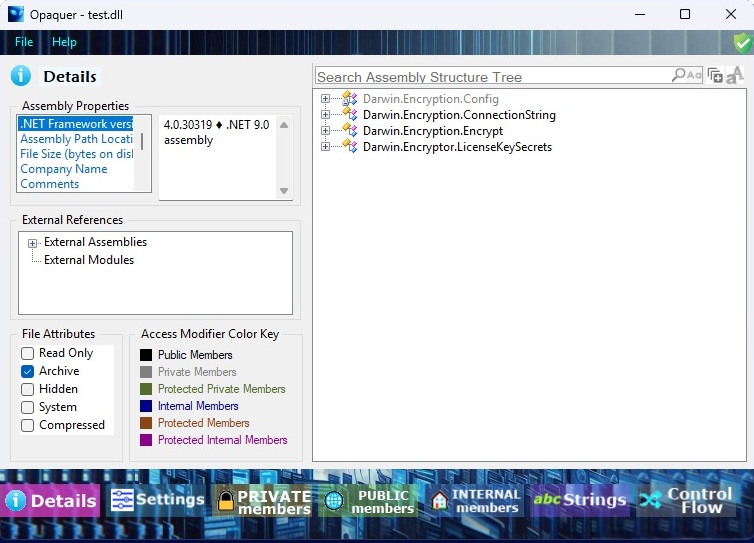
Click once on the plus or minus icon next to any member node in the Assembly Structure tree to expand or collapse its contents. When no such icon is displayed, the node has no further nested elements and represents the final level of that branch. A brief description of the currently selected member is always shown in the Status Bar, giving you quick contextual information without opening additional panels.
A command-line interface is essential because CI/CD pipelines rely entirely on automated, scriptable operations. After the project is compiled, the pipeline must be able to invoke the obfuscator without human intervention. This ensures that every release build is protected consistently, predictably, and with the exact same configuration.
In practice, the CLI becomes a premium feature because it enables two major automation scenarios:
1. Full CI/CD Pipeline Integration (Post-Compilation Automation)
The CLI allows the obfuscator to be executed as part of a build script, a DevOps job, or a release pipeline step. This is critical because:
This is how teams enforce secure-by-default release processes.
2. Local Developer Automation and Tooling Integration
Even outside CI/CD, the console interface is valuable for developers who want:
In these cases, the CLI acts as a scriptable engine behind the GUI, enabling developers to embed obfuscation into their own workflows.
1. with pre-stored obfuscation settings (a preferable way):
Opaquer [SettingsName]
'SettingsName' is a name of pre-stored Settings.
The command-line version running in batch mode is much useful for your scheduled products updates. You have to assign settings for an assembly in Graphical User Interface (GUI) version first. Then the batch obfuscate task will use the settings.
Also you can use assembly obfuscation settings stored in a separate xml file per assembly.
The Opaquer has two ways to store configuration information for assemblies.
You can call obfuscation settings by the settings name as shown above. Also the obfuscation preferences could be stored per project in the .NET project folder in a separate xml configuration file.
-XMLFILE=[Path+FileName] Pre-stored Settings XML File Name with full path
Example:
Opaquer -x=C:/MyDir/MyAssemblySettings.xml
In GUI you can call the xml pre-stored settings to apply in Opaquer interface by Ctrl+F3 ('Apply XML file Settings') key combination. The settings XML configuration file could be connected with your .NET project, is easily to backup, can be checked out with the project, can be shared between several users or taken to another development machine as a part of obtaining the .NET project source code from the source code repository.
Learn how to assign and save Assembly Settings by using GUI version.
2. The command-line interface
When you run Opaquer.exe in console MS-DOS mode it accepts the following command-line parameters:
USAGE:
Opaquer [SettingsName] [options]
OPTIONS:
[SettingsName] Name of a pre-stored Settings profile
-XMLFILE\=[Path+FileName] Full path to a pre-stored Settings XML file
-SOURCE\=[Path+FileName] Full path to the source assembly to obfuscate
-OUTPUT\=[Path] Directory path for the obfuscated output assembly
-KEY\=[Path+FileName] Full path to the strong-name key file
-METHOD\=[Number] Naming method for symbol obfuscation:
0 - Non-Standard characters (default)
1 - Non-Displayable characters
2 - Alphabetic and Numeric Characters
3 - Synthetic Names (64 Characters)
-ALLPRIVATE Obfuscate all private members
-PUBLIC Obfuscate all public members
-CONCEALSTRINGS Conceal all System.String values
-FLOW Apply Control Flow Obfuscation to all methods
-HIDE Run without showing the console window
-WRITELOG Generate an error log if obfuscation fails
-? Display this help message
NOTES:
All option keys begin with '-'.
Options are recognized by their first character.
Verify your account in the GUI. Without verification, access will be denied.
EXAMPLES:
**Opaquer** **MyAssemblySettings**
Uses a Settings profile previously created in the GUI.
**Opaquer** -**s**=C:/MyDir/MyAssembly.dll -**o**=C:/Dir_New/ -**k**=C:/MyKey.key -**a** -**p**
Obfuscates the specified assembly using command-line options.
The MyAssembly.dll that located in C:/MyDir/ will be stored into C:/Dir_New/ directory after obfuscation.
Since the assembly is strong-named it will be signed with C:/MyKey.key.
The process will implement all private and all public members obfuscation.
Please note, when use Opaquer command-line interface the console command has to conform with MS-DOS commands rules. When you specify a parameter it should NOT have spaces.
If it does include spaces the passing argument must be surrounded with double quotes:
**"**C:\Program Files (x86)\FolderName\Opaquer.exe**"**
Opaquer obfuscator with the CLI supports:
Without a command-line interface, obfuscation becomes a manual, error-prone step that breaks automation and weakens the overall security posture.
Note You can run Opaquer as a single process at your PC. Please do not run the command-line interface while the Opaquer GUI is open. It will not start.
Global settings can be specified on Settings page to control the obfuscation process.
The Settings interface allows you to configure how your assemblies are obfuscated and protected. It provides fine-grained control over renaming, signing, and additional protection mechanisms.
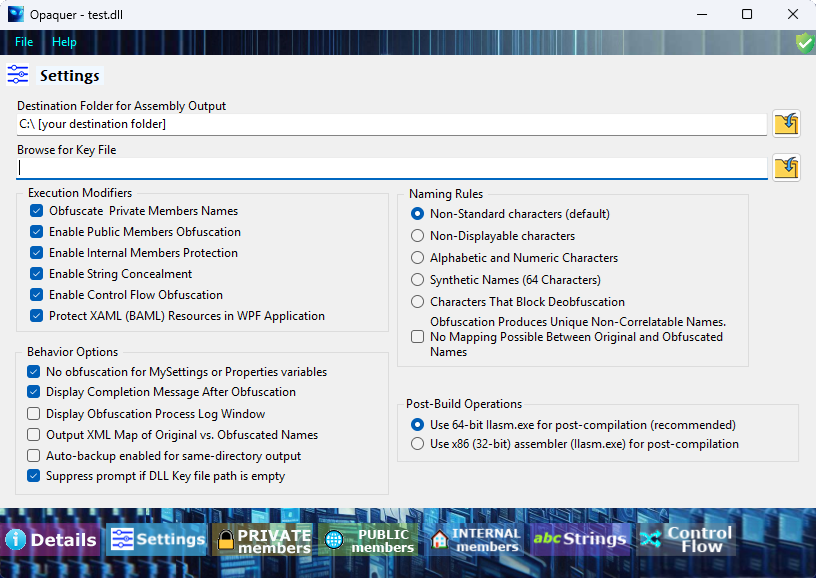
Use the “Naming Rules” options to define how assembly members will be renamed during obfuscation. Renaming (also known as symbol obfuscation) affects:
Obfuscating both private and public members replaces meaningful names with randomized ones, making reverse engineering significantly more difficult.
Enabling “Non-Displayable Characters” takes this a step further by generating names that include invalid or non-printable characters. These names cannot be easily represented in source code, which helps prevent successful recompilation of the assembly after deobfuscation attempts.
You can sign input assemblies using a specified key file:
If the original key file is not available, you have alternative options:
The Settings interface allows selective application of obfuscation:
Apply obfuscation to all private members, or limit it to specific groups:
The same level of control is available for:
Public members
In addition, you can enable or disable advanced protections such as:
For applications built with .NET Framework 2.0 or later, special namespaces are used to store application settings:
MySettings (VB.NET)Properties (C#)These namespaces contain application-wide configuration values defined via the project’s Settings tab.
Important: Property names in these namespaces must not be obfuscated.
This is because:
If these names are changed during obfuscation, the runtime will fail to locate them, leading to application errors.
To avoid this issue, enable the option:
“No obfuscation for MySettings or Properties variables”
When selected, Opaquer will automatically exclude these members from renaming.
During obfuscation, Opaquer generates an XML mapping file that records all renaming operations.
This file contains:
The mapping file is especially useful for:
By referencing the XML map, you can translate obfuscated method and class names back to their original form when analyzing runtime errors.
Name obfuscation scrambles the identifiers of classes, methods, variables, and other assembly members, making reverse engineering significantly more difficult. Meaningful names are replaced with unintelligible strings that provide no semantic clues to anyone attempting to analyze the code.
Certain Opaquer settings take this further by generating names that are incompatible with standard compilers, preventing decompiled code from being successfully recompiled.
Opaquer provides three dedicated interface pages, one each for Private, Public, and Internal access modifiers, that share a consistent layout and allow developers to select which members within each access scope should be targeted for renaming.
Note Public members in DLL libraries are typically excluded from obfuscation because they are designed to be accessed by external assemblies. However, if you know that certain public members are never referenced from outside, you can safely include them in the obfuscation process.
For EXE applications, the assemblies are generally self-contained. In that case, you can apply obfuscation much more High-Intensityly and rename all possible members, including public ones, without risking compatibility issues.
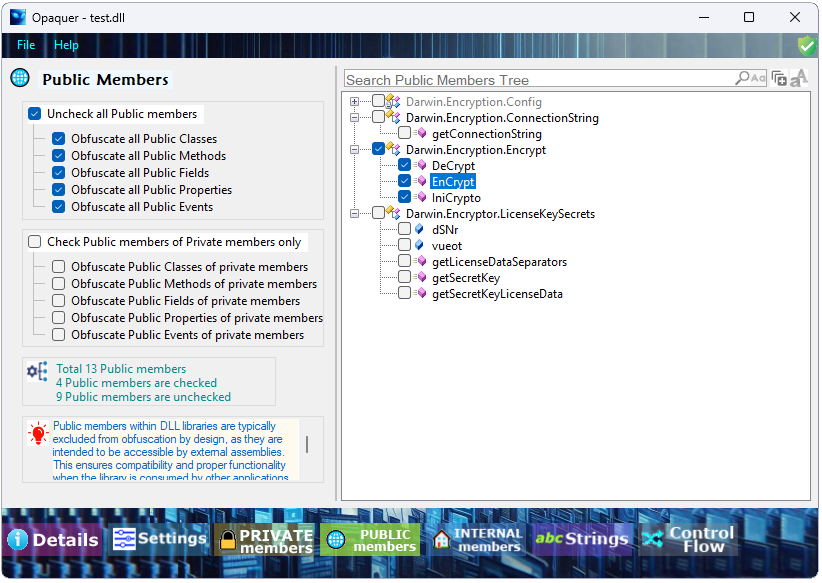
The three configuration pages for Private, Public, and Internal member name obfuscation share a largely identical interface layout. To avoid repetition, let’s focus on the Public Members page as the representative example.
The Public Members tab is divided into two main panes. Its purpose is to let you browse all public members in your assembly and selectively include or exclude them from the obfuscation process.
Left Pane - Group Settings and Options
The left pane provides additional configuration options. Here you can check or uncheck entire groups of public members to include or exclude them from the obfuscation process. These group-level toggles allow you to quickly apply settings without manually selecting each individual member.
Right Pane - Assembly Structure Tree
This pane displays a hierarchical, tree-style representation of your assembly. Each node represents an object-namespaces, classes, methods, fields, properties, and other members. The tree behaves like a nested object model: expanding a node reveals the objects it contains.
Opaquer allows you to adjust the interface to your workflow:
Resizable Panes
A central vertical splitter separates the two panes. When you hover the mouse pointer over it, the cursor changes to indicate that the panes can be resized. Drag the splitter left or right to allocate more space to either pane.
Flexible Navigation
The tree view makes it easy to navigate through your assembly’s structure. You can expand only the areas you need, collapse sections you’re not working with, and visually inspect which public members are currently selected for obfuscation.
To include a public member in the obfuscation process, simply check its box in the right pane. To apply broader rules, use the checkboxes in the left pane to toggle entire categories of public members at once.
This tutorial explains why name obfuscation is an essential first step in protecting .NET applications from reverse-engineering. You will learn how .NET metadata exposes readable identifiers, how easily compiled assemblies can be decompiled, and how Opaquer .NET Obfuscator applies name obfuscation to reduce this risk.
.NET assemblies contain rich metadata that preserves class names, method names, field names, and other identifiers. While this metadata is useful for debugging and reflection, it also makes compiled applications easy to inspect and reverse-engineer.
Name obfuscation replaces human-readable identifiers with meaningless symbols, making the internal structure of your application significantly harder to understand.
This tutorial demonstrates:
To illustrate the process, create a simple console application. The following examples show equivalent C# and VB.NET versions. Both versions print a greeting along with the current date and time. Two private fields are included so we can observe how they appear before and after obfuscation.
using System;

struct Module1
{
        private string str = "Hello World! Today is:";
        private System.DateTime today = Now;

        void Main()
    {
        Console.WriteLine(str + System.Convert.ToString(today));
    }
}
Imports System

Module Module1
        Private str As String = "Hello World! Today is:"
        Private today As Date = Now

        Sub Main()
        Console.WriteLine(str + CStr(today))
        End Sub
End Module
After compiling, you will obtain an executable such as ConsoleApplication1.exe.
The .NET SDK includes ILDasm, a disassembler that displays IL (Intermediate Language) and metadata stored in an assembly. Running ILDasm on the compiled executable reveals all identifiers exactly as they appear in the source code.
(Excerpted for clarity)
.class private auto ansi sealed beforefieldinit Module1
{
        .field private static string str
        .field private static valuetype [mscorlib]System.DateTime today

        .method public static void Main() cil managed
    {
        .entrypoint
        IL_0001: ldsfld string ConsoleApplication1.Module1::str
        IL_0006: ldsfld valuetype [mscorlib]System.DateTime ConsoleApplication1.Module1::today
        IL_0015: call void [mscorlib]System.Console::WriteLine(string)
        IL_001c: ret
    }
}
Even without IL expertise, you can clearly see:
Module1)Main)str, today)This transparency is why .NET assemblies are vulnerable to reverse-engineering. Modern decompilers can reconstruct high-level C# or VB.NET code that closely resembles the original source.
Next, open the compiled executable in Opaquer .NET Obfuscator.
The application will continue to run normally, but its internal structure becomes harder to interpret.
.class private auto ansi sealed beforefieldinit '0AAAA'
{
        .field private static string '1AAA0'
        .field private static valuetype [mscorlib]System.DateTime '2AAAA'

        .method public static void '1AAAA'() cil managed
    {
        .entrypoint
        IL_0001: ldsfld string ConsoleApplication1.'0AAAA'::'1AAA0'
        IL_0006: ldsfld valuetype [mscorlib]System.DateTime ConsoleApplication1.'0AAAA'::'2AAAA'
        IL_001c: ret
    }
}
All identifiers have been replaced with randomized alphanumeric tokens. This makes the code less readable, but the IL is still valid and can be recompiled using ILAsm.
Opaquer .NET Obfuscator also supports a more High-Intensity naming mode that uses characters invalid in IL identifiers, such as ?.
.class private auto ansi sealed beforefieldinit '?'
{
        .field private static string '?'
        .field private static valuetype [mscorlib]System.DateTime '?'

        .method public static void '?'() cil managed
    {
        .entrypoint
        IL_0001: ldsfld string ConsoleApplication1.'?'::'?'
        IL_0006: ldsfld valuetype [mscorlib]System.DateTime ConsoleApplication1.'?'::'?'
        IL_001c: ret
    }
}
In this mode:
This provides a stronger barrier against reverse-engineering.
Name obfuscation is the first essential step in protecting .NET assemblies. It:
For comprehensive protection, combine name obfuscation with additional Opaquer .NET Obfuscator features such as:
These techniques work together to significantly increase the difficulty of analyzing or modifying your .NET applications.
The string-encryption feature lets you designate any string literal for protection. You can choose to encrypt all strings automatically or selectively mark only specific values for obfuscation. The obfuscator then applies a cryptographic algorithm to those strings, ensuring every selected value is securely encrypted or obfuscated.
Strings can provide valuable clues to anyone attempting to reverse-engineer your code. For this reason, it's wise to protect your string data from prying eyes. While no method can stop a determined hacker from eventually deciphering the conversion and accessing your data, you can significantly raise the bar. For example, an attacker trying to crack a licensing routine will typically start by searching for license-related strings to quickly locate the relevant code section.
Opaquer makes this process much harder by encrypting the strings embedded in your .NET assembly. It works by injecting a decryption routine directly into the assembly and calling that routine at runtime to restore the original string values. This way, static analysis tools see only encrypted data, not the plaintext strings.
In this approach, encrypted strings remain within the main .NET assembly. The decryption logic is also embedded in the assembly, and strings are decrypted on the fly when needed. This method is simple to deploy (no extra files) but slightly less secure, because both the encrypted strings and the decryption mechanism reside in the same managed assembly, still a significant obstacle for casual reverse-engineering, but not impenetrable.
Strings are critical parts of your code’s logic. For stronger protection, you can move them into native code. Opaquer generates a separate C++ DLL that contains the protected strings in native machine code. Native code is much harder to reverse-engineer than managed code, it requires deep expertise in assembly language and low-level debugging. Additionally, the strings inside this DLL are themselves encrypt-protected, adding another layer of security.
How It Works:
appExtension.dll).Deployment Requirements:
You must include the separate strings DLL in your product distribution package. Your final .NET assembly and this DLL must be installed together in the same folder. Without the DLL, your .NET assembly will not function.
Security Benefit:
This mechanism ensures that decompilers cannot see or decipher the string objects in your output assembly. The actual string values become completely invisible to static analysis tools, protecting sensitive information like license keys, URLs, error messages, or embedded secrets.
Summary
Method
Pros
Cons
Strings inside assembly
Simple, single-file deployment
Strings and decryption both in managed code
Strings in separate native DLL
Very high security, native code is hard to reverse-engineer
Requires deploying an extra DLL; more complex setup
For maximum protection of sensitive string data, especially in licensing, authentication, or proprietary algorithms, the separate native DLL option is strongly recommended.
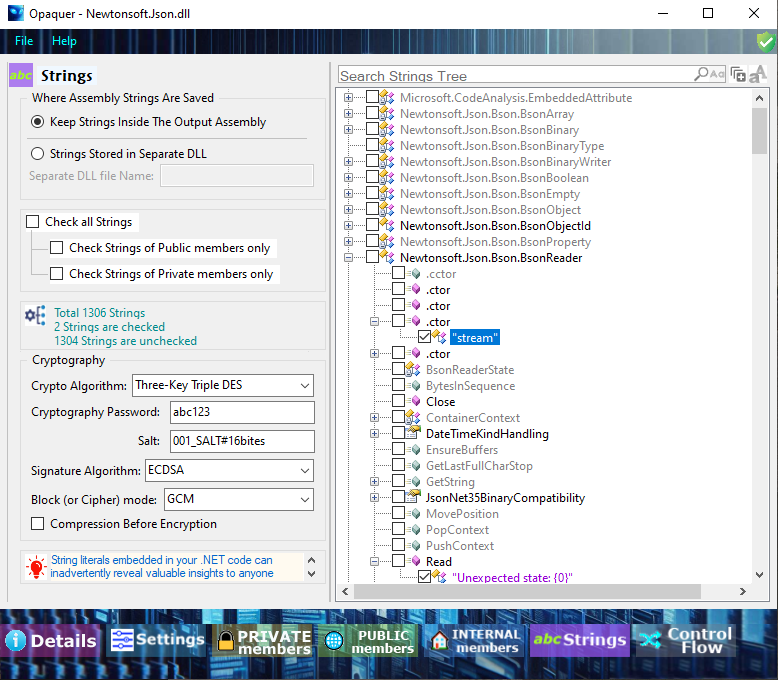
The Strings tab-page is split into two panes. By using the page you able to browse Strings values in the assembly structure and select/deselect them for obfuscation process.
The left section gives you ability to adjust some specific settings. The right section of the tab-page interface shows you a structure of your assembly. You can easily change the appearance of panes.
The right section displays a hierarchical view of your assembly structure in a tree-like structure. This Tree is regarded as an object with several objects inside it, representing assembly classes, methods, fields, and others. Check some particular String value and it will be encrypted.
Check/uncheck checkboxes in left pane. It will select/deselect corresponding String values groups to include them into obfuscation process.
You can set up cryptography algorithm for your String values encryption process. For this case you must enter a password for cryptography. The password will be encrypted and stored inside your obfuscated assembly.
Opaquer enables you to resize each of two panes by using special center splitter. When you pass the mouse pointer over the central vertical edge, the cursor changes to indicate that the both panes can be resized. Click once on the plus or minus icon next to a member node in the right pane tree. This action expands or collapses the member node. If no plus or minus icons appear next to a node, it means that the member node holds no objects extending beyond the level of that node.
Control Flow obfuscation is designed to disrupt decompilers and deobfuscators by transforming .NET methods into highly irregular, non-linear execution paths. By scrambling both functions and procedures, it significantly increases the difficulty of reverse engineering, static analysis, and tampering attempts against protected assemblies.
The Control Flow algorithm restructures the IL (Intermediate Language) instructions of each selected method. It introduces misleading branches, opaque predicates, and reordered instruction blocks while preserving the original runtime semantics. The result is a method body that behaves identically to the original but appears chaotic and unintelligible to humans and automated tools.
The transformation process includes:
This approach forces decompilers to produce unreadable or incorrect output, dramatically increasing the effort required to analyze protected code.
Control Flow obfuscation introduces additional IL instructions, which can:
For most applications, this overhead is acceptable. However, if your project does not require maximum protection, you may choose to disable Control Flow obfuscation or apply it selectively to reduce executable size and improve performance.
Selective application is strongly recommended for large assemblies.
Opaquer provides two Control Flow algorithms, each suited to different protection needs:
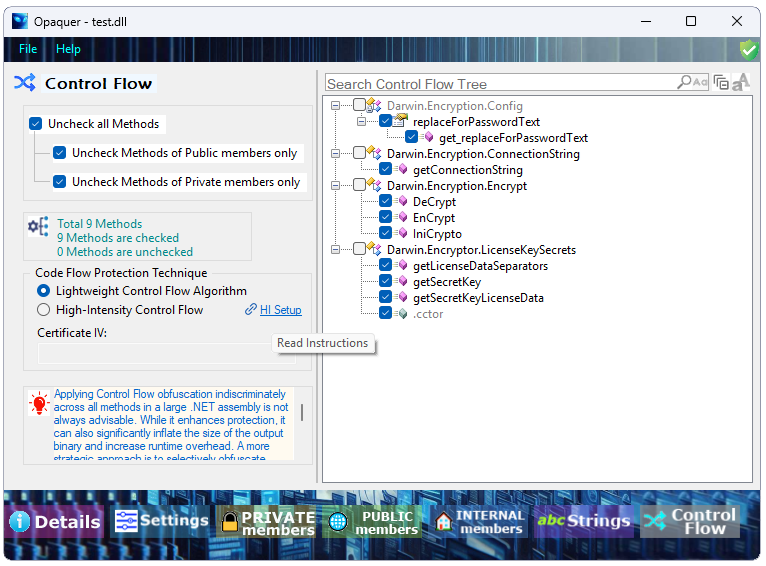
The Control Flow panel displays a hierarchical tree of all classes and methods in the loaded assembly. Each method can be individually included or excluded from obfuscation using checkboxes.
Convenience options at the top of the panel include:
A status bar beneath the panel displays:
The screenshot below illustrates the Control Flow configuration panel in Opaquer with a sample assembly loaded. The method tree on the right shows all available methods grouped by class.
Apply Lightweight only where needed. Avoid enabling all build methods, and always validate behavior thoroughly-its control-flow changes can introduce subtle, unpredictable effects.
The Lightweight algorithm performs deep control-flow restructuring to hinder reverse engineering. Because these transformations are already extensive, enabling every build method adds little security benefit while significantly increasing complexity and the likelihood of runtime issues.
Caution
Lightweight increases the chance of subtle defects. Treat obfuscated builds as distinct release artifacts: apply changes gradually, validate thoroughly, and maintain a dedicated QA cycle.
High-Intensity Control Flow is an advanced protection mode exclusive to the Enterprise version of Opaquer .NET Obfuscator. It pairs High-Intensity control-flow transformations with selective Code Virtualization - extracting small, critical fragments from chosen methods and running them at runtime inside a secure, cloud-backed virtual machine.
Key constraints:
Skater.Cloud.Vault packageControl-flow obfuscation restructures targeted methods into forms that decompilers struggle to interpret.
Selective Code Virtualization goes further: rather than virtualizing an entire method, Opaquer identifies and extracts high-value code fragments - such as license checks, cryptographic routines, or proprietary algorithm kernels - encrypts them, and stores them in the Skater Cloud Vault. At runtime, these fragments are downloaded, decrypted, and executed inside a built-in VM interpreter. The original binary retains none of this logic in plaintext.
Security benefits:
Before enabling High-Intensity Control Flow, confirm the following:
Skater.Cloud.Vault to your projectNote: Certificate IVs are unique and dynamic. They may be updated before each obfuscation run to reduce the risk of attacker exploitation.
Skater.Cloud.Vault NuGet packageChoose methods carefully Target methods that run rarely - startup routines, license validation, and one-time initialization are ideal. Avoid protecting anything in a tight loop or frequently called hot path.
Keep scope narrow Virtualizing small fragments delivers strong protection with minimal performance overhead. Resist the temptation to protect more than necessary.
Manage your Certificate IV securely Treat the IV as a sensitive credential. Store it in a key management system and rotate it regularly as part of your build and deployment pipeline.
Plan for network availability Verify that target environments have reliable HTTPS access to the Skater Cloud Vault. Configure caching so that brief Vault outages don't disrupt the user experience.
Layer your defenses Code Virtualization is most effective when combined with symbol renaming, string encryption, anti-tamper measures, and standard control-flow obfuscation.
Test thoroughly Run tests for cold starts (first execution, requiring fragment download and decryption) and warm runs (using cached fragments). Also test behavior when the Vault is unreachable to confirm your fallback works as intended.
Performance impact is generally minimal, since only small code fragments are virtualized. However, the first execution of a virtualized fragment may incur a brief delay for download and decryption. Subsequent calls should use the local cache, assuming caching is enabled.
Design your application so that virtualized code paths are not encountered during frequent user interactions. Reserve this protection for rare but sensitive operations.
Opaquer provides two options for handling Vault unavailability:
When implementing fallback behavior, ensure it does not expose or hint at protected logic. Log Vault availability issues to support diagnostics.
If protected code fails to execute or behaves unexpectedly, work through the following:
Skater.Cloud.Vault is referenced in the project and present at runtimeSkater.Cloud.Vault is referenced via NuGetCode Virtualization is the right choice when you need to:
High-Intensity Control Flow combined with Code Virtualization is a powerful, cloud-backed technique that removes critical logic from the shipped binary and executes it inside a protected VM at runtime. Use it selectively on no more than three methods, manage your Certificate IV carefully, plan for network reliability or caching, and layer it alongside other obfuscation techniques for the strongest overall protection.

Rustemsoft presents a modern key management system that provides cloud data encryption approaches to secure your data keys.
What is Private Keys Depot?
Depot works by encrypting each key to help prevent unauthorized users from gaining access. Depot functions mostly as an active storage container for keys as well as an account management system for dealing with multiple privileged accounts across your company.
Skater Private Keys Depot protects cryptographic keys (that can be used as connection strings and passwords) in the cloud. When storing sensitive and business critical data, however, you must take steps to maximize the security of your Depots and the data stored in them.
We are going to provide an overview of security features and best practices for Private Keys Depot.
Private Keys Depot authentication option
When you create a Private Keys Depot within your Skater Depot license, it's automatically associated with the Registration ID of the license. All callers must register by using this Registration ID and authenticate to access the Keys Depot. Applications can access Private Keys and represents a service principal or managed identity. This identity is the most common scenario for applications that periodically need to access keys from the Keys Depot. For this scenario to work, the Certificate IV (Initialization Vector) of the application must be specified in the access function signature and the Key Name must be specified as well.
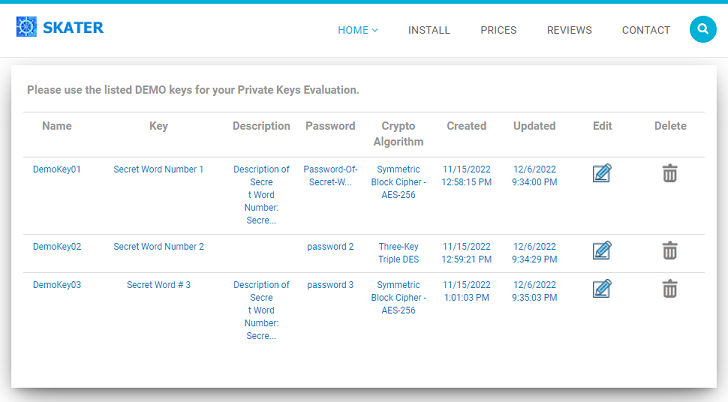
You have ASP.NET web application that uses a symmetric encryption algorithm. How would you store the secret key and IV? Storing as a hardcoded string value in the code seems like a bad idea. How about app settings? What is the best practice? How to achieve the best result?
The Skater Private Keys Depot is a key management system. This is a software system that stores .NET applications' encryption keys and performs cryptographic operations. The Skater Private Keys Depot as encryption key management software is used to handle the administration, distribution, and storage of encryption keys. The Skater Private Keys Depot ensures encryption keys, and therefore the encryption and decryption of their sensitive information, are only accessible for approved parties. .NET software developers use these solution to ensure access to highly sensitive .NET apps information remains secured.
Learn How to manage keys in Skater Private Keys Depot?
Namespace: Skater.Cloud.Vault
Assembly: Skater.Cloud.Vault.dll
KeysDepot class offers a convenient interface for making calls to the Private Keys Depot. KeysDepot class is a part of Skater.Cloud.Vault namespace. The API is .NET idiomatic Client library for Rustemsoft Cloud services.
C#
public class KeysDepot
Let's suggest you have the following code that updating a SQL Server table records.
string sql_Query = "UPDATE MY_TABLE SET FLAG_FIELD = 1;";
string dBConnectionString = "Persist Security Info=False; User Id=UserName; Password=SecretPassword; Initial Catalog=MY_DATABASE; Data Source = ServerName;";
using (SqlConnection conn = new SqlConnection(dBConnectionString))
{
conn.Open();
using (SqlCommand cmd = new SqlCommand(sql_Query, conn))
{
cmd.ExecuteNonQuery();
}
}
The most vulnerable element, in terms of the possibility of a hacker attack, is of course the dBConnectionString connection string. It contains secret data about connection to SQL Server. It must be cryptographically encoded and then securely hidden by storing to a cloud server. By using Skater Private Keys Depot you can easily accomplish that.
Suppose you have certificate IV associated with your registered Depot account CERTIFICATE_IV. To get the Certificate IV (a cryptographic initialization vector) you need to access your online Skater Private Keys Depot account and copy the IV. Also you have previously stored the key named CONNECTION_STRING_KEY in the Keys Depot. You stored CONNECTION_STRING_KEY Key value as
"Persist Security Info=False; User Id=UserName; Password=SecretPassword; Initial Catalog=MY_DATABASE; Data Source = ServerName;"
So the above code that updating a SQL Server table can be modified as shown below:
Skater.Cloud.Vault.DepotKey depotKey = Skater.Cloud.Vault.KeysDepot.getKey("CERTIFICATE_IV", "CONNECTION_STRING_KEY");
if (depotKey != null)
{
string sql_Query = "UPDATE MY_TABLE SET FLAG_FIELD = 1;";
string dBConnectionString = depotKey.Key; // Connection String replaced with the depot's retrieved Key
using (SqlConnection conn = new SqlConnection(dBConnectionString))
{
conn.Open();
using (SqlCommand cmd = new SqlCommand(sql_Query, conn))
{
cmd.ExecuteNonQuery();
}
}
}
The following methods of KeysDepot class from Skater.Cloud.Vault namespace need to be utilized to manage keys from Skater Private Keys Depot
Method
Description
getCertificate(string CertificateIV)
Get Certificate details associated with user registration account
Returns Certificate data structure object
getKeys(string CertificateIV)
Get all keys associated with Depot registered account
Returns IEnumerable<DepotKey>
getKey(string CertificateIV, string KeyName)
Get all fields of a specified Key
Returns DepotKey data structure object
dropKey(string CertificateIV, string KeyName)
Delete Key from Depot
Returns string result information message
checkKey(string CertificateIV, string KeyName, string Key)
Check Key by comparing its value against an external entered value
Returns string result information message
updateKey(string CertificateIV, string KeyName, string Key, string Description, string Password, string cryptoAlgorithm)
Update Key that already exist in Keys Depot
Returns string result information message
addKey(string CertificateIV, string KeyName, string Key, string Description, string Password, string cryptoAlgorithm)
Add new Key into Skater Private Keys Depot
Returns string result information message
To get the Certificate IV (Initialization Vector) you need to access your online Skater Keys Depot account.
There is an additional DepotKey data structure class in Skater.Cloud.Vault namespace. The structure contents the following public properties
Property
Description
KeyName as string
Name identifier of the Key. The Name uniquely identifies a key in Private Keys Depot. Must be no longer than 128 characters. Accepts alphanumeric characters and the _ char only.
The names must be unique and do not start with a number.
KeyDescription as string
Description of the Key. Optional parameter. Must be no longer than 512 characters.
Key as string
Key. The value cryptographically encoded. Must be no longer than 1024 characters.
cryptoPassword as string
Key's password of cryptographic encryption for internal system usage. Must be no longer than 128 characters.
cryptoAlgorithm as string
Key's cryptographic algorithm name. The algorithm is used to encrypt data and provide confidentiality. Depot offers to select an algorithm that will be used for Key encryption. Take one of 3 listed algorithm names:
"Symmetric Block Cipher - AES-256",
"Three-Key Triple DES", or
"Hash Functions - SHA-256"
created_at as DateTime
Date and time when the Key first created. Read-only, system generated value
updated_at as DateTime
Date and time when the Key last updated. Read-only, system generated value
The structure is useful to specify a key. That defined key then can be easily added, modified, and read to/from Keys Depot.
There is a Certificate data structure class in Skater.Cloud.Vault namespace. The structure contents the following public properties
Property
Description
RegistrationID as string
Registration ID: a unique identifier is an alphanumeric string occurs when users register for Private Keys Depot.
CertificateOwner as string
Person or an organization who registered for Skater Private Keys Depot license.
EmailAddress as string
Certificate Owner's email address. Can be used as a registration User Name.
LicenseeAddress as string
Certificate Owner's post address. Optional, can be kept empty.
LicensedDate as DateTime
When Skater Private Keys Depot account has been registered
Status as string
License status.
Use the Certificate structure when you call getCertificate() method.
Also there is IList<string> collection of cryptographic algorithm names in DepotKey class. The collection is useful to specify which one of 3 types algorithm you would like to utilize for your key cryptography.
GitHub repository that demonstrates Private Keys Depot and a custom .NET Windows Forms application integration (.NET framework 4.8) GitHub repository for .NET 10
Obfuscating XAML in WPF matters because BAML resources can be easily extracted and decompiled back into readable XAML, exposing your UI structure, bindings, and logic.
WPF Application Protection: Requirements & Restrictions
The Opaquer's WPF protection feature comes with a specific set of requirements that must be met before your application can be successfully protected.
Framework Requirement WPF protection is only supported for applications built on .NET 6 or later. Projects targeting older frameworks, including .NET Framework 4.x or any version prior to .NET 6, are not compatible with this feature and will not be processed.
Language Requirement Your WPF application must be written in C#. While the .NET ecosystem broadly supports multiple languages, WPF protection currently does not extend to VB.NET projects. Support for VB.NET is not available at this time, and attempting to protect a VB.NET-based WPF application will not produce the expected results.
Summary of Requirements
Requirement
Supported
Not Supported
Framework
.NET 6, .NET 7, .NET 8+
.NET Framework 4.x and below
Language
C#
VB.NET
Please ensure your project meets both of these criteria before running the Obfuscator. If your application does not currently meet these requirements, consider migrating to a supported framework version or language to take advantage of WPF protection.
When a WPF application is built, its XAML files are compiled into BAML, a Binary Application Markup Language representation. BAML files are then embedded into the assembly’s resource container, typically:
At runtime, the .NET Framework loads these resources using Application.LoadComponent(), extracts the BAML, parses it, and constructs the corresponding WPF visual tree.
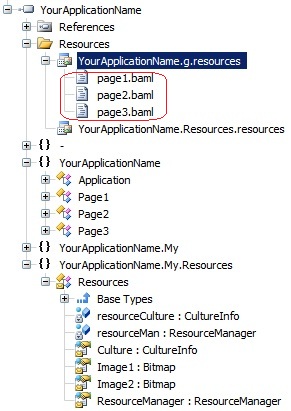
Every production WPF application relies heavily on resources, strings, images, persisted objects, and BAML. These resources are not executable code but are still essential parts of your UI and workflow.
Because BAML is simply a compiled form of XAML, specialized tools can read BAML and reconstruct the original XAML, revealing:
This means anyone with a decompiler can inspect your UI, even if your C# code is obfuscated.
Opaquer .NET obfuscator includes features specifically for WPF:
Some tools historically struggled with WPF because BAML contains references to types, properties, and bindings that must stay consistent after renaming.
For example, Opaquer .NET Obfuscator includes dedicated BAML/XAML analyzers to rewrite these references safely.
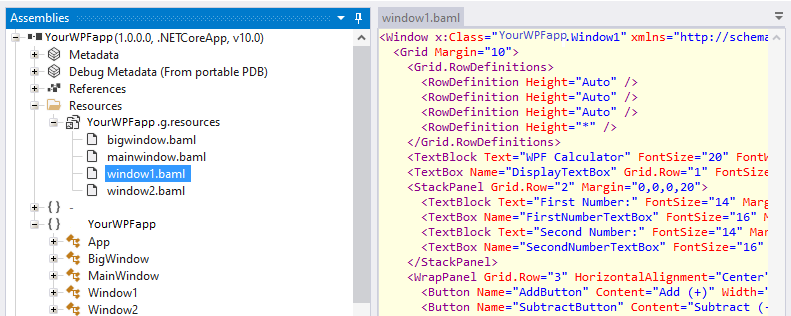
Suppose you have a WPF application called YourWPFapp that contains four WPF windows, as shown in the screenshot below. Using standard WPF inspection tools, anyone can click on any of these windows and easily browse the underlying XAML structure, including all controls, visual elements, bindings, resource references, and property values. This exposes important details about your application's internal design and implementation, making reverse engineering significantly easier. For commercial software, intellectual property protection and application hardening should be important considerations.
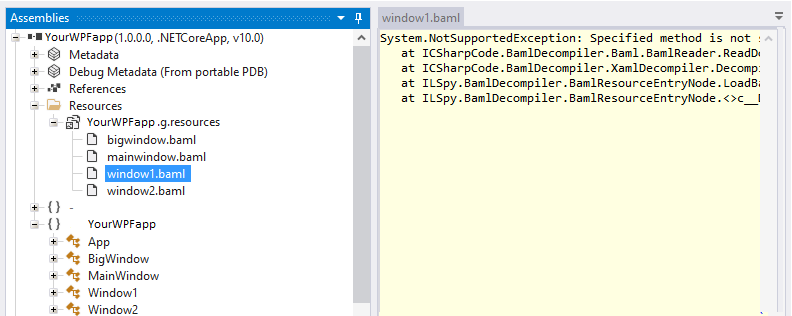
After applying Opaquer WPF Obfuscation feature, the situation changes completely. As shown in the second screenshot, the layout and structure of your WPF windows are no longer accessible through inspection tools. Attempts to browse the visual tree, controls, or XAML definitions result in exceptions such as:
"System.NotSupportedException: Specified method is not supported."
This occurs because all compiled XAML resources (BAML files) are encrypted and protected. As a result, attackers, competitors, or curious users cannot inspect the application's user interface structure, discover control hierarchies, analyze bindings, or extract implementation details from the WPF resources.
By encrypting and securing BAML resources, Opaquer .NET obfuscator helps protect your application's intellectual property, prevents unauthorized analysis of the UI architecture, and significantly increases the difficulty of reverse engineering WPF applications.
Why Obfuscate XAML/BAML?
Because BAML is not secure. Tools exist that load assemblies, extract BAML resources, and display the original XAML.
This exposes:
Proprietary UI/UX design
Custom control structures
Sensitive bindings or workflow logic
Internal naming conventions
For commercial software, this is a significant intellectual-property risk.
Obfuscating XAML in WPF is essential because:
The configuration settings you apply to a specific assembly can be saved and reused across sessions, streamlining your obfuscation workflow.
To save your current assembly settings, click the "Save Settings" menu item or press F4. This will open the save settings interface, allowing you to name and store the configuration for future use.
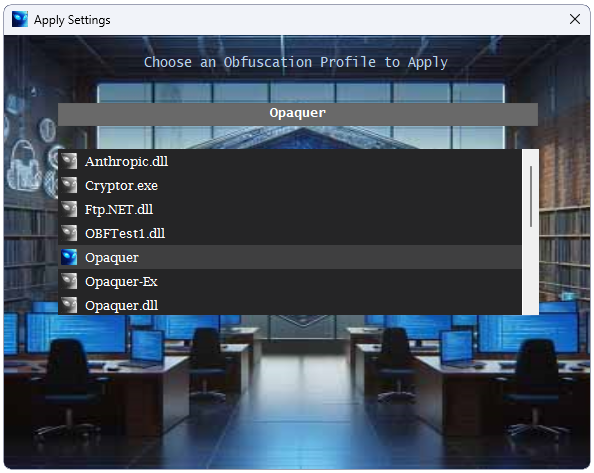
Once saved, you can later apply these pre-stored assembly settings by clicking the "Apply Settings" menu item or pressing F3. The saved configuration will then populate within the Opaquer interface.
Two Ways to Store Configuration in Opaquer
Opaquer offers two distinct methods for storing assembly configuration information:
Settings by name - As described above, you can store obfuscation settings under a custom name, making them easily retrievable via the F3 shortcut.
Project-level XML configuration - Obfuscation preferences can also be stored per project in a separate XML configuration file located within your .NET project folder. To apply these XML pre-stored settings in the Opaquer interface, use the Ctrl+F3 key combination ("Apply XML file Settings").
Benefits of the XML Configuration File
The XML settings file integrates seamlessly with your .NET project, offering several practical advantages:
Command-Line Usage
In addition to the graphical interface, the stored settings can also be used for command-line obfuscation in batch MS-DOS mode. For more details, refer to the Opaquer console usage.
You may remove some pre-stored settings. Select the settings and push "Delete" button.
In a Visual Studio Deployment project, the PreBuildEvent runs after your assemblies are compiled but before the deployment/installation packages are created. This makes it the ideal stage to run Opaquer's command-line tool. Follow the steps below to set this up.
Create obfuscation settings files for each assembly using the Opaquer GUI. For example, if your assemblies are named MyFirstAssembly.exe and MyFirstAssembly.exe, save their settings files as MyFirstAssembly and MyFirstAssembly respectively.
Open your Deployment project in Visual Studio's Solution Explorer. If your solution contains multiple projects, select the one that builds first this way, dependent assemblies won't need to be obfuscated again separately.
Navigate to the Properties tab in the Deployment project. Note that this is accessed via the Properties tab in the panel, not by right-clicking and selecting Properties. This opens the Deployment Properties page.
Add the following commands to the PreBuildEvent field. Before doing so, test each command line outside of Visual Studio to confirm they work correctly.
echo off
echo Obfuscating MyFirstAssembly.exe
"C:\Program Files\Rustemsoft LLC\Opaquer\Opaquer.exe" MyFirstAssembly
echo Obfuscating MyFirstAssembly.exe
"C:\Program Files\Rustemsoft LLC\Opaquer\Opaquer.exe" MyFirstAssembly
A common and easy-to-miss issue can result in your deployed application not being obfuscated at all, even when the build appears to complete without errors. Here's what causes it and how to avoid it.
To reproduce the problem:
setup.exe or .msi to deploy. What actually gets deployed is the Primary Output assembly the unobfuscated one.The fix: Do not use the Primary Output option in the Setup Wizard. Instead, build your application separately and manually add the compiled assembly to the application folder of the Setup project. This ensures Opaquer obfuscates the exact file that ends up in your deployment package.
Protecting your .NET application’s intellectual property is a critical part of any secure software delivery process. Even a simple .NET assembly can be decompiled into readable C# within seconds, making obfuscation a non-negotiable step before distribution. Opaquer .NET Obfuscator provides a robust command-line interface (CLI) that allows you to embed obfuscation directly into your build workflow, locally and in CI/CD, ensuring consistent, automated, and repeatable protection.
This guide walks through two essential integration layers:
The result is a seamless, end-to-end obfuscation strategy that protects every build intended for distribution.
Integrating Opaquer into your local build process ensures that every compiled assembly is automatically obfuscated before it leaves your machine. This eliminates manual steps and guarantees consistent protection across developer environments.
Open Project Properties
In Visual Studio, right-click your project -> Properties.
Navigate to Build Events
Select the Build Events tab.
Add a Post-Build Command
In Post-build event command line, insert the Opaquer CLI command.
Before enabling Aggressive Control Flow Obfuscation, confirm that your project builds sequentially (details below).
"C:\Program Files (x86)\RustemSoft\Opaquer\Opaquer.exe" ^
  -SOURCE="$(TargetPath)" ^
  -OUTPUT="$(TargetPath)" ^
  -KEY="$(ProjectDir)KeyFile.snk" ^
  -WRITELOG="$(TargetDir)Opaquer.log" ^
  -ALLPRIVATE ^
  -CONCEALSTRINGS ^
  -FLOW
Parameter
Purpose
-SOURCE="$(TargetPath)"
Uses the freshly compiled assembly as input.
-OUTPUT="$(TargetPath)"
Overwrites the original assembly with the obfuscated version.
-KEY="$(ProjectDir)KeyFile.snk"
Re-signs the assembly using your strong-name key.
-WRITELOG="$(TargetDir)Opaquer.log"
Produces a log file for diagnostics.
-ALLPRIVATE
Obfuscates private members for deeper protection.
-CONCEALSTRINGS
Encrypts string literals.
-FLOW
Applies control-flow obfuscation.
Opaquer modifies assemblies immediately after compilation. If Visual Studio builds multiple projects in parallel, another project may attempt to load a DLL while Opaquer is still rewriting it, causing file-lock errors.
To avoid this:
Tools -> Options -> Projects and Solutions -> Build and Run -> Maximum number of parallel project builds -> set to 1.
This ensures deterministic, conflict-free obfuscation.
To guarantee that every distributed artifact is protected, obfuscation must also run inside your CI/CD pipeline. This ensures:
Opaquer must be installed on your self-hosted build agent.
Hosted Microsoft agents cannot be used because they do not allow installing custom software.
- task: CmdLine@2
  displayName: 'Obfuscate MyLibrary.dll with Opaquer'
  inputs:
    script: |
      "C:\Program Files (x86)\RustemSoft\Opaquer\Opaquer.exe" ^
        -SOURCE="$(Build.SourcesDirectory)\MyProject\bin\Release\net6.0\MyLibrary.dll" ^
        -OUTPUT="$(Build.SourcesDirectory)\MyProject\bin\Release\net6.0\MyLibrary.dll" ^
        -KEY="$(Build.SourcesDirectory)\MyProject\KeyFile.snk" ^
        -WRITELOG="$(Build.ArtifactStagingDirectory)\Opaquer.log" ^
        -ALLPRIVATE ^
        -CONCEALSTRINGS ^
        -FLOW
  condition: and(succeeded(), eq(variables['BuildConfiguration'], 'Release'))
Component
Explanation
Condition
Ensures obfuscation runs only on successful Release builds.
Path Variables
Use DevOps variables ($(Build.SourcesDirectory), $(Build.ArtifactStagingDirectory)) for stable paths.
Artifact Handling
The obfuscated DLL is automatically included in published artifacts. The log file can be published for review.
Protect your strong-name key
Store KeyFile.snk in Azure DevOps Secure Files or a protected variable group.
Secure your self-hosted agent
It contains source code, signing keys, and obfuscation tools.
Limit access
Only trusted build administrators should have access to the machine.
Obfuscation can occasionally alter runtime behavior, especially when:
To mitigate risk:
By integrating Opaquer .NET Obfuscator into both your local development workflow and your CI/CD pipeline, you create a secure, automated, and repeatable protection strategy. Every build, whether compiled on a developer machine or produced by Azure DevOps, emerges fully obfuscated, re-signed, and ready for distribution.
This approach:
System.Reflection NamespaceThe .NET Framework includes the System.Reflection.ObfuscateAssemblyAttribute attribute, originally introduced to help developers guide obfuscation tools without relying on external configuration files. While this attribute remains part of the .NET platform, Opaquer .NET Obfuscator provides a far more powerful and flexible configuration model through its GUI-based, pre-stored settings. For this reason, we recommend using Opaquer’s built-in configuration system as your primary method of controlling obfuscation behavior.
However, if you prefer to embed obfuscation hints directly into your assembly, Opaquer does support the ObfuscateAssemblyAttribute with some important limitations and usage rules described below.
ObfuscateAssemblyAttributeOpaquer recognizes and processes the System.Reflection.ObfuscateAssemblyAttribute only when it appears at the assembly level. The attribute acts as a high-level instruction that tells Opaquer whether the assembly should be treated as a private assembly or a library assembly during the obfuscation process.
The attribute exposes two key properties:
AssemblyIsPrivate
Determines whether Opaquer should treat the assembly as private or as a shared library.
StripAfterObfuscation
Controls whether Opaquer removes the attribute from the final obfuscated output.
AssemblyIsPrivateAssemblyIsPrivate Value
Opaquer Behavior
true
Opaquer treats the assembly as private. Public types and members will be renamed, following your pre-stored obfuscation settings.
false
Opaquer treats the assembly as a library. Public types and members will not be renamed, even if your obfuscation settings normally allow renaming.
This mechanism allows you to embed a simple, assembly-wide rule directly in your code, although it cannot replace the fine-grained control available through Opaquer’s GUI configuration.
When Opaquer processes an assembly containing ObfuscateAssemblyAttribute, it can optionally remove the attribute from the final output. This prevents the obfuscated assembly from revealing metadata about how it was processed.
The attribute’s StripAfterObfuscation property controls this behavior:
falsetrue: Opaquer removes the attribute after obfuscationfalse: Opaquer leaves the attribute intactThis gives you control over whether the obfuscation hints remain visible in the final binary.
The following example marks an assembly as private and instructs Opaquer not to strip the attribute after obfuscation:
using System;
using System.Reflection;

[assembly: ObfuscateAssemblyAttribute(true, StripAfterObfuscation = false)]
In this configuration:
AssemblyIsPrivate = true
→ Opaquer renames public types and members according to your stored obfuscation settings.
StripAfterObfuscation = false
→ The attribute remains in the output assembly.
Opaquer does not support ObfuscateAssemblyAttribute by default.
The attribute is recognized only when explicitly present in your assembly code.
Opaquer’s GUI configuration provides far more granular control.
You can define detailed rules for individual namespaces, classes, methods, properties, and fields something the attribute cannot express.
Pre-stored settings override attribute limitations.
The attribute can influence high-level behavior, but Opaquer’s configuration files remain the authoritative source for detailed obfuscation rules.
Use the attribute only when you need assembly-level hints embedded in code.
For most scenarios, especially CI/CD workflows, command-line parameters and GUI-generated settings are the recommended approach.
System.Reflection.ObfuscateAssemblyAttribute provides a simple, assembly-level mechanism for influencing how Opaquer processes your code. While Opaquer supports this attribute, its capabilities are limited compared to the comprehensive configuration options available through the Opaquer GUI. For best results, treat the attribute as an optional hinting tool rather than a primary configuration mechanism.
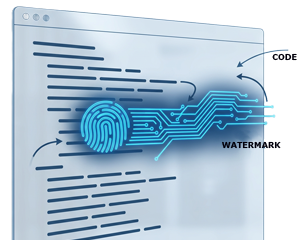
Historically, a watermark was a subtle pattern embedded into paper during manufacturing visible only when held against the light. It served as a mark of authenticity, identifying the paper’s origin or quality. In the digital era, this concept has evolved into digital watermarking, where identifying information is embedded into media files such as images, videos, and software to support ownership verification and copyright protection.
Opaquer .NET Obfuscator extends the watermarking concept to compiled .NET assemblies (DLLs and EXEs). It allows you to embed a unique, persistent identifier directly into your protected assembly.
This watermark acts as a hidden signature one that travels with your software wherever it goes.
Once applied, the watermark can be inspected at any time using the Opaquer interface. If you encounter a suspicious third-party assembly, simply load it into Opaquer and check the “Opaquer Watermark” property to verify its origin.
Obfuscation protects your code from reverse engineering but it doesn’t fully prevent misuse of your compiled binaries. For example:
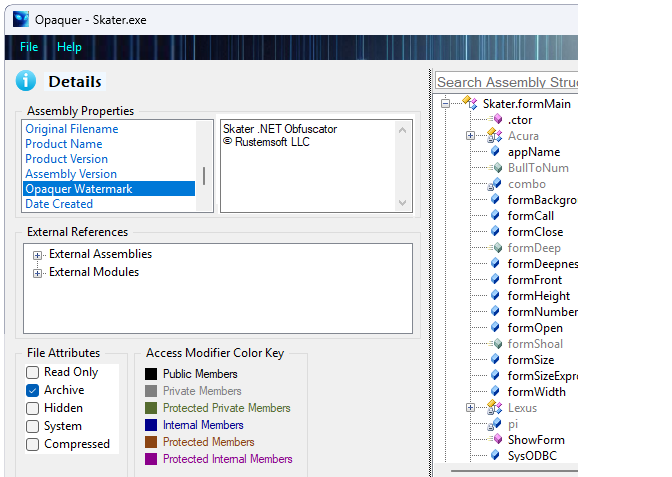
A watermark addresses this gap by providing traceability.
Even if your assembly is copied or repackaged, the watermark remains embedded and detectable.
When you protect your application with Opaquer:
This makes the watermark effectively tamper-resistant.
To create and apply your personalized watermark:
Once configured, this watermark will be embedded automatically during the obfuscation process.
1. Ownership Verification Quickly confirm whether a DLL or EXE originated from your build pipeline.
2. Protection Against Unauthorized Redistribution Even if your software is copied or rebranded, the embedded watermark exposes its origin.
3. Deterrence The presence of a persistent, non-removable identifier discourages misuse and unauthorized reuse.
4. Brand Recognition Your assemblies carry a consistent signature, helping partners and customers identify your software components.
5. Evidence in Disputes Watermarks can serve as technical proof in licensing or intellectual property conflicts.
Opaquer Watermark adds an additional layer of protection beyond traditional obfuscation. It doesn’t just hide your code it helps you track it, prove ownership, and defend it.
Copyright © 2026 Rustemsoft LLC. All Rights Reserved.
Opaquer .NET Obfuscator the Best source code protector

